TetraMesa

  • About Us
  • Services
  • Clients
  • Contact
  • Blog

The Interface Taxonomy Beyond APIs (2 of 5)

August 21, 2026 By Scott

In this part 2 of 5 for the series, we’re going to look at the “What & When”of digital connectivity among products.

The fastest way to make this whole topic area a confusing mess is to just list out technology definitions. This might not be the best way to learn how things work. Though we do need to quickly visit buzzwords like REST, GraphQL, gRPC, webhooks, MCP, and some others. They don’t all sit at the same conceptual level, and they’re not interchangeable answers to one problem. What we’re going to do in this article series is look at some use cases and a handful of popular options. And in the very next installment, some live examples and work products of things you can try yourself if you want to dive in a bit. Again, we’re not trying to be coders. We won’t be experts. But sometimes just seeing something actually work can bring those Aha moments we can keep with us over time vs. just spewing buzzwords. It’s the difference between sleepily scanning another bullet point list vs. “oh, yeah… I see how that works now.” (We are going to ask some questions and run some lists first before we get to the fun stuff though.)

A useful direction in this space can perhaps start by asking ”What interaction are you trying to create?” Then look at technologies that can do it. Or you can always ask your dev, architect or AI team members. Yeah, I said it. “AI team members.” While I believe in the “mostly sort of trust, but verify” framework here, at this point, I’ve found our still somewhat new AI friends rise to that level. Maybe they still have that fresh new AI smell, and we still need to sort out best ways to use them, but there you go.

Diving deeper now, we can see things like OpenAPI and AsyncAPI can describe interfaces. OAuth 2.0 handles delegated authorization. JSON and Protocol Buffers represent data. SDKs package interfaces for developers. HTTP, WebSockets and MQTT move information. All these things matter, but they are not all separate product interaction categories.

[Read more…]

Filed Under: Product Management, Tech / Business / General

Product Leader Mental Models of Connectivity Beyond APIs (1 of 5)

August 21, 2026 By Scott

In this part 1 of 5 for the series, we’re going to look at the “Why” of digital connectivity among products first. Then we’ll dig into some details including several real-world hands-on examples.

Why APIs and Interfaces need a fresh high-level consideration.

We know the role “Digital Product Manager” has always been ambiguous. Still, ideally any Product Manager should have something to do with market awareness, looking around corners, and so on. And this includes the building blocks we may choose. A lot of us may have come from some kind of coding background, but certainly not always. In any case, even if we don’t, (or shouldn’t), need to be expert developers, we should understand how our products are stitched together.

[Read more…]

Filed Under: Product Management, Tech / Business / General

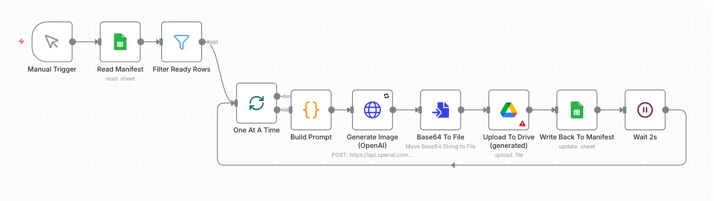
Poor PMs Guide to AI Image Generation Workflow With n8n

August 13, 2026 By Scott

A practical setup for kicking out a lot of decent hero images fast, plus the decisions that mattered more than the tools.

Note: Files for this project are available here: GitHub: n8n-blog-image-pipeline

Here’s one from the “Practical Product Quick Build Toolkit.”

I needed bunch of graphics for content. Here’s how I got solid results quickly and inexpensively.

My focus is on product, not production. But time and money were factors (as always) so this was the fastest way to get things done while leaving a reusable workflow for future needs. There’s a variety of tools for this sort of thing, but I wanted specific direction with general rules. Not just “generate an image,” but a repeatable system that produced a consistent series.

Using a workflow agent tool like n8n coupled with an image-generation model did the trick. I could set images to get generated and then do something else. A few caveats up front: you still have to check the images. Every one. And you won’t own the copyright as you might with commissioned work. But you can kick out what you need fast. Even if you’re only using them as placeholders for a prototype or something, you can replace with better stock or custom work later. For a prototype test that just needs a quick hero image on every page, that trade is worth it. And this will work for a production site as well. But for highest level of quality, professional stock and commissioned work can replace these placeholders. If you’re using a full site AI generator, those will usually be able to make your graphics. But if building with a coding assistant, perhaps not. Here’s a solution for that. Create the graphics in bulk, stage them somewhere with know filenames, (ideally based on direction directly from a coding tool), then load them into your site’s image folder.

Here’s the setup, what it cost, and the rules I’d carry to any similar project. The tooling is the least interesting part. The decisions about what to automate, what to keep human, and where quality actually comes from are the ones worth consideration, whether you’re building this pipeline for one time bulk use or deciding how this AI tool flow fits into your product.

[Read more…]

Filed Under: Product Management, Tech / Business / General, UI / UX

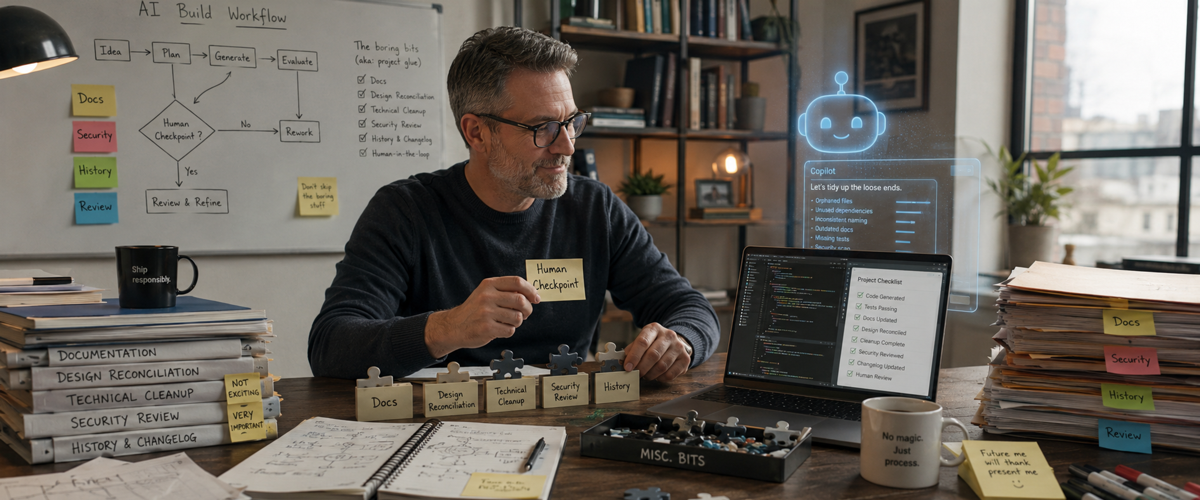
AI Build Copilot, Part 6: MORE Bonus Bits & Pieces

July 22, 2026 By Scott

It doesn’t matter what you’re doing. Product Management work, Creative work. Requirements. Code. We’re all over these tools now and across disciplines, we face some of the same challenges. Here’s yet another set of practical snippets for dealing with AI-assisted coding and building. The tools can move fast and sometimes faster than we can track. This installment collects a few more practical habits for staying in control. These are the small, deliberate practices that keep “trust but verify” from turning into “hope it worked.”

[Read more…]

Filed Under: Product Management, Tech / Business / General, UI / UX

AI Build Copilot, Part 5: Bonus Bits & Pieces

July 21, 2026 By Scott

Intro

I thought Part 4: Preparing for Production was going to wrap up the series. But wait, there’s more! Not every useful lesson about building with AI tools fits neatly into the larger themes of the past articles in this series. So this final section is a collection of extra bits and pieces that don’t quite belong anywhere else, but may still save you a lot of trouble. Yes, I could have just called it “Misc.” I suppose. But in any case, there’s just some random bits that didn’t fit cleanly into earlier docs and fell out of the edits.

Here they are in one random walk place.

[Read more…]

Filed Under: Product Management, Tech / Business / General, UI / UX

AI Build Copilot, Part 4: Preparing for Production

July 14, 2026 By Scott

Part 3 was about building durably, so what happens after that? A successful prototype creates a new problem if you actually put it into some form of production. Not too long ago, if we built what we called prototypes, maybe they went to user testing, or we ‘sort of’ put them out there. But now? A lot of so-called tests really aren’t. That is, they’re really more actual rollouts. Just maybe not necessarily with the same rigor we used to give product launches. The line between that which was intended as prototype testing and so-called Minimum Viable Product (MVP) seems like it might get blurry.

The next challenge with launching a kind of prototype, but that which is maybe real product is someone may decide to use it. So… Is it really a prototype? Meaning… is this just some brochureware for testing or is there actual sign-up functionality, any kind of real billing, private information collection, and so on.

This is when the low-stakes experiment begins accumulating customers, private information, billing relationships, operational dependencies, and consequences. You have to make your own call on this kind of thing. I have to tell you, personally I’ve never loved the “false front door” thing for testing. I get that it can be useful, but sometimes it’s on the edge of unethical in how it seems to trick people. If your prototype is really a test and that’s understood, great. If the truth is it’s not much of a test, but a rollout? Then there’s probably some more risk elements and due diligence that should be covered.

Prototypes have a way of becoming products. Temporary credentials become permanent. Test data becomes customer data. A one-time API connection becomes a critical service. The final part of an AI-assisted build is not clicking Deploy.

It’s deciding whether the thing can be operated safely. One thing that I’ve done along the way when building is created something I’ve called “Launch Blockers.” This is different than a UI backlog or minor changes you find along the way. It’s things like purging schemas, or making sure live production feature flags are set properly. It means a real security review. Things like that.

[Read more…]

Filed Under: Product Management, Tech / Business / General, UI / UX

AI Build Copilot, Part 3: Building a Durable Workflow

July 14, 2026 By Scott

In Part 2, we went over Staying in Control of your build session. Now it’s time to start looking at consistency and reliability issues. AI conversations are useful working spaces. However, they’re not reliable long-term project memory. Sessions end. Context fills up and you have to switch chats. Maybe you switch models from Fable 5 to GreekTragedy-7.6 or ElonsNextWife-10.4. Files are edited elsewhere, etc.

An agent’s understanding of the project can become stale while sounding completely confident. That’s why the project must survive the chat and there’s ways to do that.

[Read more…]

Filed Under: Product Management

AI Build Copilot, Part 2: Staying in Control

July 14, 2026 By Scott

We started in Part 1 with what the bright shiny What AI (Site builder) Demonstrations Leave out… and it was fairly high level. Now we’re going to dive a bit deeper and yes, somewhat into some technical things. My goal remains: to help level up those in generally more non-technical roles, especially product management. (Though of course, what that technical continuum looks like varies widely.) Let’s start with some basics, and drill down from there…

The dangerous thing about AI coding assistants is that they are often very good.

Huh? How could that be dangerous? It’s dangerous because if they were obviously terrible in spots, we would remain more alert as we used them. Instead, they’re helpful enough to earn trust and inconsistent enough for us to experience times where we clearly shouldn’t have trusted them.

The interaction feels conversational. The agent explains what it is doing, uses reassuring language, and often anticipates the next task. Over time, it becomes easy to stop evaluating each recommendation independently.

That’s the lull.

The assistant is called a copilot for a reason. Do not become its passive passenger.

Disclosure: I did use AI in this series for spelling, grammar and to fill out a few bullet lists with minor items I missed. Generally, I draft, do outlines, and write everything; then have AI check spelling, grammar, and completeness; maybe clean up a few items. Here I did miss some bullets though and those are filled in. Where that was true, I checked sources on ‘truthiness’ for everything. The point is, every high-level thing I go into here are things I’ve personally run into – recently – while working on real projects. So it may seem like a lot, but none of it’s fluff. And you ignore them at some degree of risk.

[Read more…]

Filed Under: Product Management, UI / UX

AI Build Copilot, Part 1: What Demos Leave Out

July 14, 2026 By Scott

I’d recently put up an article about a joke site I build for fun while helping create some overall scaffolding for a more serious project. At the outset, I’d pointed out part of my motivation for writing about some of these things is to try to offer some tips and mention some of the traps that go with the reality of using these tools as product people. The bubbly happy path posts and videos seem to mostly gloss over some of the real speed bumps and risks along the way. I get that demos are often to help people just see what’s possible. But lately there’s such a hard sell to some of these things, and so full of clickbait as to often be somewhat disingenuous.

As “non developers” use these tools more, it’s obvious enough that AI coding tools can be astonishingly productive. They can also be confusing, unreliable, expensive, overconfident, and occasionally dangerous. As product people at all levels from Individual Contributor to Senior Managers, VPs, etc., start getting deeper into these things, (not as full developers, but just as useful parts of our new toolkits), we’ll need to get real about some basics. The Happy Path feel good posts on LinkedIn and demos on LinkedIn rarely go over the many real blockers.

So I’m going to do some of that here, in several parts.

[Read more…]

Filed Under: Product Management, UI / UX

I Built a Joke Site with AI – Then It Became a Production System

July 14, 2026 By Scott

This started as a joke that got out of control, but the build produced a few lessons worth sharing.

Most of my work is product-focused rather than production-focused. Product and marketing people should spend their time with customers, markets, competitors, business models, and worthwhile problems. Becoming absorbed in production can turn attention inward instead of outward.

Still, sometimes you need or just want to build something yourself. Like everyone else, I now use AI for all manner of things. But there’s a difference between a throwaway prototype for quick user testing and something that might approach production. For one project, I had to move beyond simple prototypes and build a modern AI-assisted production pipeline without experimenting on a client’s product, a company’s core offering, or anything containing important customer data. So I needed something harmless, but sort of real, to test with. To borrow from my woodworking hobby, I practice new techniques on cheap material before touching fine red oak. The same principle applies here: make early mistakes where failure costs essentially nothing.

So I built a joke website, but the tools and methods behind it are no joke. They are genuinely powerful. At the same time, the more serious project benefits from using this as a no risk practice platform. So here’s where we come out:

  • This article: I’ll just tell you what I built and some of the tools I used to do it.
  • Next Up: A series on AI Build Copiloting in general for “semi” technical users. That is, product folks with some basic engineering familiarity, who need to dive a bit deeper into these areas, even if only part of the time.
  • After that: Another series focused on building in databases with AI assistance.
[Read more…]

Filed Under: Marketing, Product Management, Tech / Business / General, UI / UX

  • « Previous Page
  • 1
  • 2
  • 3
  • 4
  • …
  • 14
  • Next Page »

Recent Posts

  • Mitigating Risks When Installing AI Skills
  • Guardrails I Built While Building With Claude Code
  • Digital Dollars, Real Debt: Hidden Connections Between Stablecoins, Treasuries, and Banks
  • Human-in-the-Loop, But Not in Control
  • Pricing and Why “Unlimited” Digital Offers Are Generally Bad

Categories

  • Analytics
  • Book Review
  • Crypto
  • Marketing
  • Product Management
  • Tech / Business / General
  • Travel
  • UI / UX
  • Uncategorized

Location

We're located in Stamford, CT, "The City that Works." Most of our in person engagement Clients are located in the metro NYC area in either New York City, Westchester or Fairfield Counties, as well as Los Angeles and San Francisco. We do off site work for a variety of Clients as well.

Have a Project?

If you have a project you would like to discuss, just get in touch via our Contact Form.

Connect

As a small consultancy, we spend more time with our Clients' social media than our own. If you would like to keep up with us the rare times we have something important enough to say via social media, feel free to follow our accounts.
  • Facebook
  • LinkedIn
  • Twitter

Copyright © 2026 · TetraMesa, LLC · All Rights Reserved