It doesn’t matter what you’re doing. Product Management work, Creative work. Requirements. Code. We’re all over these tools now and across disciplines, we face some of the same challenges. Here’s yet another set of practical snippets for dealing with AI-assisted coding and building. The tools can move fast and sometimes faster than we can track. This installment collects a few more practical habits for staying in control. These are the small, deliberate practices that keep “trust but verify” from turning into “hope it worked.”
Can I Get a Witness?
Working hard today? Take a break with Marvin Gaye’s original Can I Get a Witness. (YouTube.)
In the song, the term may have had religious overtones. For us? It’s more about safety. Plenty of AI agent purists out there will tell you to string together 10 agents, have them work with each other towards goals, etc. and maybe just leave you alone until it’s done. Is that always a good idea?
I’m suggesting, “no, it is not a good idea”. At least, not always. You have to use your judgement. One thing that’s good to do during AI sessions with things like coding is to make sure you witness actual events. That is, don’t just approve things that the tool tells you it did. You need to see for sure that a file was written, that the correct files are in something like a github push and so on. We need to create the breakpoints and check. This is more work for us. But you maybe avoid missing some things. For example, Claude Code, (or any tool), might take your last command and execute it, but along the way also fix something else all on it’s own. Maybe it will fix multiple files. But it won’t necessarily report all this not commanded activity. All of a sudden, you check status of changed files and find two new files you never requested had work done. What happened? You may need to ask. Or run difference checks. Either way, there’s maybe not a record of a change when you might want or need one in a log.
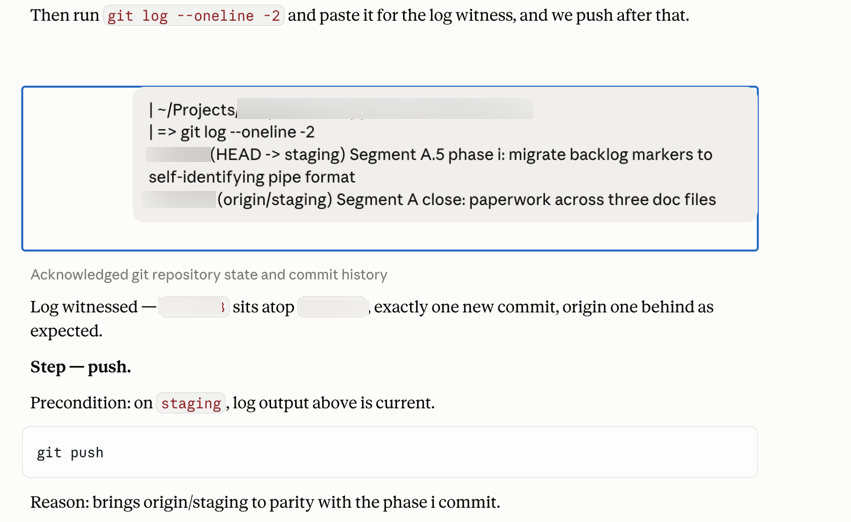
Below shows a scenario where I’m cleaning up some requirements paperwork for a new session handoff. It’s not even actual code. It’s “just” requirements. It’s my part of this project. I don’t even really have to do this part. But it’s my part. It’s intentionally here as a quality check to make sure things are really happening as they seem. Why? What’s the value?
(Yes, this is using github for some product docs. Nothing wrong with whole teams managing their assets with this tool. Jira’s great. Confluence Wiki rocks, other asset management systems are great, etc. etc. But github as a shared source of truth can work across functions as well.)
In this case, we’re seeing the two most recent commits, one line each. Breaking it down: git log lists commit history (newest first); --oneline compresses each commit to a single line instead of the full multi-line view with author, date, and body; -2 limits it to the two most recent. So what I end up with is this serving as the log witness. One line proves your new commit landed with the right message, and the second line proves it sits directly on top of the expected parent, so nothing unexpected slipped in between. You may notice that after the instruction to me to Push, there’s a line with the reason. That’s because I’ve instructed it to tell me the “why” behind its instructions. We’ll get to that as well.
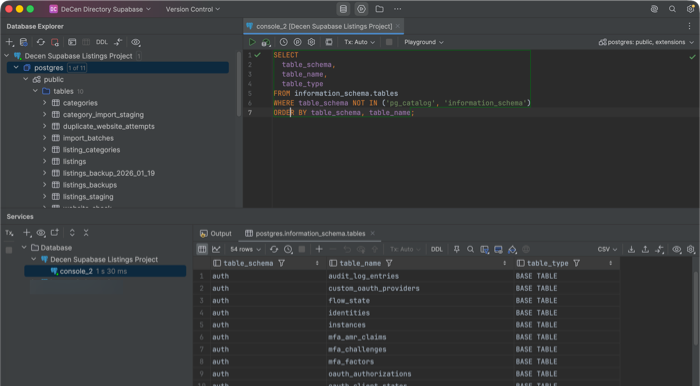
Just as one other example, there’s other types of witnessing as well. Let’s say you have a new feature and you test writing some info to a database. You should check the actual database to make sure it happened. That’s witnessing. You don’t need to necessarily know SQL database language for this. Just ask your AI for it. You will, however, need access to your database. If you’re using something like Supabase or anything else, again, just ask for help in navigating it. Personally, I like using a tool called DataGrip, which may be slightly more challenging to set up, but keeps me out of the database itself. I use it only for read actions, which is safer. If I’m modifying something, it’s with specific instructions with an AI, it’s highly intentional via a terminal window, and requires password. This helps avoid casual mistakes. Yes, if a database person is reading this right now, they’re cringing terribly. And yes, it would be good if you knew at least a little about databases in these cases. There’s plenty of courses. Again, product folks or casual users don’t need to be experts in relational algebra. But it would be good to at least understand some basics. Here’s a view of a DataGrip view on a database, with a query just asking for what tables are in the database. This way you can see for yourself that something was created properly.
The Point? Making sure things that are occurring in your work product, (whatever it may be), is a “trust, but verify” measure. Here’s one more spot where humans still have value. These things may be getting better everyday, however… they are simply not wholly reliable yet. Anyone who’s actually working with these tools should know that. I’m constantly amazed at some of the happy path postings seen on LinkedIn, YouTube and so on with what are possibly very sloppy recommendations. If what you’re working on requires any degree of quality, you really need to check.
Do You Want the Receipt?
This is kind of like Witnessing a thing, but keeping the receipt for seeing it.
I’ve got an annoying paper file folder at home. I’m not sure I’ve ever really had to look it in. Maybe once or twice, and at end of year I typically dump it. What’s in it? Receipts. Receipts from restaurants, from parking meters, and so on. Why? Because if someone bills my credit card $50 for something or other and they shouldn’t have, I want a record. We actually did have a restaurant overcharge my wife’s credit card on a tip recently. It’s a place we go a lot and I’m sure it was a mistake and not a constant thing with them. And they fixed it with a phone call. But I wonder… how many millions happen each year with no one paying attention.
What’s this got to do with AI coding? A lot actually. You should get full receipts for work done. Verifications, not just declarations.
In practice this looks like refusing to simply click “Accept” or type “yes” when the agent reports success. Instead you ask it (or yourself) to surface the proof. Show me the files that changed, run the relevant tests, display the git log, or open the diff. (The difference between changed files.) The extra thirty seconds of checking is the digital version of keeping the paper receipt. Most of the time everything is fine. The times it isn’t are exactly why the habit exists.
The point of this section is simple. Treat every significant claim an AI coding tool makes as something that still needs a receipt. Don’t accept the declaration alone. Demand (and keep) the verification.
First Things First
My own take on the classic Dr. Who episode, “Meglos Part One” (1980).
As part of a skill or opening a chat where you’re going to be asking for instructions, we want to make sure we pick up properly where we left off and keep our sequence aligned.
So demand something like this of your tools…
“When you give me instructions, put any pre-cursors, pre-requisites, setup instructions, etc. first. Do not give me instructions and then offer additional rules like, “But first…” or “Before you use that command…” Always put preparation work first.”
Why do this? Because otherwise you could easily get ahead of yourself and kick off running something before some other critical thing is done. Unraveling the resulting mess could take hours.
New Context Window Handoffs
What are context windows? A context window is the limited amount of recent conversation, files, tool results, and instructions the model can keep in active memory at once. Once it fills or is cleared, earlier details are lost or compressed, which is why handoffs matter. The context window size and capability is one of the marketing claims for the various AIs. Though it’s hard to impossible to know exactly what this means in practice and how much they can hold. Regardless, they’re limited and they’re limited in unclear ways. So the idea here is try try to use some general guidelines for when to switch. That will be in a next section. For now, this is more about how to switch.
There are at least two types of context windows we’re dealing with.
- Your code builder (for which you likely need a command to clear it, such as /clear)
- Your AI Chat (for which you just open a new chat)
Others might be various external tools you’re calling.
Use markdown files. You likely already know about these. If not, see the following. (With the understanding that specific may differ per platform, so this is general info; you need to learn how to work with your own favorite tools.)
- Your .md files are a memory architecture
- Why You Should Learn To Build skill.md Files to Unlock AI’s Full Power
- How to Secure Your .MD files & Close A Critical Data Security Gap in the Age of Vibe Coding
- How to Use Markdown to Improve Ai Results (YouTube)
- The Complete Guide to AI Agent Memory Files (CLAUDE.md, AGENTS.md, and Beyond) (YouTube)
Use things like:
- decisions.md – A living log of settled technical, architectural, or product choices (with dates and rationale) so new sessions treat them as closed and do not re-argue them.
- session-handoff.md – A concise, copy-paste-ready summary of current status, completed work, open items, and next steps written at the end of one session so the next context window can pick up cleanly.
- ui-backlog.md – A prioritized running list of outstanding UI/UX tasks, polish items, and interface improvements that still need attention.
- launch-blockers.md – A short, focused list of the specific issues that must be resolved before the project (or a major release) can ship.
The first two have become somewhat common, especially within Claude Code. The latter two are things I’ve taken to using myself. For the first two, persistent markdown state files for handoffs and decisions are now mainstream advice among people doing serious work with coding agents. For the latter two, I’ll have my tool(s) write out to them to keep track. Eventually, they may get reconciled with larger scale PRDs or a ticketing system of some sort. But minimally, the tools don’t lose them as context.
There’s pros and cons to doing this sort of thing for handoffs. The cons are upon opening new sessions, a new chat may need to do some circular things to get going and it may feel you’re re-visiting old items as it verifies. You don’t have much choice of course, because your context window just needs to go to zero on occasion and start over.
In any case, I avoid any manual edits of these files. I have something like Claude Code do it, then I check to verify. The point of the handoff is to capture what the current session actually knows and did. Having the model generate the summary reduces the chance we accidentally omit something important or inject our own post-hoc interpretation. We can (and should) review and lightly correct it, but the first draft is usually stronger coming from the session itself.
Here’s the good news. Verification is bounded; re-visiting is not. Session-open verification is generally three things when set up this way. It’s git state, suite count, read the handoff and then it’s done. (The suite count is the number of passing tests in your test suite, assuming you’re using that. For example, Playwright end-to-end test suite.) What’s not allowed is re-litigating anything already ruled in a file like decisions.md unless new evidence contradicts it. That’s its purpose. A decision with a dated entry is closed. If a future chat starts second-guessing a recorded ruling without new evidence, that’s the circularity failure mode, and you should name it and cut it off. You’re entitled to say “that’s ruled, entry exists, move on.”
This is part of the whole point of this handoff procedure. Maintain consistency and context across AI code or AI chat sessions. (For example, Claude Code and Claude.AI chat.)
Here’s a general template you can use. Update it if you’re using the suggested file types as well.
I’ll sell an AI chat… “Please create a clean hand-off summary for a new context window.”
And I’ll structure it something like this:
Goal

[One sentence of the overall objective]

Current Status

What’s been completed

What’s currently working

What’s broken or incomplete

Key Decisions & Constraints

Important technical choices made so far

Style, architecture, or business rules that must be followed

Anything the new session must not change

Relevant Files / Context

List the most important files (with brief notes on why they matter)

Any critical code snippets or error messages that should be carried over

Next Steps

Exact task(s) the new session should focus on first

Any open questions or risks
Keep the summary concise, factual, and copy-paste ready. Do not add extra commentary.
When Should You Start a New Context Window
Right now, the best way to do this is use a tool I call the HPBFM tool.
That’s short for “Hocus Pocus Black F#$@#’n Magic”
That’s right. No one really knows. Welcome. Welcome all my friends to the show that never ends.
Here’s what Grok says about when to start a new one.
| Signal | What it looks like | Why it matters |
|---|---|---|
| Forgetting earlier details | The AI asks for information you already gave, or contradicts something from 20+ messages ago | Context is getting truncated or diluted |
| Responses get vaguer / more generic | It starts giving high-level advice instead of precise, project-specific answers | The model is losing focus on the current thread |
| Repeated mistakes | It keeps making the same error even after you corrected it multiple times | Error patterns are stuck in the context |
| Topic drift | You’ve moved from “fix this auth bug” to “redesign the entire dashboard” | Mixing goals pollutes the context |
| Long tool-call / agent loops | Especially in Claude Code / agentic tools — the agent has taken 15–30+ steps and is going in circles | History becomes noisy and expensive |
| You’re about to switch major scope | Moving from backend API → frontend component, or from one feature to a completely different one | Clean slate is almost always better |
| Token / cost pressure | You notice the conversation is getting expensive or slow | Long contexts cost more and can degrade quality |
Here’s my general flow…
For things like coding tools, I do try to check status. But start a new session any time I’m at some major breakpoint. If you’re not using a schedule of some sort, well, you’re on your own. Another way to do it is if you’re switching to some other general task or part of code base. Either way, I’ll ask it to write a summary of what’s been done so I have it for the next one or for logging in a file.
For chats, it’s usually if it’s just gone a long time, as in more than an hour or two or three. Again, having it write its own handoff of what’s been done can be useful to carry to the next one.
One thing I don’t want to do if I can avoid it is start a new one in the middle of a complicated task, especially if debugging something. This is no different than when we get interrupted when deep into a task. At these points, the session has all the context. If you interrupt here, there may be more “where were we” back and forth to start another session. This is why it’s important to clear things at good breakpoints, even if it seems like a time-consuming hassle. It’s only a couple of minutes. I don’t like getting to the point where things are already getting sloppy or something like Claude Code is automatically compressing the session. That feels like the “low gas” light coming on. Which means I’ve not been planning ahead well.
There are some things you can check somewhat. See if you can find out about your status and about where you are. In Claude Code, for example…
/status (then select Usage)
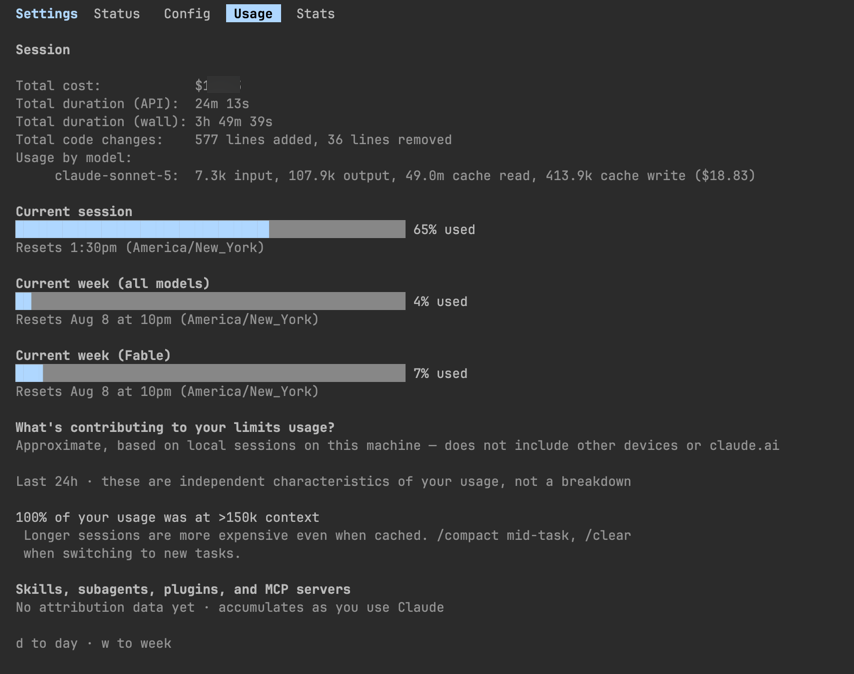
and then also /context
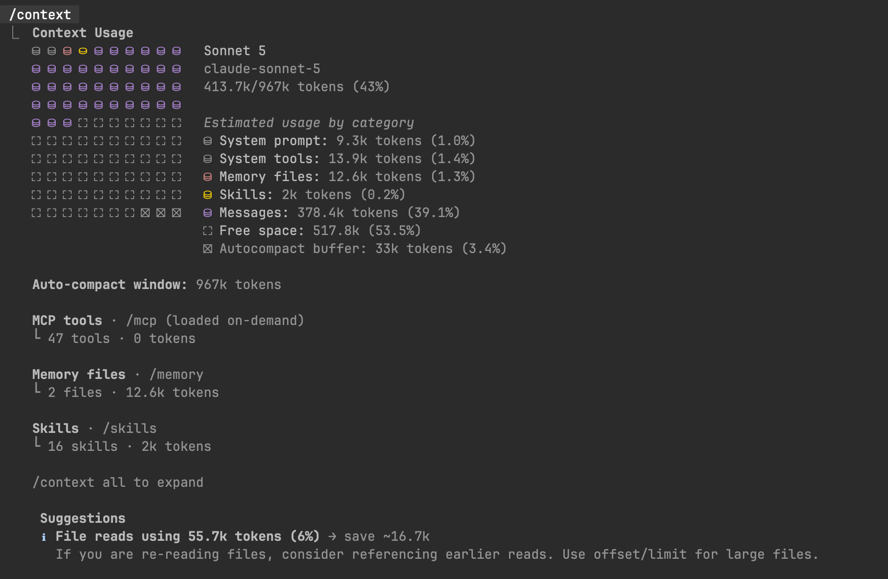
You have to judge for yourself how much more work you’ve done on a particular segment of your project and how far you have to go. I treat this somewhat as an automobile gas tank. I don’t like to see it get as low as 1/4 before filling up. This is especially true if you’re not exactly sure how much further you have to go. You might think a particular part of your project is only going to be a few more round trips. But then a bug or testing keeps you engaged for an hour or more and dozens of clarification prompts.
Over time, it’s likely we’ll get better guidelines on what to do here. For now, oddly perhaps give the sophistication of these tools, we’re still maybe feeling our way through some of this.
Learn
Every time you get asked to do something or get a results you don’t understand is an opportunity. It’s an opportunity to blindly take another step or an opportunity to learn.
You can just hit “Yes. Perform that action for which I don’t have a clue” or you can say, “I’m happy to do that. Please explain what this is in just a few sentences using simple terms and assume minimal pre-requisite knowledge.”
You will very quickly learn new things. You do not have to become an expert in this new thing. But at least you’ll have a clue or two. And that could easily save your butt one day. Because sometimes you’ll get this…

One standing command I have for any technical tasks, (and often others), is “Tell me the reasons for things if you want me to do something. Just give me one or two sentences of explanations for why you’re asking me to give a command or whatever.” This is good enough that it will tell me the reason. Often, this becomes repetitive for similar things. That’s ok. It’s a relatively low-cost annoyance for increasing confidence with what’s going on.
Stay Active – Pushback
Claude.AI told me something a couple of points during some long-ish prompts it was trying to help with with regarding Claude Code. Something didn’t feel quite right. I didn’t know for sure why. So I thought about it a bit and tried a few things. Then, it didn’t just “not feel right.” At that point it wasn’t a feeling. It was a thought. But I still don’t know why. So I asked. And it turned out to have been a mistake. This happened at least twice in this session. At the end of this chat when I was forming a handoff to a new session, Claude.AI, (on Fable 5), offered me this, unprompted…

There’s two ways to think about this. One is, “Good for me. Look how smart I am working with AI.” But the other? WTF else have I missed? Maybe that’s ok if you’re using review tools along the way and other professionals are checking work before it goes near production. Still, the point is you need to stay actively engaged and thinking about what’s going on. If you end up just clicking like a walking dead zombie, you’re begging for problems that you could have avoided.
The good news is that staying awake doesn’t require becoming a full-time AI auditor. It just means treating every session like you’re still the one responsible for the outcome. Witness the changes. Ask for the receipts. Demand the “why.” Push back when something feels off. Do those few things consistently and you keep the human value right where it belongs—on the critical path.