
I’m a product manager who floats among multiple clients, from strategy through finance through product craft and, of course, some direct building. My roles are generally senior, but I’ll be candid here. I’ve been immensely enjoying some recent individual contributor type build work. I’ll admit it out loud. There is just some kind of childlike joy in hands-on making stuff. You have to be careful with that. It’s easy to get comfortable in a build-and-ship “product owner” role and forget to keep your head up toward the marketplace, customers and strategy. It’s so much easier now to just “make stuff,” it’s even more critical to be clear on why you’re bothering in the first place, what’s the value and for whom?
In any case, I’ve had some challenges using AI builders, and specifically Claude. Or rather, the builders are fine. They do what they do. Some of the happy path writeup garbage online is less fine. You’ve seen it. The “you can build it in a weekend” garbage. Yes, prompt-focused builders kick out reasonable prototypes quickly. It’s almost like a modern, more custom equivalent of finding the right WordPress template. But you can’t always prompt yourself out of every issue. Sometimes direct manipulation makes more sense, and you can only do that with access to the code. Which brings its own issues.
Most of the code-generation discussion is speed vs. quality. Yes, yes, MVP, Cagan, et al. Agile’s dead, long live agile. Launch, launch, launch. Maybe. But if you need even a little actual quality along the way, if you realize that in Minimum Viable Product the Viable part is sometimes not so minimal, you still need a bit of process.
What follows is how I’ve been managing my Claude Code based builds, mostly Next.js and React. NOW, I am a PRODUCT person, not a dev. Really. In spite of what I’m about to go over, this is all meant to be taken through a product focus, for when product folks are building more directly. Though I do have some long-ago dev background, and most would call me a somewhat technical PM. That deep background, however long ago, definitely helps in managing these environments. Nonetheless (or maybe because of this), I’ve built a set of guardrails for myself. And you don’t have to comment “SPAM ME” on my LinkedIn feed to get them. Hopefully some of these will help you. Maybe you have tips for me as well.
The three buckets
I use Claude Code and then Codex for some security cross checks, but almost nothing below depends on it. Any capable coding agent has some way to hold standing instructions, some way to block a command, some way to run a saved prompt. The mechanisms differ; the problems they solve are the same. Swap the file names and this applies to whatever you are using.
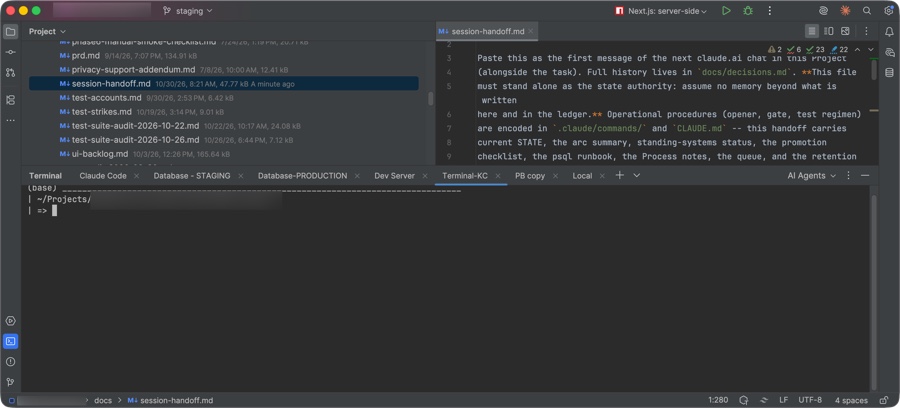
A word on where this all happens. Claude Code itself is a command-line tool: you type to it in a terminal (the plain text window where you run commands). In practice, most of the time I’m using it from inside an IDE, an an Integrated Development Environment such as WebStorm or Visual Studio Code. The IDE is the application that shows you the code files, lets you edit them, and runs the project; the agent runs in a terminal window inside it. That matters because several of the guardrails below are files that live next to the code, and you will be looking at them in the same general environment the agent is working in. Along the way I’ll gloss over the technical terms briefly when they show up, and then move on.
A few that recur: a repo, short for repository, is the project’s folder of code under version control. Git is the version-control tool almost everyone uses; a commit is a saved, named checkpoint of the code; a push sends your commits to the shared copy online (GitHub, usually). Production is the live site your customers use; staging is a private copy of it for trying things first.
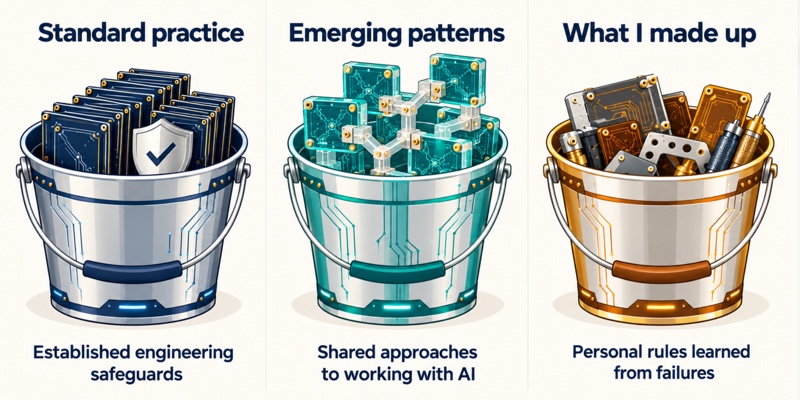
When I finally listed everything I’ve built up to use the core AI tools, it sorted cleanly into three piles:
- Standard practice. Things any competent engineering team already does. I am not inventing anything here; I am a PM learning what the engineers knew.
- Emerging patterns. Things a lot of people building with agents are inventing on their own, in roughly the same shape, with no agreed name yet.
- What I made up. Rituals that exist because of a specific thing that went wrong on a specific day. These are the interesting ones, and the ones most likely to be wrong for you.
The rest of this article walks the three buckets. For each item, I’ll define what it is, and the problem it’s there to solve. The problem matters more than the rule, because the rule is what you will need to change.
One more convention. A fair number of these rules exist because a human has to be the one who decides, and the agent has to be mechanically unable to decide for you. Not all the time perhaps, but for items you decide are critical. Those are human-in-the-loop checks, HITL from here on.
Every item that is one carries a [HITL] tag, so you can see at a glance where I have deliberately kept my hands on the wheel, and where I have let go. You need to decide for yourself, probably depending on your risk levels through your workflow, where you want these.
Here’s some different control mechanisms to consider:
| Mechanism | How it works | What it actually provides |
|---|---|---|
| A written rule or authorization word | Text in CLAUDE.md, a prompt, or the handoff file that the agent reads and is expected to obey; nothing outside the model enforces it | An instruction the agent can misunderstand or fail to follow |
| A hook or permission check | A script runs before each command (or a deny list is checked) and refuses matching ones before they execute; the agent sees the refusal | An enforced checkpoint within the tool paths it covers |
| Credentials and access restrictions | The agent is never given the token, password, or write-capable connection the action requires, so there is nothing to refuse | A limit on what the agent can access or execute |
| Human review | The agent stops and reports; you read the diff against the plan and authorize or redirect | A decision point whose effectiveness depends on the reviewer and the evidence, if the agent actually stops when it should |
Bucket 1: Standard practice
If you have shipped software with a real team, skip this section. If you are a PM who has not, this is the floor. The agent will not insist on any of it, and it will happily build without it. It might truly feel like it sometimes, but they really don’t care.
Here’s the standard practice items.
A standing instructions file in the repo. Most agents have this available. (Claude calls it CLAUDE.md, a plain text file at the top of the project). It holds the stack (the languages, frameworks and services the product is built on), the conventions, and the rules the agent must follow every session. The agent reads it on start, so you stop repeating yourself and the rules stop drifting. Sort of. Maybe. At least, they’re supposed to. Anthropic’s docs describe it as instructions loaded into the agent’s context. Nothing enforces it.
Hooks or permission rules that block destructive commands. A hook is a small script the agent’s tooling runs before each command, (though can run at different lifecycle events), and it can refuse the command. At least, my pre-tool-use hook runs before matching tool calls and can block them. Mine refuses git push (publishing code to the shared copy), history rewrites (editing or erasing past commits), force-deletes, and anything that applies a database change. The agent will eventually try one of these in good faith. A mechanical block is cheaper than vigilance. (Meaning something that stops the action without you watching for it. A hook is the cheap version, a tripwire that refuses the command. The stronger version is an access gate: the agent simply doesn’t hold the credential, so there is nothing to refuse. I use both, in different places. For git, it’s the hook plus my review, because the agent runs in my shell. For the database, the agent’s connection is read-only and staging-only, and the production password lives where the agent never looks. The hook catches the attempt; the missing credential is what makes a production write impossible.)
Versioned database migrations, committed to the repo. [HITL] A migration is a file describing one change to the database’s structure. Add this table, add this column. Never let the agent, or yourself, change the structure through the provider’s dashboard instead. Every change is a file; the file is the record. (Meaning if you click “add column” in a dashboard, the change happened but the change is often not automatically recorded in your repository’s migration history. In such cases, it’s likely nothing remembers how or why. If the same change is a numbered file in the repo, you can read exactly what was done, in what order, by whom, and replay the whole sequence onto a fresh database and get the same result. The files are the history, and the history is what lets you rebuild.) Writing the file does not change anything by itself. The agent writes the migration; applying it to a real database is a separate step, and in my setup the hook blocks the CLI command that would apply it. The apply itself is mine. I run the apply myself, staging first, production at promotion. On a team that step is often automated in the deploy pipeline. Either way, the file is a proposal until something deliberately runs it. If your database supports row-level security (the database itself deciding which rows each user is allowed to see), the security rule goes in the same migration as the table it protects.
A staging environment and promotion through pull requests. [HITL] Code goes to staging first; production only changes by merging a pull request, or PR (a proposed batch of changes that someone reviews and approves before it goes live). If you’re not familiar with GitHub or similar version control, this is the one piece of developer tooling worth an afternoon of your time before you build anything; nearly every guardrail in this article sits on top of it. The agent works on staging. You merge, meaning you are the one who clicks the button on GitHub that folds the reviewed changes into the production branch, which is what triggers the live site to update. The agent never holds the credential that would let it do otherwise.
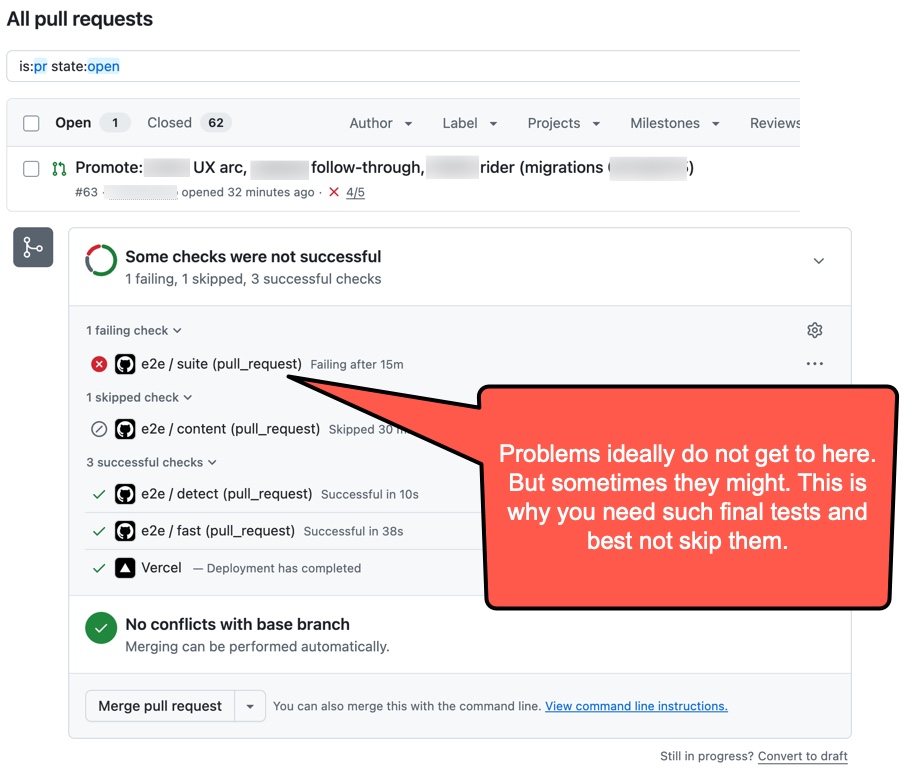
Continuous integration on every PR. Continuous integration, or CI, is a set of automated checks that run on their own every time code is proposed. The tests, a type check (does the code’s own declared structure hold together), a lint pass (style and common-mistake scan), and a full build. Boring, and the thing that catches what you did not read. C’mon, let’s be candid here. You are not going to read every diff. So at least have tests set up to check everything, and have your AI tool write the tests as it goes. The tests are the review you will actually do.
Scoped tool access. When you give the agent a connection to your database or your browser, give it read-only, and give it the staging environment, not production. Set that up in the connection itself, not with a sentence in a prompt. Telling the agent “don’t write to the database” is asking it to behave. Giving it a login that physically can’t write means it doesn’t matter whether it behaves.
Secrets live in environment files, never in code. Frameworks typically read configuration from a .env file, a plain text list of NAME=value settings such as database URLs, API keys, signing secrets. (At least, Next.js supports loading environment variables from .env files.) The convention I use is one committed file with placeholder values (.env.example) so the agent knows what variables exist, and one uncommitted file with the real values (.env.local) that is listed in .gitignore (the list of files version control must never pick up) from day one. The agent can read the example. It should not need the real one, and if it does, it reads a variable name, not a value. Just be aware that any tool that has legitimate access to your file system could conceivably read anything. Your hosting provider has its own encrypted store for the production values; those get entered there by hand, once, and marked as secret so they cannot generally be read back out of the dashboard later, though this control depends on how the provider manages such security.
Public versus private variables. Most frameworks have a naming prefix that means “this is safe to ship to the browser.” Anything without the prefix stays on the server. (Or more precisely, the public prefix controls automatic exposure through that mechanism. Server code can still expose a secret through a response, logging, or other implementation mistakes.) The rule is simple and the failure is common. An agent will cheerfully put a server key behind the public prefix to make a build pass. Search the client bundle (the code that is actually delivered to the browser) for your secret names or maybe a small part of the key before every promotion, or better, write a test that does.
A password manager as the system of record for secrets. [HITL] Every secret, every key, every database password lives in a password manager entry, and the .env.local file is a copy, not the original. When a key rotates, the manager is updated first. Why? The file on your laptop is one disk failure away from gone, and “what was the old value” is a question you will ask. The manager is also the one place the agent cannot see.
Secrets that can be rotated without downtime. Prefer providers that let you create a new key before revoking the old one. Rotation then becomes create, swap, redeploy, revoke, with no outage window. If your provider only offers one key at a time, you will put rotation off, and that is how a leaked key stays live for months.
Keep secrets out of what you paste. Process listings (the list of running programs and the arguments they were started with), shell history, connection strings typed on a command line, and error output can all carry a password in plain text. If the agent, or you, pastes any of that into a chat, the password is now in a transcript. Pass credentials through environment variables rather than command-line arguments, and treat any paste that shows one as a rotation event, not a shrug.
I’ll admit it. There have been a few times I took a screen grab with a question for an AI and it had a key in it I didn’t want to share. Is this a real risk? Impossible to say for sure. I’d still rotate the key anyway. To their credit, the AI I was using warned (scolded?) me for it, and rightly so.
Separate terminals for separate environments. I use multiple terminal windows to keep things clear. One might have Claude Code running, another is for staging, another for production. The staging window carries only the staging database URL, the production window only production. Database helper commands print the environment they are about to touch before they connect. Why? The day you run a cleanup script in the wrong window is the day you learn why this matters. (If the graphic is hard to see, the window tabs are: Claude Code | Database – STAGING | Database – PRODUCTION | Dev Server | Terminal | PB Copy | Local. (PB copy is where I just keep use of a single command to copy the report from Claude Code runs, it just makes it easier. And Local is just a spare terminal window because there’s always some random command to run.)
Backups outside the vendor, and a restore you have actually run. [HITL] An encrypted database dump (ideally a complete copy of the database written to a single file) somewhere your hosting provider does not control, on a schedule, with the encryption key in the password manager. (Note that dumps might be multiple files or be missing some clusters of info like roles. This is something you’ll have to check for your database.) The agent can write the backup script. It cannot make you run the restore test, and an untested backup is a hope, not a backup. Testing a restore can actually be a bit scary. But if you don’t try it, you can’t really know. “I really think so because it looks good” is simply not as confident as “I did it and witnessed the success.” (Most database providers let you restore a backup into a brand-new throwaway project, so you can prove it works without touching the real thing.)
All of this is easy to skip when one person is doing everything and the agent is fast. None of this is novel yet. We’ll get to some of my personal additions soon enough, but I wanted to run through the basics first.
Bucket 2: Emerging patterns
These are the things I keep seeing other builders describe in slightly different words. Nobody taught them to me. I suspect nobody taught them to anyone yet. There are some decent trainers, YouTubers and others emerging with better practices, but this all is still rather new. So this section is still more about things I’ve gathered up then anything inventive.
Two layers: a reviewer and an executor. [HITL] I run two separate AI sessions. (At least. But typically just two, though Claude Code will often spawn multiple workers of its own.) One is a chat where I plan, make decisions, and review diffs (the line-by-line view of exactly what changed). The other is the coding agent in the IDE that actually edits files and runs tests. The chat helps me draft the instructions for clarity, helps me check my own requirements, or those from a PRD. Yes, those do still have value. Planning still has value. Think of this step as honing or double-checking a user story. Then the agent executes the instructions; the agent’s report comes back to the chat for review; I read the review and decide. Why? A single session that both decides and does will rationalize its own work. Separating the two gives you a second opinion that has not seen the code being written. The human sits between the layers, and that is the point. You can also zoom out a view here at this level and double-check what’s being worked on is aligned with strategic goals and is driving towards a business outcome. I’ve got the chat tied into Atlassian Jira and Confluence so it can read those items, and also can update some of those areas.
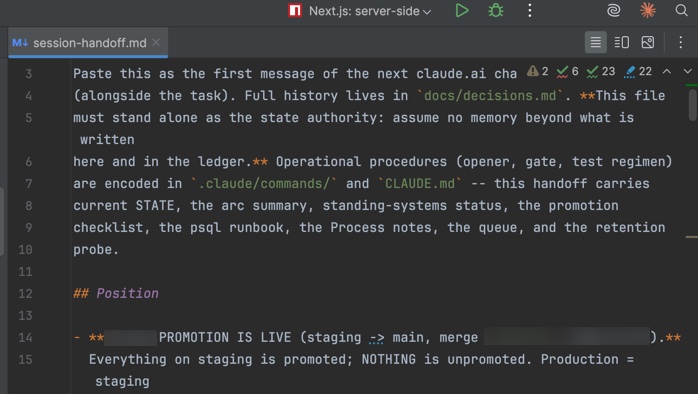
A handoff file. I use session-handoff.md as a markdown file (plain text with light formatting) in the repo that the agent reads at the start of every session and rewrites at the end. It carries where we are, what is open, and the standing rules that must not be forgotten. Why? Agent sessions end. Context might not survive or at least not be nearly as explicit. The file is memory. Even if context can survive in some form or another, doing this creates a handoff file giving you an explicit, inspectable record independent of conversational continuity. It might seem like a hassle to write something like this. So I don’t. It’s just another standing order for Claude Code to produce it. This way, when I rotate into new sessions, the new session can pick up where it left off as confidently as possible.
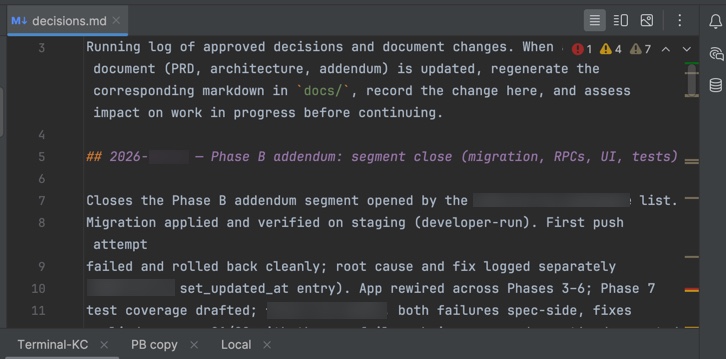
A decisions ledger. This one is decisions.md. A file of dated entries recording every product and process ruling, written before the code that implements it. Architecture Decision Records are an old idea; the new part is that the agent writes and reads them, and that the entry lands before the build starts. Why? Without it, decisions live in chat history, and chat history is unsearchable or cumbersome to search and potentially purged altogether. Again, this might seem like a hassle to maintain. So I don’t. I’ll have the chat direct Claude Code to append to the file. (Though I do read / skim it. Trust, but verify.)
Named units of work with a fixed lifecycle. I call them arcs: plans, rulings, build, report, review, commit. One at a time. Why? An agent given a vague goal will keep adding. A bounded unit with a defined end is how you stop it.
Test lanes by risk. [HITL] A small fast gate that runs on every promotion and a larger set that runs rarely or never. Standard CI thinking, but most solo builders never get to it, and agents generate tests faster than anyone can run them. Why? The full suite will grow until it holds everything hostage. Decide early what actually has to pass, and make the delete list yours to rule on, never the agent’s. If the test regimen gets bulky, reassess it. Some tests can be combined. Some will start colliding with one another if it gets out of control. You get to decide. This is where you both take on and manage a large part of the risk.
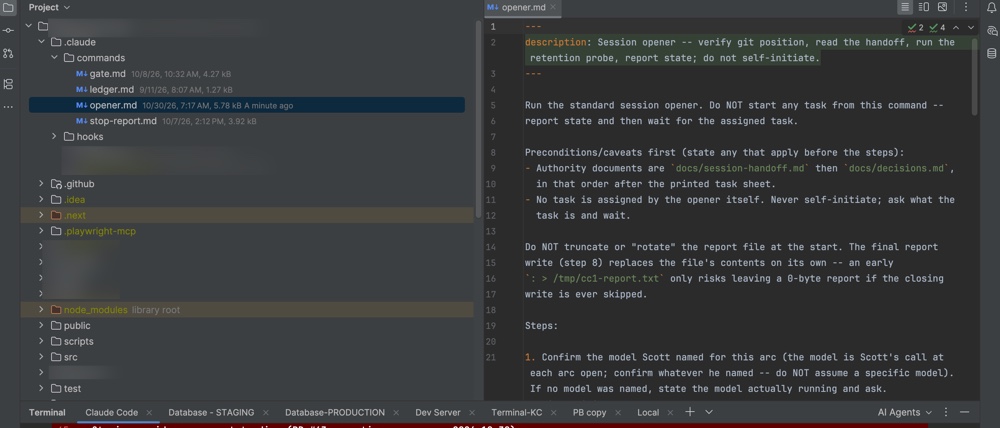
Saved prompts as slash commands. A slash command is a saved prompt you trigger by typing a slash and its name, like /opener. The session opener, the stop report, the commit gate, the ledger entry; each one. Why? The ritual only works if it’s cheap to invoke and provides value. (A slash command is just a markdown file in .claude/commands/ and you’ll find a table for all of this at the bottom of this article.)
Bucket 3: What I made up
Every item that comes next has a date attached to it in one of my ledgers, and a story. Not happy stories. Nothing tragic either. Just learnings for when things were what on I would call “sub-optimal” looking trajectory. None of what I’m defining here are best practices. At least, not yet. They’re my best practices. Maybe they can help you too. They’re some scar tissue. I include the failures that prompted them, (pun intended), because the failure is what tells you whether you need the rule.
The same goes for all of my HITL notes. There are others out there who might say you can skip this. Just make an executive agent to do all of it for you. They’re right. You can. Depending on your role, you can maybe automate a whole lot of your day right away. Have at it if you like. My stops are where I believe I wanted to keep the judgment calls. You need to make your own, based on the issues at hand. Personally, I have to tell you, some folks out there right now kind of scare the crap out of me with what they may be working on. Do as you will. However, let me suggest some judgment by category. Building a new recipe database? Do whatever. Building mission- or safety-critical things? Factory automation? Healthcare related? Aviation? Even if you’re just doing upfront work that other pro devs will check later, maybe take more care right from the start in these areas. Yes, AI can help us in so many ways. But it can amplify early mistakes that compound down an error chain.
One literal word to authorize a commit. [HITL] My agent never commits until I reply with the word AUTHORIZED. (Or shouldn’t.) It won’t continue if I just say, “looks good,” or “go ahead.” I’m using one specific word. The same pattern covers applying a migration and accepting a plan. Why? Because saying “looks good” in the middle of a review once got read as permission to commit when that’s not what I really meant. One word is cheap, though remember that there are times when things could still be misinterpreted in this regard.
A written STOP is never a judgment call. [HITL] I tell the agent to make obvious decisions on its own, note them, and keep going, because stopping to ask about everything is slow. But a STOP written into the instructions overrides that. Why? The agent once reasoned that continuing past a stop was the obvious call. It was not.
Preconditions before instructions, always. Any caveat, any “only if,” any “first check that” goes above the numbered steps, never below. Why? An agent might read top to bottom and could act as it reads. Ideally, it will take into account full context. But not necessarily. A caveat at the bottom could arrive after the damage. Supposedly, agents should digest the entire passage before calling tools. This also might depend on the agent. In any case, this isn’t a bad practice to put pre-requisites before they’re needed. To do otherwise is like getting a recipe that says, “Mix these two really-hard-to-ever-undo ingredients in a bowl. But FIRST do this other critical thing” We’ve all experienced this, right? Sometimes with not very good outcomes. It’s why they always say to read all the instructions first. Which, of course, we all do. Right?
A report file the agent writes, with a timestamp check. Every reply meant for review goes to a fixed file, and I check the file’s last-modified time before I copy it. Why? I pasted a stale report from the clipboard once and reviewed work that had already changed. Okay, it was three times. So far. Speed is good, but there’s an old saying: slow is smooth, and smooth is fast. We humans tend to rush. But we can build guardrails for ourselves as well.
A retention probe at session open. The handoff file records the last commit; the agent verifies the current commit is exactly one ahead of it (the handoff rewrite is that one). Why? It catches the case where the agent is reading an old handoff, or a commit landed that nobody recorded.

Frozen names for work units, assigned only at plan time. The agent is not allowed to coin a name for a piece of work. Small spin-off work rides under its parent’s name. Why? The agent invented a new segment name once, and for a week two documents disagreed about what we were building. Drift happens. It happens with people, it happens with AI tools. At some point it’s good to reconcile the “as built” work with the original PRDs and timelines. But if you have a feature identification scheme of some sort and it gets out of sync, re-aligning it is confusing and time consuming.
Two strikes for a flaky test. [HITL] A test that fails for a non-product reason gets one strike and no same-day fix. A second strike deletes it unless it guards something critical, and whether it’s critical is my call. Why? Fix-and-rerun loops ate whole afternoons. The end-to-end (e2e) test suite was holding the release hostage over its own defects. I’ve found that often (though not always) this is old test fixtures that aren’t even relevant anymore getting in the way of new tests. In other words, the failures aren’t real failures. They’re sometimes just bad tests. This isn’t a hard rule though. It’s a guideline. This area is potentially dangerous and requires care. You still have to determine if a failed test is a product defect, a defective test, or an unresolved failure.
Wait for evidence, not for time. If something has to wait for proof, say what proof, not how long. The instruction states the minimum evidence needed and the fastest way to produce it myself. Why? I was once told to wait two days for logs that a fifteen-minute walk through the app would have produced. This is why it helps to have at least some systems or tech background. It’s useful to just have a sense of when to question or push back.
Purge test residue at every promotion. [HITL] A script that hard-deletes what the test suite left behind, run by hand before every production release, preview first, then the real run. Why? I had been testing some database items. I found eighteen thousand soft-deleted test records (flagged as deleted, but still sitting in the database) in a test fixture (the standing set of sample data the tests run against). Nobody had decided to keep them; nobody had decided to delete them either. The script is the agent’s. Running anything that deletes is mine.
Decide, note, continue, but every skipped edge case is written down. My standing rule is that invisible minor failures do not get heroic fixes unless they are a security risk. But each one must be an explicit, recorded choice. Why? Because “We have decided not to fix that” and “we forgot that” look identical six months later unless you wrote it down.
Reconcile the master documents in batches. I do not touch the PRD every time a ruling changes it. Rulings live in the ledger; when enough have piled up, the documents get regenerated in one pass. Why? Per-ruling document surgery is where a solo PM’s week goes to die. And it’s where team meetings extend somewhere between an hour and forever.
If you are reading this list and thinking some of it sounds paranoid… It is. Each rule costs relatively little and removes a failure I had already paid for once. Maybe even twice.
What to take from this
Three things, if you are a PM about to start building more for real. I’m not talking about some cheesy first cut output from yet another GPT of some sort. I’m talking about either alone or part of a team using serious production flows even if you’re early in the prototype process. It’s still a lot faster than “the old ways.” And yet we should still be sensible, safe, respectful of each other as team members and our customers’ data. We might throw out a lot more early bad ideas, but things that are somewhat good tend to just barrel forward. Often as is. That’s where some non-trivial risk can live; both strategic and tactical.
First, adopt bucket one before you write a line of product code. Or rather, before you have your new friend(s) start spewing thousands of lines of code. The agent will not ask you to, and every item there is harder to add later than at the start.
Second, expect bucket two to show up on its own. You will find yourself wanting a handoff file and a ledger within weeks. Build them deliberately rather than by accident, and put them in the repo where the agent can read them.
Third, do not copy bucket three. Build your own. The rules I listed came from my failures, with my agent, on my product. Yours will be different. What transfers is the habit. When the agent does something you did not ask for, write down what happened, write down the rule, and put the rule somewhere the next session will read it. One rule at a time, each one tied to a date.
And look at where the HITL tags landed. They cluster around three things: anything that touches production, anything that deletes, and anything that spends a secret. That is not an accident. Everything else I have been willing to hand to the agent, with a report. Those three I have not, and I do not expect to.
The product management skill underneath all of this is the one we already have. It’s noticing that something went wrong, naming the actual problem, and writing a requirement that prevents it. It turns out the requirement is sometimes for the process, not the product. That part is still ours to write.
Summary of Files I Use
These are the files and the commands I’m using. There’s a lot of suggestions out there for what to do here. My suggestion is to use this as a guideline, but you need to make your own. Also, consider not overloading with .md files, and in any case, if you find someone out there pitching you on using any as a framework, make sure to check them out carefully for both suitability and safety.
Repo-committed
| File | What it is |
|---|---|
CLAUDE.md | Standing instructions the agent reads every session: stack, conventions, git and session boundaries |
docs/decisions.md | Ruling ledger; dated, coded entries written before the code that implements them |
docs/session-handoff.md | Handoff/breadcrumb file; read at session open, rewritten at session close – I’ll use this if I’m using a controlling chat or agent to control Claude Code. This way, that agent or chat knows where we left off |
docs/*.md | Markdown mirrors of the master PRD and architecture documents, for overall context |
docs/email-templates.md | Text of every system-sent email, mirroring the live auth provider templates |
docs/test-strikes.md | Two-strikes log for flaky tests |
.claude/commands/*.md | Slash command definitions (see below) |
.claude/hooks/block-commands.sh | In this case, a pre-command hook that refuses push, history rewrites, force-deletes, DB applies |
.claude/settings.json | Permission deny rules, second layer behind the hook |
supabase/migrations/ (or your DB’s equivalent) | Versioned schema migrations, security policies in the same file |
scripts/sql/fixture-hard-purge.sql | Hard-deletes test residue from fixture data; run by hand at each promotion |
scripts/backup/db-backup.sh + scheduler config | Encrypted off-platform database dump on a daily schedule |
.env.example | Placeholder values naming every environment variable; the only env file the agent needs |
Local, never committed
| File | What it is |
|---|---|
.env.local | Real environment values; listed in .gitignore from day one (This is a very dangerous file. Don’t share it anywhere. Don’t upload it anywhere other than a secure password location maybe. Be careful not to take any screenshots if you have it open.) |
~/.YOUR-PROJECT-db-env | Staging and production database URLs, read by guarded shell helpers |
~/.bash_profile (or shell rc) | Helper functions such as pgstaging / pgprod that print their target before connecting |
/tmp/agent-report.txt | Every agent reply bound for review; check its timestamp before copying |
/tmp/* working tables | Scratch survey/analysis tables from an arc, discarded after |
External drive / YOUR-BACKUP-FOLDER/*.age | Encrypted backup output; a .part file means a failed run |
Slash commands
A slash command is just a markdown file in .claude/commands/. The file name becomes the command (opener.md → /opener), and typing the command pastes the file’s contents in as the prompt. Claude Code supplies the mechanism; the content is entirely yours.
| Command | What it does |
|---|---|
/opener | Session start: verify git position, restart the dev server, confirm model, run the retention probe against the handoff file, read any health/ops status, state “will not self-initiate” |
/stop-report | End of a build step: write the report to /tmp/agent-report.txt, verify its timestamp, copy to clipboard; then stop and wait |
/gate | Commit gate: run the gate test lane plus type check, lint and build; report; wait for the literal word AUTHORIZED |
/ledger | Write or close a docs/decisions.md entry in the standard shape, committed before the code it governs |