This started as a joke that got out of control, but the build produced a few lessons worth sharing.

Most of my work is product-focused rather than production-focused. Product and marketing people should spend their time with customers, markets, competitors, business models, and worthwhile problems. Becoming absorbed in production can turn attention inward instead of outward.
Still, sometimes you need or just want to build something yourself. Like everyone else, I now use AI for all manner of things. But there’s a difference between a throwaway prototype for quick user testing and something that might approach production. For one project, I had to move beyond simple prototypes and build a modern AI-assisted production pipeline without experimenting on a client’s product, a company’s core offering, or anything containing important customer data. So I needed something harmless, but sort of real, to test with. To borrow from my woodworking hobby, I practice new techniques on cheap material before touching fine red oak. The same principle applies here: make early mistakes where failure costs essentially nothing.
So I built a joke website, but the tools and methods behind it are no joke. They are genuinely powerful. At the same time, the more serious project benefits from using this as a no risk practice platform. So here’s where we come out:
- This article: I’ll just tell you what I built and some of the tools I used to do it.
- Next Up: A series on AI Build Copiloting in general for “semi” technical users. That is, product folks with some basic engineering familiarity, who need to dive a bit deeper into these areas, even if only part of the time.
- After that: Another series focused on building in databases with AI assistance.
Critical Disclaimer: There are skilled developers who may see some of what I say here and in the subsequent series, and outright cringe. This might not be a wrong reaction. The point here isn’t to turn generalists or product managers into production people. It’s to just level up some who are maybe still skittish about some of these tools. We always need to focus on looking outward to customers and markets and all the other things around building core value. But these days – at just about every level – we also need to be able to just kick out some of our own things on occasion. Or at least, understand very well what our newer build tools can do.
Why Share?
As usual it’s just in my nature to try to help, but right now it’s a bit more than that. I see a lot of things getting posted that are either a bit too “happy path” perspective and sometimes not exactly true. Yes, it’s true there’s no shortage of videos and posts about people building applications in a day, launching SaaS products over a weekend, or generating companies during lunch. Some seem to gloss over so much that I wonder whether their creators have actually used the tools. Extraordinary things are more possible now, yet plenty of grittiness remains, even with Fable 5, GLM 5.2, or whatever becomes next week’s model of choice.
Why gritty instead of AI pretty? Accounts must be created, tools connected, permissions managed, domains configured, API keys protected, environments separated, and code tested. Errors appear, documentation is incomplete, and features that should work sometimes simply do not.
AI-assisted development is approachable, but it is not magic.
OK, sure… in a way it can feel ‘kind of’ magical sometimes. Still, it’s not always a magic happy path. My goal here is to show that these tools are not something non-developers need to fear. Yet it takes time to become familiar with them, just as it takes time to become familiar with any other professional tool. The good news is that you can learn through projects that do not matter very much.
Again, I also wanted to explore the difference between generating a prototype and operating something that resembles a real production system. Nothing described here should be interpreted as a claim that I produced bulletproof software. The modern threat surface area is enormous. The same technologies helping ordinary people create products are also being used by sophisticated attackers to steal credentials, exploit applications, scrape systems, and search public repositories for mistakes.
- A generated interface is not the same thing as a safe product.
- A working demo is not the same thing as production.
- That distinction became the real subject of this project.
This will start with a simple app build. But then there will be a series of learnings that go deeper into the tips and traps of crafting things with our new tools.
So, What Did I Build?
Something a bit ridiculous, though mildly amusing: a few pages, a membership card and certificate generator, a mini-blog, and a merch store. (Though this last part is just a poorly integrated bolt-on.) Voilà, Sarcasm Without Borders.
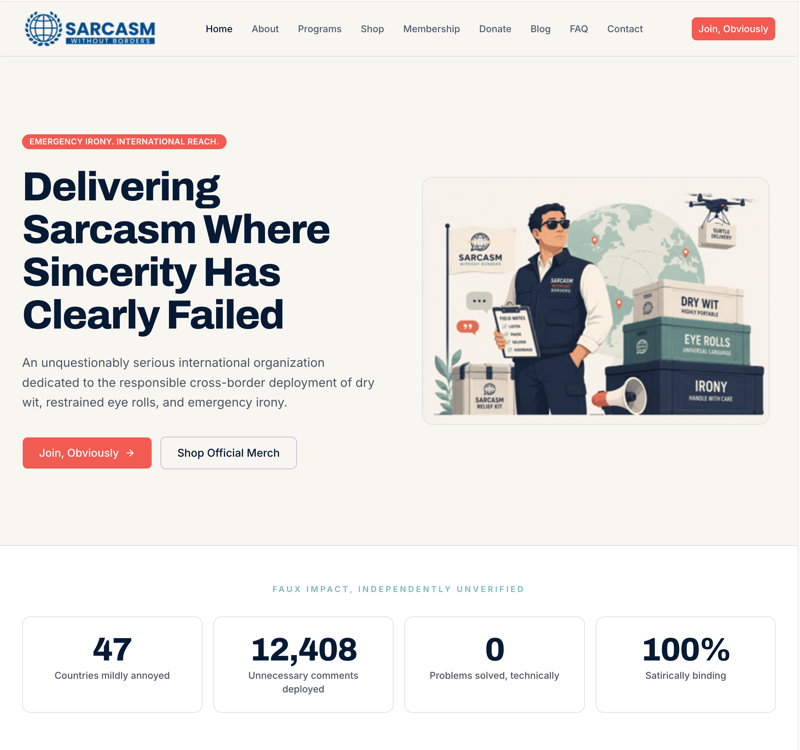
The idea for “Sarcasm Without Borders” popped up on a Thursday afternoon during a joke conversation. I assumed there had to be a website. There’s website for everything. Apparently not. Since nature abhors a vacuum, I felt compelled to fill it. In the past, I would have grabbed a WordPress template and slapped something together in a few hours. But it’s the mid 2020s and we have some more serious power tools. (Though WordPress still works perfectly fine for a whole lot of things.)
The result was more than static pages. It includes content, branding, forms, membership card and certificate generators, analytics, and a third-party merchandise store. It’s still a toy, but a functioning one with a production pipeline behind it.
My hands-on time totaled about nine hours. Roughly twice my estimate; mostly because of tooling setup rather than site construction. That included the website, deployment workflow, analytics, domain configuration, and merchandise integration. Calendar time was about a week because the “work,” if you can call it that, happened across several sessions, often while I watched some evening TV and had Claude Code run in stages.
The cost is harder to calculate because I already subscribed to many of the tools. If I’d been starting without those accounts, I estimate about $200. (It can easily be much less or free if you just skip using paid / pro tools.)
What’s In The Toolbox
My goal was not simply to generate a prototype. I wanted a workflow that preserved access to the files and code, allowed direct changes, maintained version history, supported testing before publication, and let me move between AI generation and manual editing.
That shaped every tool choice. Many site builders produce decent results and host them for you, but can leave you prompting endlessly to change a color or move an object. I wanted direct access to the code without preventing the AI from continuing to work with it. Your needs will vary. The point is your first step might need to be considering your end state as it could inform which tools might work for you, and which could send you into a dead end.
Almost any attractive AI website generator will do for a disposable prototype. I wanted a proper round-trip workflow:
- Define the product.
- Generate an initial implementation.
- Store the code in version control.
- Make changes through prompts or direct editing.
- Deploy to staging.
- Review before promoting to production.
Then publish it so the world can enjoy whatever random amusement flashed into my head.
That sounds basic because it is. Yet AI builders make these steps easy to skip by placing a large, inviting Publish button in front of you. And despite the usual “The PRD Is Dead” clickbait, I think higher-level product requirements and supporting documents may be more important than ever when working with AI.
My primary tools were the following.
ChatGPT
I used ChatGPT for ideation, product requirements, the creative brief, content development, vendor and merchandise research, and converting the requirements into prompts for an AI site builder. I already had a paid consumer subscription and did not need my API account. I also considered running an alternative locally or renting access to GLM-5.2 from Z.ai, which appeared close to Opus 4.8 in capability at a fraction of the cost.
Claude and Claude Code
I used Claude.ai for technical discussions and Claude Code inside my development environment for code changes, troubleshooting, and repository work. They are related products, but not the same working context. A web conversation does not automatically transfer into a development session, so important requirements must live in written project artifacts rather than only in chat.
One approach is to have Claude convert the PRD into Markdown files and place them in the repository for Claude Code to use as context. Claude can then help write implementation prompts, while Claude Code records scope changes and decisions in files such as decisions.md. Those changes should eventually be reconciled with the original requirements so everything stays synchronized. If you’re not familiar with markdown files, (.md files), yet, here’s a few resources: How to Use CLAUDE.md in Claude Code in 5 Minutes, (6min/YouTube), Use .MD Files for Better AI Results (12min/YouTube), An example of how Claude does it, , (article that I wrote), to do competitive analysis. (Note that these examples are Claude Code focused, but others are similar, e.g., OpenAI’s AGENTS.md, Google Gemini’s GEMINI.md and so on.)
Integrated Development Environment (IDE)
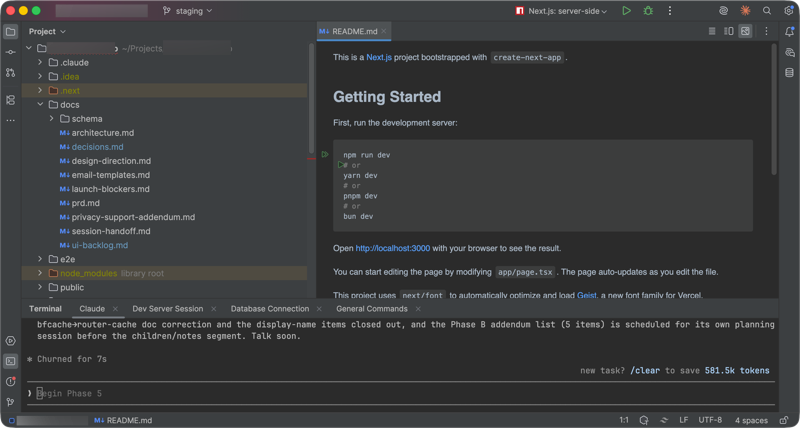
WebStorm was my integrated development environment, or IDE: a sophisticated code editor for navigating the project, reviewing changes, using the terminal, managing Git, and detecting problems. I already subscribed to the JetBrains, though the free Visual Studio Code is a most popular free alternative. Then there’s Cursor, and of course others. Someone who does not want to manage code directly can largely skip this layer and use AI prompt focused builders like Lovable, Bolt, and so on. I wanted the option to manipulate output directly. And that’s what this is about, going beyond “kick it out” prototypes and mini sites to something that could potentially be handed off to a pro development team. I’ve used all of these products for different projects. They’re all good for their purposes. Note that even some of the “prompt first” focused tools often allow some access to code and GitHub integration. And using a more IDE focused solution doesn’t necessarily make something dev handoff-ready. But can certainly get you closer. The point is to consider choosing your tools based on what it is you’re going to do next with output. Quick prototype for user testing? Pick anything. Something you think may eventually move into real production? Work with your team to choose an approach that provides the new speed we all like without creating a handoff mess later.
Vercel and V0
When choosing hosting, plenty of builders let you do deployment directly from a tool to some form of hosing. I used V0 to generate the initial site and Vercel for deployment and hosting. I soon abandoned V0 because of a billing problem: Even though these products are from the same company and integrated, they have different billing tools and I could not upgrade V0 by any available method, and its chatbot seemed more effective at blocking access to customer service than providing it.
I do not want to overstate the complaint. The point is that you may need flexibility as some of these companies or tools are still relatively new. Vercel itself is excellent, and its flow from build through staging and production is impressive. I chose the combination because V0 and Vercel were supposed to make that path easy, so losing part of the workflow was frustrating.
Although closely integrated and owned by the same company, V0 and Vercel remain separate products with distinct accounts, billing, quotas, and roles. The episode was another version of the old “best of breed versus one-stop shop” problem: even products designed to work together do not always cooperate.
V0 created the initial application. Vercel continued to host it and generate preview deployments for staging and proposed changes.
GitHub
GitHub provided version control, change history, remote backup, and a way to manage staging and production work. It is best known for code, but I have also used it to track other material as a product manager.
Lately, I have been “kind of” coding with it. I say “kind of” because producing a few applications does not suddenly take product managers and turn them into talented professional developers. (And the point here is absolutely not to try to turn product people into developers; it’s just to help those who may be just doing a bit more on the production side of things than we used to.) So again, yes, you can usually publish directly from an AI builder and skip GitHub. And for something disposable, that may be acceptable. It is not a good habit for anything you – or more likely someone else – may need to maintain.
Domain and Email Providers
I registered the domain through GoDaddy and initially set up Zoho Mail because both offer inexpensive options. Then I realized the site doesn’t even need email. An early product test can just route contact-form submissions to a spreadsheet instead. (Even this introduces questions about spam prevention, data access, failed notifications, and responsible storage of personal information. But the point is, if you’re just slapping together a prototype or test, you can possibly avoid some integration hassles.)
Merchandise Platform
Rather than build commerce infrastructure, I connected the site to an external print-on-demand provider. That kept payment processing, fulfillment, product configuration, and shipping out of my application. For a small experiment, outsourcing those responsibilities is an easy choice.
The Hidden Cost of Tokens
AI subscriptions create peculiar spending behavior.
Token use is like eating Doritos. You think one more prompt will finish the job and satisfy you. Then another seems necessary. Then the AI produces something almost right. And this kind of can be more expensive than something obviously wrong, because you’ll work on the wrong thing. The maybe correct thing silently passes. Then we have the user experience that some changes are surprisingly hard to describe, and doing them manually may be easier, if you know how.
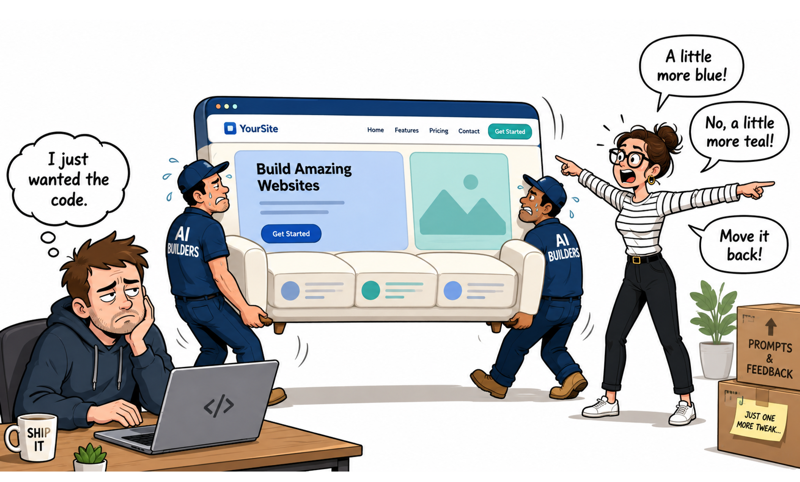
Meanwhile, estimating usage in advance remains difficult. Costs depend on the model, the amount of context, the complexity of the work, how frequently files are reread, and how many times an approach has to be revised.
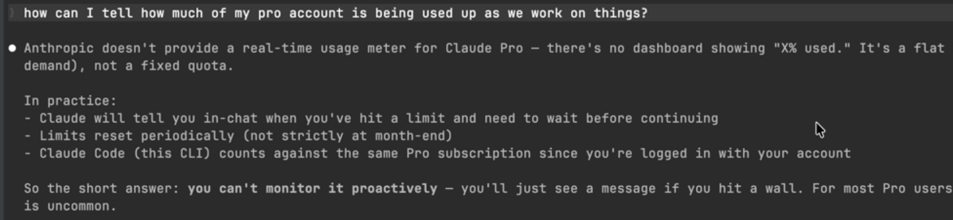
There are ways to reduce consumption. You can use smaller models for routine work, clear sessions at logical boundaries, keep durable project documentation, or run certain models locally. Every option introduces tradeoffs in quality, convenience, speed, and effort. For a project like this, I would assume some experimental waste. Learning has a cost. The goal is not to eliminate that cost but to make it visible and keep it within a deliberate boundary.
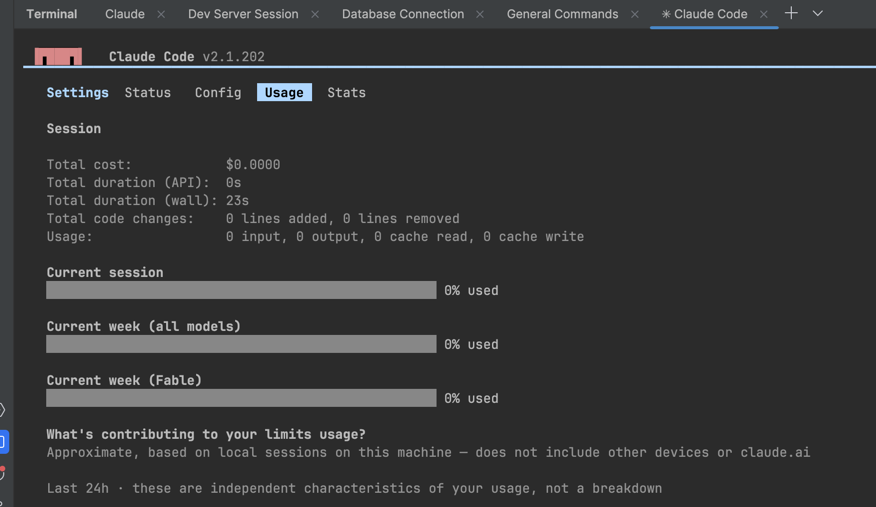
Even though estimating ahead of time can be challenging, be aware that within Claude Code, you can use a slash command like /status and select Usage to see where you’re at. (I suggest doing this in a separate terminal window than the one in which you’re running Claude Code for your main work to avoid interrupting a current task.)
Turning a PRD into a Build Prompt
I began with a lightweight product requirements document. Yes, PRDs still have value. (My opinion.) Thinking things through just a little bit beforehand can save a lot more time than it costs. For a large product, if I’m working more on pure business and strategy, there might be some general direction only. And that might be all that’s needed to start with these tools. But if deeper in, I would work with a team to break requirements into epics, flows, data definitions, technical requirements, safety constraints, and build phases. Here, I asked ChatGPT to convert the PRD into a format suitable for an initial V0 generation.
This time, the instruction was simple: “Turn this PRD into a digestible prompt for an initial V0 build, splitting it into logical rounds if necessary.” I included a logo, brand guidelines, creative brief, page requirements, and functional descriptions. The PRD was longer than just a prompt, but not a hundred-page specification. Including every possible future requirement would have added noise and made the result harder to evaluate. And that’s partly the point. A PRD and associated project doc might be hundreds of pages. In these cases, you have have another AI tool break those down into .md files or leave them as project files and have the actual code tools work off of them slowly. If you try to just generate the whole thing at once, it’s going to take a long time, it will probably stop a lot with questions, and likely lose context somewhere along the way. There are those out there who build larger scale agent flows to manage this. But for starting out with such things? Being somewhat hands on is useful and educational.
So the goal was not to finish the product in one shot. Again, more agentic frameworks will eventually make that practical. For now, the first generation only needed to establish:
- a visual direction
- basic page hierarchy
- shared navigation
- core components
- primary user actions
- and enough representative functionality to test the approach
A sitemap, reference image, wireframe, or brand example can help enormously. AI builders perform better with clear constraints than with instructions to simply “make it cool.”
The First Generation
After ten to fifteen minutes, V0 produced the initial site. By traditional standards, the speed was remarkable. A few years ago, even a rough version of this simple project might have required a designer, a front-end developer, and perhaps another developer working for several days. And even just months to a year ago, this would have taken longer and had sloppier output.
That does not mean the result was brilliant. The first version was average at best: functional, coherent, and visually acceptable, but more generic and sterile than the work of a strong designer. AI can dramatically accelerate a competent first version. Competence is not the same as taste. Still, it did what a first version should: gave me something concrete to evaluate. And I haven’t even improved it much. Note that you can also add design instructions in something like a design.md file. And, of course, there’s tons of advice on how to do that: How to write a DESIGN.md file Claude can actually use. And you can Set up your design system in Claude Design. This is an opinion, but none of this… none of it, truly replaces a talented designer. We can get away with a whole lot with these tools and many things maybe don’t require heavy design work. But… at least for now… a lot of these things still product outcomes that are somewhat more sterile than if a really talented designer actually crafted something. Sometimes this is a subtle thing that’s hard to describe, but you kind of know it when you see it.
In the meantime, with these tools we can at least get to a place where we can ask some basic questions. Instead of discussing an abstract design, I could ask:
- Does the visual hierarchy work?
- Does the joke reveal itself quickly enough?
- Is the homepage too busy?
- Does the membership card generator belong with the rest of the product?
- Does the navigation make sense?
- What should be deleted or emphasized?
- What looks generated rather than designed?
Iterating Before Leaving the Builder
My goal was to work directly with the files in WebStorm after the initial generation. But once manual changes begin, synchronizing them back into a visual AI builder becomes difficult. Few tools handle round-trip editing well. Generated code can usually be exported, but extensively modified code may not return cleanly. V0 supposedly lets you pull from GitHub. This would be great to create a “digital twin,” but I never got there.
So I completed several rounds of visual and structural refinement in V0 before moving into the broader development workflow. I reworked page structures, adjusted copy, refined responsive behavior, improved components, clarified the generators, and ran basic tests. Then left V0 completely for working directly in WebStorm.
It felt like giving feedback to a design and production team, except the loop took minutes, not hours or days. I did not wait for perfection. The goal was simply to reach a stable baseline so future changes could happen safely in code. So yeah, there’s a freedom in just knocking out your vision without needing designers or development staff. But is it as good as it could be? There’s an incredible irony and tension right now in product craft. And it’s not just digital. We have “perfect is the enemy of the good” and the need for speed, but we also have the reality that quality across the board seems to be coming down. And quality can win. But, quality does cost. What’s going to win in the marketplace will depend on the usual; what sector are we talking about, what does the competitive space look like, etc. And this is an entirely separate conversation. However, now is a good time to point out: As you knock stuff out with these tools – assuming your a product person – did you get too caught up in the production? Is what you made going to flow through to actual product? Is it really any good? Will it drive towards the metics, KPIs and outcomes you intend? Now is maybe a good time to pull your head out of your tools and consider that other aspect of your craft.
Connecting GitHub
GitHub was optional for a project like this, but I wanted to exercise a real production workflow. I created the repository first, then connected it to Vercel. That allowed me to authorize access only to the specific project rather than every repository in the account. Permissions should be scoped narrowly whenever possible.
GitHub then became the source of truth for the code, with:
- a staging or development branch for integration work
- a production branch for the live site
- and short-lived feature branches for individual changes
Vercel generated preview deployments from branch activity, giving each proposed change a reviewable URL before it reached production. At that point, the experiment stopped being merely an AI-generated site and became a small software delivery pipeline.
Preparing the Local Environment
To work locally, I installed or verified Node.js and Git, opened the project in WebStorm, and reviewed its structure. The generated site used familiar modern technologies: TypeScript, React, and Tailwind CSS. These last parts are various sorts of code, and Node.js is a server that lets JavaScript run locally on your computer.
While all of this is arguably somewhat technical, a lot of it is little different than installing a kind of browser. It would certainly help with all of this though, if you at least know some basic HTML/CSS. Again, your goal isn’t to be a developer, but grade school kids can make web pages. A quickie HTML/CSS course can de-mystify a lot of things if you’ve never delved deeply into web pages before.
A non-technical user could still do much of this with AI guidance, but complete blindness is risky. You do not need to become an engineer. Nor should you if your focus really needs to be on general product issues. Though my personal opinion is you should understand enough to distinguish a layout file from a configuration file, a secret, a database migration, or a destructive terminal command. Whether you’re working more with production tools yourself or with a development team, this is helpful, regardless of whether your a junior individual contributor or a senior manager. Even if doing high-level strategy, it helps to have somewhat of a clue as to how your means of production work.
Putting Project Knowledge into the Repository
Project decisions should not live only inside AI conversations. Chats are temporary, but repositories are durable. I added instructions, design decisions, architectural notes, safety constraints, and implementation guidance to the repository. Markdown works especially well. A root-level CLAUDE.md can provide standing instructions to Claude Code, while a /docs directory can hold requirements, design notes, database rules, and decisions. Large PDFs and planning documents can be condensed into smaller files the agent can reread efficiently.
The repository then becomes more than code. It becomes the product’s institutional memory. AI sessions end, context windows fill, models do not automatically share knowledge, developers come and go, and requirements change. Written artifacts survive and can be used to generate next steps prompts.
Working with Claude Code
With the repository ready, I began using Claude Code inside WebStorm. I reserved capable models for architecture, product structure, and irreversible decisions, then used less expensive ones for narrower tasks. Model names and prices will change, but the principle remains:
Use the strongest reasoning where mistakes carry large downstream costs. Use faster, cheaper models for constrained, testable, reversible work.
- Database structure deserves deeper reasoning
- Renaming button text does not
- I also defined clear task boundaries. Rather than asking an agent to “finish the site,” I assigned work with observable completion criteria
- implement a specific form
- fix a responsive-layout problem
- add analytics without collecting unnecessary personal data
- connect a merchandise link
- update the card generator
- or prepare a change for review without merging it
The clearer the finish line, the easier the work is to supervise.
Staging Before Production
Vercel preview deployments simplified staging. Direct deployment might have been acceptable for a joke site, but the point was to build the habit. Production should not be the first place a change is observed. Even small products benefit from a preproduction checkpoint.
Finishing the Product
The remaining work combined generated changes with production chores: connecting the domain and merchandise store, setting up email and analytics, testing forms and spam protection, replacing temporary branding, reviewing metadata and social images, checking mobile layouts, and validating primary flows.
None was difficult, but together they consumed a substantial share of the project.
That’s another difference between a demo and a product. The interface may appear quickly. The final twenty percent is a pile of small tasks that determine whether the site can operate.
The End Result
You can judge the site for yourself. You can even get your own membership card. (Cards and Certificates. And yes, this was my idea, but it was Claude Code that build these pages and the pdf generator in a matter of minutes.)

It is intentionally absurd. A fictional organization, mock-serious credentials, and merchandise for a nonexistent cause. I probably should be embarrassed by it. I’m not.
What began as a joke to use something worthless to create production scaffolding for another real project became something I enjoyed building. Whether anyone visits is almost beside the point.
The project succeeded because it gave me a low to essentially zero risk place to exercise new tools, code ownership, version control, local development, staging, and production deployment fit together. And I suggest to others looking to exercise these tools they consider doing something similar. It can be more effective to experience these toolsets with a zero-risk throwaway project before getting to things that matter.
What the Experiment Actually Demonstrated
AI did not build the product while I just passively watched. What it did was accelerate ideation, requirements, design, copywriting, setup, code changes, troubleshooting, and documentation. It also had added responsibilities: reviewing output, controlling permissions, managing context, choosing models, monitoring costs, validating claims, protecting secrets, and knowing when not to let the agent act.
AI reduced labor but not the need for product judgment. Judgment grows more important as the cost of producing the wrong thing falls. When implementation becomes cheap, selection becomes expensive.
The question is no longer only, “Can we build this?” And not just “Should we build it,” but also how should it work, what risks are we accepting, and how will we know when it is wrong?”
Another Note on Being “Semi-Technical”
Personally, I describe myself as semi-technical, but the phrase is subjective. Product management exists on a continuum. At one end are technical product managers working with platforms, infrastructure, APIs, and engineering systems. At the other are commercially oriented leaders focused on markets, performance, and strategy.
Most of us live somewhere in the middle. These days, some may have actually learned product focused skills in an early program and tracked directly for it early career. However, most of us came to the role from other places; sometimes by accident.
My background includes enough development experience that code does not look alien, but I’m hardly anywhere near what one would call a professional developer. A developer may find this trivial; someone from a creative, marketing, or business background may find it intimidating. That does not make the tools inaccessible. Still, some foundational learning helps.
So along this path of making things, one can also ask AI to teach while it assists. Instead of saying only, “Tell me what to click,” share a screenshot and ask:
- What does each section control?
- Which settings could affect production?
- What is the safest option?
- What could go wrong?
- What information should never be exposed?
The goal is not merely to finish the task, but to become less dependent next time.
And at the very same time, always beware of become trapped in the tools. That is all of these things are a means to an end. Producing value. Delivering prototypes or even artifacts that will go on to production is not a business outcome. The benefit of some of these tools is that we who are mostly working in product management can maybe now do some more independent early work. At the same time we have to always be aware of our actual larger scope goals.
The Bottom Line
You can build useful products responsibly with these tools by defining the objective, choosing the right workflow, protecting important systems, and keeping humans in control.
- Start with something low-risk.
- Write down the requirements.
- Use version control and staging.
- Protect your secrets.
- Treat generated work as a proposal, not truth.
- And remember: a copilot is not the pilot.
The next series of articles will cover the gotchas, permission traps, security risks, context failures, and operational habits missing from most “I built an app in a weekend” stories. What I’m trying to avoid is just give you some happy path to production. Nor will any of this make you a professional coder. At all. But by at least skimming the topics, ideally you can be safer with whatever you’re doing. And maybe more quickly get over some speed bumps or blockers more quickly.