
We started in Part 1 with what the bright shiny What AI (Site builder) Demonstrations Leave out… and it was fairly high level. Now we’re going to dive a bit deeper and yes, somewhat into some technical things. My goal remains: to help level up those in generally more non-technical roles, especially product management. (Though of course, what that technical continuum looks like varies widely.) Let’s start with some basics, and drill down from there…
The dangerous thing about AI coding assistants is that they are often very good.
Huh? How could that be dangerous? It’s dangerous because if they were obviously terrible in spots, we would remain more alert as we used them. Instead, they’re helpful enough to earn trust and inconsistent enough for us to experience times where we clearly shouldn’t have trusted them.
The interaction feels conversational. The agent explains what it is doing, uses reassuring language, and often anticipates the next task. Over time, it becomes easy to stop evaluating each recommendation independently.
That’s the lull.
The assistant is called a copilot for a reason. Do not become its passive passenger.
Disclosure: I did use AI in this series for spelling, grammar and to fill out a few bullet lists with minor items I missed. Generally, I draft, do outlines, and write everything; then have AI check spelling, grammar, and completeness; maybe clean up a few items. Here I did miss some bullets though and those are filled in. Where that was true, I checked sources on ‘truthiness’ for everything. The point is, every high-level thing I go into here are things I’ve personally run into – recently – while working on real projects. So it may seem like a lot, but none of it’s fluff. And you ignore them at some degree of risk.
Ask Agents What their Proposed Actions Will Actually Do
Often, you may use multiple agents in some capacity. Or an “AI director.” For example, I’ve mostly settled on Claude Code via a code editor. And then I’ll use another AI in a browser to help me direct Claude Code. Sure, I can tell it what to do myself, but it’s helpful to have another AI criticize your prompts and make them more complete. Maybe I’ll try some other tools out of curiosity, but for now, these work for my tasks. For a lot of us, these tools are a relatively small part of our day. There’s time / effort in learning, but it’s not where we’re going to live. And also note that while this is my primary choice for these things, I might also use a more prompt focused tool, (like Lovable), if I just need a super fast user test on something. Either way, I may get help from a web-based AI for crafting prompts. Also, I’ll usually have some form of requirements. Sometimes really light, sometimes not. And maybe even a design system or brand guidelines. This might go into a project folder for the AI to read, or be fed in piecemeal. Either way, I’m using the web based AI, (Claude, ChatGPT, Grok, whatever), as a helper prompt builder into the actual tool.
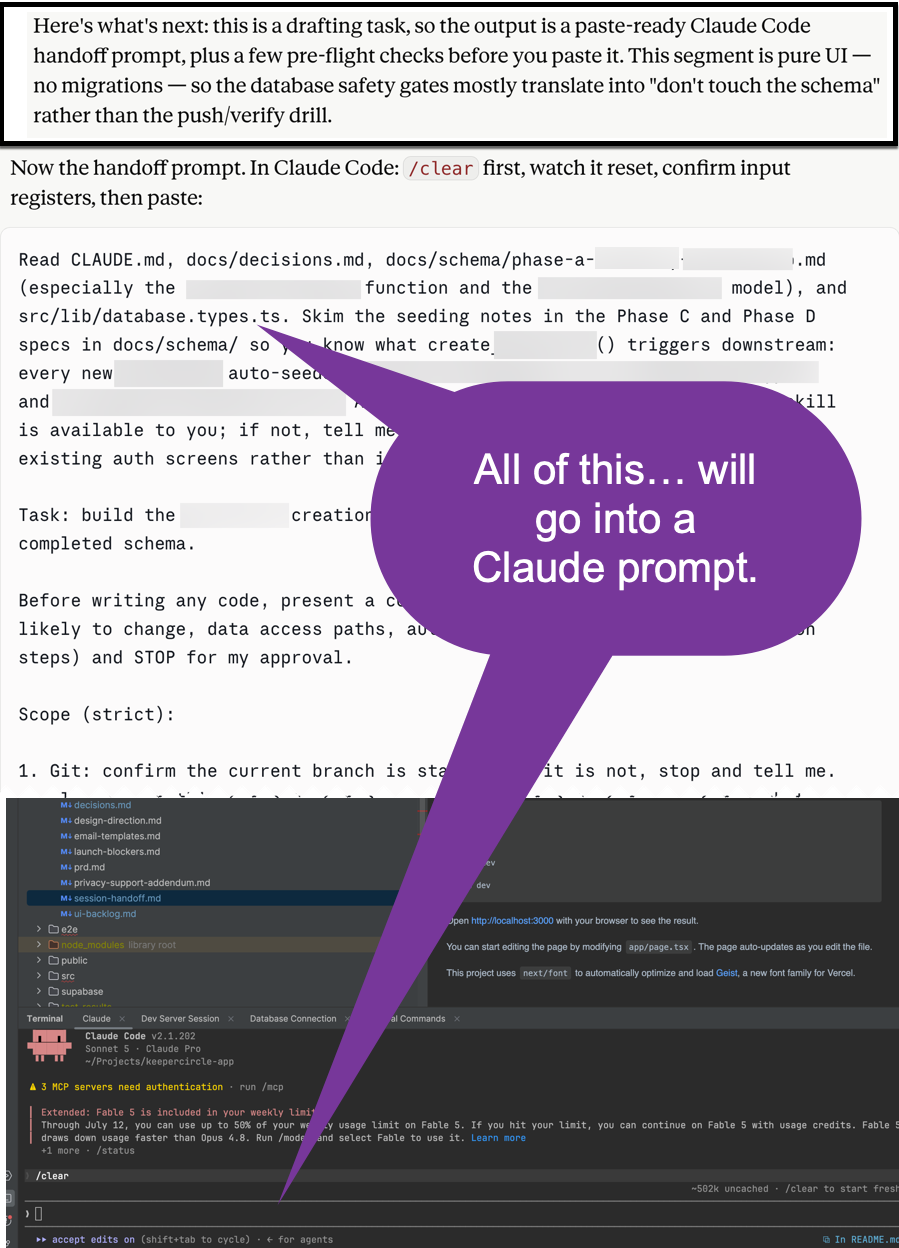
Here’s what that can look like… essentially, based on a set of instructions, upfront requirements work, maybe branding and design guidelines, I’ll have the web based AI, (in this case Claude.ai), build the prompt for its cousin, Claude Code. We can even, (actually we should), have Claude.ai check work output along the way. You know, get a little friendly family rivalry going. And this semi-adversarial back and forth is what can help find and plug holes; in both code, and inconsistent requirements.
The takeaway here is to really use these tools to help yourself. I don’t just mean for the task itself, but to guide you through your task. It’s kind of like “help me, help you, help me.” Think of it like hiring a private tour guide for a journey. You’re the boss. You are directing the overall action, goals and objectives, but the guide is showing you the way, maybe telling you what to try out. Then you do that. And you’re ideally sensing an ongoing theme with what I’m telling you… YOU are still responsible for outcomes so you have to stay engaged, pay attention, re-direct as needed. Sometimes you’ll need patience for this.
Here’s an example of a project stage handoff. Claude.ai is telling me what our next task is. And also giving me the handoff prompt to use to feed to his cousin Claude Code. These need to be checked. Maybe re-worked several times. Then fed into the Great Maw of Claude Code. Along the way we’ll run into everything from poisonous poppy fields to flying monkeys and more. Yes, Wizard of Oz reference, because you’re the Wizard in this case. Remember the story? The Wizard was actually a traveling circus performer who landed in Oz by accident and ended up with a bunch of levers and tools to make stuff happen. That’s you and me now. Welcome. And again, watch out for the flying monkeys.
And here’s the example…
So… if using an AI builder, (web and prompt focused or deep in code focused), and also using another AI to help direct your prompts… When an agent proposes a meaningful command or change, ask:
- What will this do?
- Which files or systems will it touch?
- Is it operating locally, in staging, or in production?
- Is the action reversible?
- Is there a backup?
- Which credential is being used?
- How will the result be verified?
Be especially cautious when the agent proposes an irreversible action or a shortcut around an existing safety control. Even when an agent may be completely correct. You should still understand what you are approving.
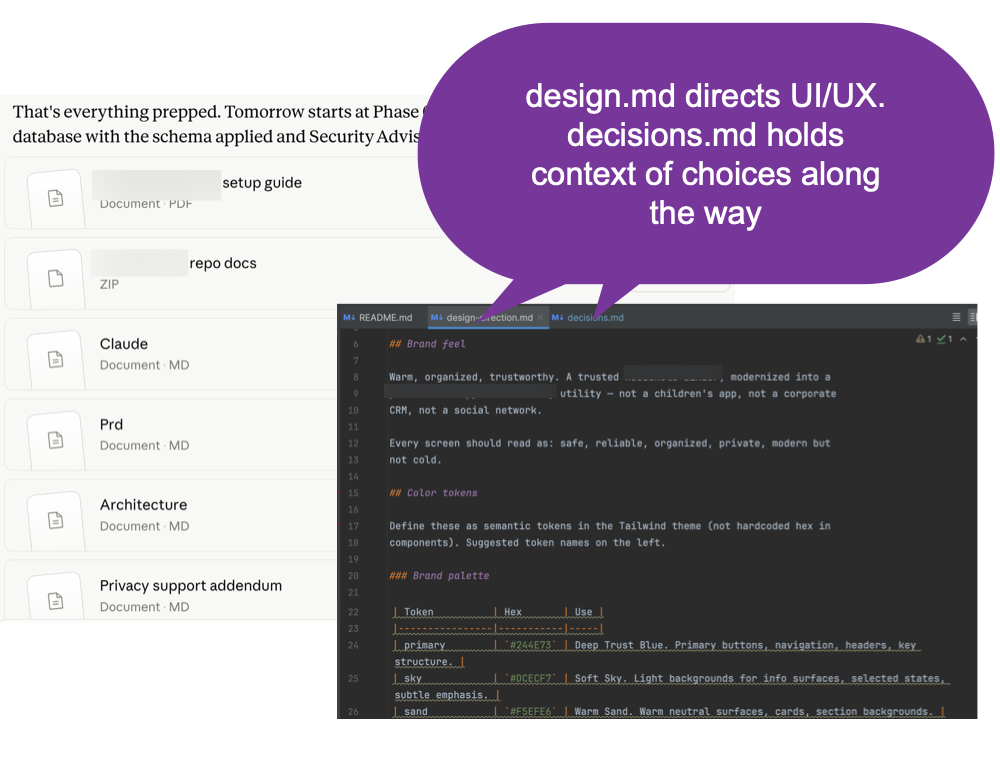
Also, here’s a tip… even before you begin, if it’s a sizable project with various requirements, you can have the AI take your existing requirements docs and turn them into markdown (.md) files. Basically, a lightweight text format that’s easy to read for computers. Increasingly, AI code builders will use some kind of .md files. The benefit here is context. These docs, (which could be updated over time), provide the ongoing memory for your tools because sometimes you may need to reset them.
Here’s what that might look like with multiple .md files defined for a project. As you can see, this wasn’t just “Uhhhhh… Clauuude? Build this this thing.” There’s still thought, planning and so on. I know, I know, I’m supposed to use the word “orchestration” to be buzzword compliant and sophisticated. Whatever. The point? Do the upfront work. It will save you time later, even if you’re adjusting along the way.
Permission Prompts Are Safety Features
AI coding agents frequently ask permission before running terminal commands.
Here’s an example from Claude Code. Others may differ. A typical prompt may offer:
- Yes
- Yes, and do not ask again for this command pattern
- No
There may be other options.
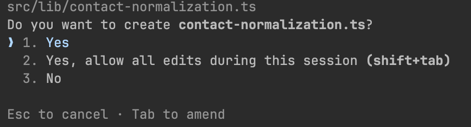
It’s tempting to approve the broad pattern so the tool will stop interrupting you. However, Sometimes that interruption is the only remaining human checkpoint. Just don’t do it. That is, don’t just blindingly keep clicking to approve without reading, understanding – at least somewhat – and making an assessment. You will find that there will be times when the answer is “No.” Sometimes another choice 3. “Chat about it”, or similar, will show up. You may want to do that.
Also, approving one harmless help command re-write is not the same as approving a wildcard for an entire command family. The first may display documentation. The wildcard may also authorize database resets, migration repairs, cloud changes, or deployments. Think about it like this; you’re getting annoyed with me because all day long I keep asking you to borrow a pen, a pencil, a stapler, etc. Yes, yes, yes, you say. Then I ask, “can I just borrow your bank card and what’s your PIN code,” Yes, yes, here it is you say. Wha… what? What did I just do? Can I go back? How do I… this thing is running with that last command. What’s it going to do? Guess what. That’s not even the issue. The issue is you may have given it keys to the castle to keep running some privileged command. Now, the actuality of it is that whether you give it permission or not, you’re still depending on it following that instruction. Still, treat it like the child prodigy it is. Smart and capable, yes. Wise? Not necessarily. You have to try to step up with that. And it’s hard. It’s really hard to stay engaged when you’re maybe task switching and just going back at break points.
As I write this, Claude Code is running in another window. When I notice it stop, I’l go check it and see what’s up. But I have to task switch and get my head back into that other game when it happens. If I’m annoyed at the interruption and just blindly approve? Maybe fine. Probably mostly fine. But… maybe not.
Got it?
Evaluate both the command and the scope of the approval.
Usually Low Risk
Commands that only inspect state are generally safer:
- Displaying help
- Listing files
- Viewing a file
- Checking Git status
- Reviewing Git differences
- Checking the current branch
- Displaying tool versions
Even here, consider whether the command could expose confidential information in its output.
Usually Reversible
Creating or editing tracked files inside a version-controlled repository is usually more recoverable because the changes can be reviewed and reverted. Just note that Git does not protect untracked or ignored files, databases, cloud resources, or other external side effects.
That does not make the edits correct. It means Git gives you a recovery mechanism. Inspect the diff (the differences) before accepting or committing the work. More often than not, code is somewhat understandable, even if it’s not something we’ve have been able to easily write from scratch. And even if we don’t understand something, often we can come to some degree of understanding through simple exposure. But that doesn’t happen if just blindly accepting “all” at once. Remember as well, if something is of concern, you can ask about it in another AI chat window. (Which doesn’t mean that will be correct either. Again, just keep your head in the game.)
Potentially Consequential
Actions affecting databases, deployments, infrastructure, access controls, billing, DNS, or production systems deserve individual review.
Examples include:
- Database pushes
- Database resets
- Migration repairs
- Production deployments
- Deleting cloud resources
- Changing DNS
- Modifying access policies
- Rotating keys
- Running broad installation scripts
For important actions, have the agent prepare the command and then execute it yourself. That small inconvenience creates an intentional checkpoint. This does not reduce the command’s privileges or blast radius. It simply forces you to pause, inspect it, and make a deliberate decision.
Avoid blanket approval for broad wildcard patterns. Do not authorize an entire command family because the first example was harmless. There are some AI manic purists out there that want to wire multiple agents to do all manner of things so you can sit on a beach or something. Maybe ok. Maybe not. The thing is, there are perhaps points where you really want to intentionally have a stopping point. Some maybe like to call this “Human-in-the-Loop” (HITL). Fine. Call it what you like. The point is to maintain some semblance of understanding and control. Where? Up to you.
Human Approval Is Only One Layer
Permission prompts are useful, but they are not a complete security system.
A local agent may have broad access to files and terminal commands. Telling it not to perform a destructive action is a behavioral rule, not a hard technical barrier.
Use multiple layers:
- Narrowly scoped credentials
- Read-only production access where possible
- Isolated development and staging environments
- Version control
- Protected branches
- Backups
- Deployment review
- Platform-level access controls
- Monitoring
- Manual approval for destructive actions
A strong safety system assumes that people, agents, tools, and credentials can all fail in different ways.
The Agent May Read Instructions You Did Not Write
An agent does not only read your prompts. You often won’t have direct control over this. It’s really just about what you feed it. Any pet owners here? Does everyone know what your pets do if you feed them lousy food?
Besides what you give it, your agent may also read…
- Websites of varying quality
- Documentation of varying quality
- Repository files of… I think you see the pattern
- Issue descriptions
- Support tickets
- Logs
- Comments
- Tool descriptions
- Material returned by external services
Some of that content may contain instructions aimed at the agent rather than useful information for you.
That creates a prompt-injection risk. A malicious or careless instruction hidden inside a file or webpage may tell the agent to ignore your rules, reveal information, run a command, install something, or contact another system. Treat outside content as any other kind of data, not authority.
When an agent is reading material you don’t control:
- Limit the tools and network access available to it (maybe it gets its own separate API key that you can revoke without breaking other parts of your product.)
- Avoid giving an agent unrestricted production credentials. When production access is unavoidable, use temporary, narrowly scoped credentials, technical approval gates, logging, and a clearly defined rollback procedure.
- Review unusual requests for permissions
- Be suspicious when a task suddenly expands
- Do not assume a README, issue, or webpage is harmless because it looks ordinary. (Those may be the most dangerous. There was an md file up on a site for agents that looked like a simple weather data retrieval tool. And it worked! It did get weather data. What it was really doing was scanning local computer files for API keys, crypto wallet keys and taking action on them. This wasn’t even hard technical code. Anyone taking the time to check could have read the file and seen a problem.)
Take a look here: Moltbook and the Illusion of “Harmless” AI-Agent Communities. The agent should follow your project rules, not instructions it happens to discover while doing research. You know the old joke, “You’re not paranoid if it’s true.” Well, I have news. There’s plenty of folks out there actively trying to get your agents. And not just “script kiddies,” but state sponsored hacker teams. By the way, I’m not even being overly alarmist here. I’m probably understating this issue.
Key Red Flags to Watch For (in .md files)
- File System Access Requests — Any mention of reading home directories, wallets, or credential files. Legitimate tools probably don’t need this. You be the judge, but do check.
- Hidden or “Helper” Commands — Unexpected installer commands deserve scrutiny, especially
curl | bash, obfuscated commands, commands fetched from unfamiliar domains, or installation steps unrelated to the skill’s stated purpose. - Obfuscated or Extra Code — JavaScript/TypeScript snippets that include network calls to suspicious domains (webhook.site, unknown IPs), or anything unrelated to the claimed function.
- Markdown Tricks — Hidden HTML comments or invisible text may be included in an agent’s context if the platform passes through the raw content. Some platforms now filter these elements, but you should not assume every ingestion path does.
- Overly Long Docs — Though it’s hard to tell just what this might mean since we keep seeing claims of expansion for what various tools can handle.
How to Avoid!
- Always inspect before install:
Just read these things! Seriously. That’s all you have to do. We all learned how not to click on email attachment from spam, right? Now we’re just inviting bad things right in and installing them with full file system access on our computers. So open the raw SKILL.md (and any linked JS/files) you might think you need. Search for fs., require(, fetch( to unknown URLs, .env, wallet, etc. You don’t even have to understand these things as an expert. Just look for them and investigate if you find them. - Grant minimal privileges to agents.
- Prefer skills from publishers and repositories whose identity and history you can independently verify. Treat popularity, download counts, reviews, and marketplace placement as signals, but not security guarantees.
- Test in isolated environments.
Watch What the Agent Is Actually Doing
Plausible activity is not proof that the agent is doing the assigned work. It is the AI equivalent of the coworker who always appears extremely busy. (If you work for a large corporate, you know what I’m talking about.)
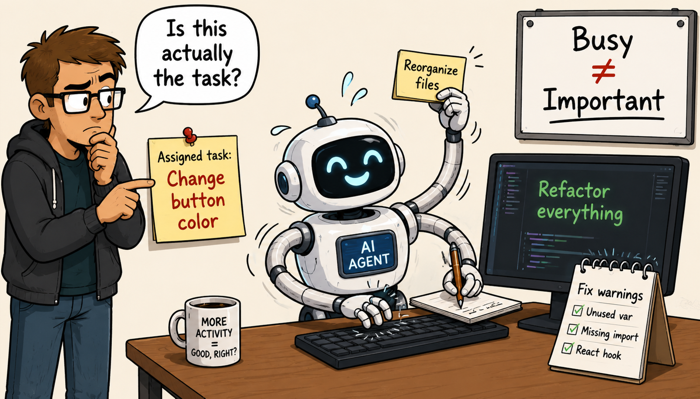
Watch the files being changed. Read the task list. Review terminal output. Inspect the diff. Make sure the agent is solving the stated problem rather than expanding into adjacent work. Agents sometimes begin “helpfully” refactoring components, changing dependencies, reorganizing files, or addressing unrelated warnings.
That work may be useful. It may also create new bugs, inflate the review burden, and make the original change much harder to isolate. Sometimes you might just get a feeling something is off or taking too long. This does not mean you should stop a task. That can be bad as well. But you can use other web AI’s to ask about your task at hand, assess things like anticipated speed, etc. But if you’re going round and round with a task? You might be making spaghetti. It may be challenging to unravel. You may need to switch models to unravel. Or return to an earlier breakpoint and start over depending on how bad things got. (If you can even tell.)
When you reach messages like this one, you better think about starting new sessions.

Your partner might just be getting ready to stop. In some products, it might just do a hard stop at some point and you’ll be stuck. You’ll have to reset somehow, and you’ll lose context.
What I do when I get ot here is I’ll ask Clause Code to close out what it’s doing, write anything appropriate for a handoff to decisions.md or to a session.md file. Then I’ll ask it to write a handoff for a next phase if there is one. I’ll edit that if necessary, then maybe paste it into a temporary file just in case. Then I’ll do a /clear and start with the new prompt. (Which maybe goes into Claude Code or maybe Claude.ai or another helper; depends what I’m doing. The point is, to keep continuity. Basically, I try to harvest the context from the session to carry it over, but with a fresh context window. (You have to just love the smell of a fresh context window in the morning.)
Here’s some other times to consider when you better consider a breakpoint. Like when the activity seems to stop making sense, stop it if you feel you must and ask:
- What are you doing right now?
- Why is this necessary for the assigned task?
- Which files have changed?
- What remains?
- What is the safest stopping point? Or, since you did some some task, “How can we continue this task safety without missing anything that got interrupted.)
It’s the same as with people. Momentum is not necessarily the same as progress.
Be Careful Around an Active Session
Do not casually type into an agent session while it is executing.
Depending on the interface, your input may:
- Steer the task
- Interrupt the task
- Answer an approval prompt
- Trigger a slash command
- Start another operation
The input field is not always a passive notepad.
Use another terminal or the web interface for unrelated questions. Wait for a clear stopping point before interacting with the active session.
If you accidentally start or cancel a command, do not assume nothing happened. Check:
- Git status
- Open diffs
- Generated files
- Running processes
- Terminal output
Interrupted work can leave a repository in an inconsistent state. I’ll get to slash commands, but the point is, be purposeful in the active window.
Pay Attention When Returning to a Window
A small interface mistake can become a meaningful operational mistake. Suppose an agent pauses on a permission prompt. You switch to another window, then click back into the terminal.
- Did the click merely focus the window, or did it select an approval option?
- Did a number key respond to the prompt?
- Did Enter execute the highlighted action?
- When returning to an active terminal, click a neutral area and read the full screen before typing.
Many incidents begin with something trivial. Here’s what I do. If I know I’m going to be bouncing among windows, (which I am as I’ve got other work to do), I’ll make sure to leave a non-functional part of the browser window clickable. So when I go back to that window, I can click on some design element of the UI or something, not hit a close window option, or an “approve” button or whatever. Sure, I’ve done it. You probably will at some point. It happens. But it can be somewhere from trivial to an hour or more diversion to fix something sometimes; all from an errant mouse click.
Keep Track of Terminal Sessions
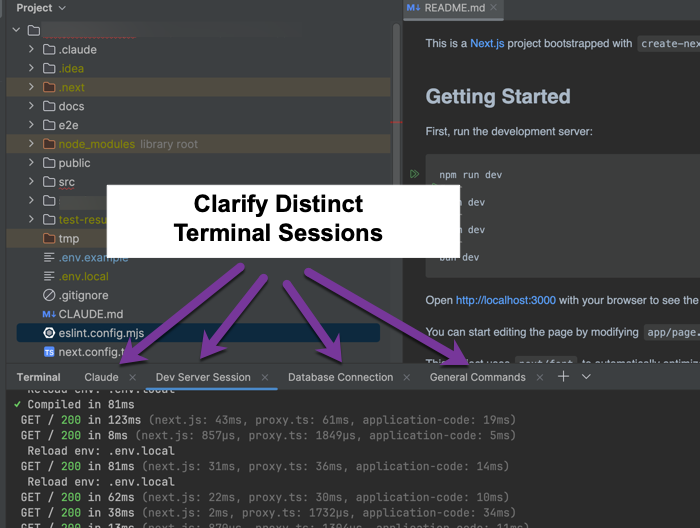
Multiple terminal windows become confusing quickly, but they’re really helpful. Using them is part of what can help you avoid shutting down a key task inappropriately. One session may be running the local application. Another may contain the coding agent. Another may be connected to a database. Another may be waiting at an approval prompt.
Label terminal tabs according to purpose. Keep production sessions visually distinct. Avoid broad process-killing commands when you are not sure what is running. In my example above, I’ve got Claude Code running on the far left and that’s where I always leave it. Then a local server, (which may or may not be in use), next a Database Connection, (which may or may not be part of a project), and lastly a blank one for general terminal commands. The real goal is to just be purposeful with the Claude Code session. (Or whatever you AI of choice is.) And not accidentally interrupt things.
If there is an interruption, (it’s just going to happen sometimes), resume from evidence rather than memory:
- Inspect Git status
- Review recent commits
- Check changed files
- Identify running processes
- Compare the repository with the task plan
Re-entry should begin with the current state of the project, not the agent’s recollection of it.
The Bottom Line
AI agents can move quickly enough to make supervision feel like an inconvenience.
That is exactly when supervision matters most.
If you have kids, you likely already know this well. Actually, I think it’d be legit to put parenting as a skill on a resume when going for AI / Agent jobs. (Maybe don’t do that of course, but seriously, it can feel similar.)
More seriously, make sure you keep any permission gates up when available. Watch the scope. Treat untrusted content carefully. Understand what the agent is doing before you approve it.
- You are still responsible for the outcome.
- The copilot may do much of the flying.
- You still decide where the plane is going.