
I’d recently put up an article about a joke site I build for fun while helping create some overall scaffolding for a more serious project. At the outset, I’d pointed out part of my motivation for writing about some of these things is to try to offer some tips and mention some of the traps that go with the reality of using these tools as product people. The bubbly happy path posts and videos seem to mostly gloss over some of the real speed bumps and risks along the way. I get that demos are often to help people just see what’s possible. But lately there’s such a hard sell to some of these things, and so full of clickbait as to often be somewhat disingenuous.
As “non developers” use these tools more, it’s obvious enough that AI coding tools can be astonishingly productive. They can also be confusing, unreliable, expensive, overconfident, and occasionally dangerous. As product people at all levels from Individual Contributor to Senior Managers, VPs, etc., start getting deeper into these things, (not as full developers, but just as useful parts of our new toolkits), we’ll need to get real about some basics. The Happy Path feel good posts on LinkedIn and demos on LinkedIn rarely go over the many real blockers.
So I’m going to do some of that here, in several parts.
The YouTube and AI courseware demo projects tend to show someone entering a prompt, watching a polished interface appear, clicking Deploy, and announcing that software development has changed forever. It probably has. We don’t have to go over that particular ongoing discussion here. If you’re anywhere near this industry, you’ve likely been getting plenty of those arguments in your feeds. It’s an important and ongoing issue, but we’re here today to talk about some of the practical gotcha’s for building products this way, regardless of who’s at the keyboard.
Some of these tools can kick out prototype websites or other apps very fast. That doesn’t mean the terminal commands are harmless, the database is protected, the API key is safe, the generated architecture makes sense, or anyone intends to maintain what was just created.
As mentioned, I recently used a joke website as a low-risk way to use a real project as part of scaffolding a more real production system for a product. For the test suite and product, if it crashed every hour, almost no one would care. That made it useful because we could just pound on it from various angles without any fear / anxiety. There’s a freedom in that and the usefulness is in what shakes out along the way. I’m not talking about full on red teaming or penetration testing for serious safety and mission-critical products; more just how not to be completely sloppy for general “workaday” type solutions.
Real products have customers, money, private information, reputational consequences, and operational dependencies. Unfortunately, “throwaway” prototypes have a strange way of becoming production systems. You do not need enterprise controls around every joke site. But low-stakes projects are a good place to practice high-value habits. There’s an old expression about how “#@$t rolls downhill.” It may have originally been a crude metaphor of water running downhill to describe how trouble, blame, or other unpleasantness moves from the top of hierarchical organizations to the lowest. But I think it sometimes also applies to production systems. Once something is written, instantiated in code, and so on, it can tend to get stuck and stay there.
So… Here are some things the breathless AI-build demos tend not to mention.
Everything Takes Longer Than the Demos Suggest

Things may still end up faster overall than they otherwise might have been with “the old ways.” The AI may generate the first interface in minutes. Buuuut… The whole project is not likely to just take minutes. You still need to create accounts, choose plans, verify email addresses, install software, authorize integrations, store credentials, configure domains, copy environment variables, test forms, create staging environments, and find settings hidden in poorly labeled menus. As with most things, once you’ve done it a few times, things go faster. And once past initial set up, things also hopefully move with less friction.
As you put pieces together, you may discover that one part of the user experience is controlled in the application, another in the hosting platform, another in the database, and another in an authentication dashboard you did not know existed.
Then you meet the unhappy paths. A webhook fails. A token expires. An integration needs another permission. A dependency changes. Maybe a tutorial that’s only a few months old points to a command or menu that no longer exists. And your separate AI assistant insists you need to flip the toggle under Settings > Whatever, except it’s either a) not there, or b) you really ought not to do that.
The total project may still be several times faster than a fully manual build. It simply will not always feel fast while you are blowing the gunk out of the pipes. AI reduces production time. It does not eliminate operational friction. This could include organizational friction to get access to certain tools, budget approvals to buy them, “token budgets” and so on.
Our personal patience remains part of the toolchain.
Time Flies Differently with an AI Agent
Once you enter a productive rhythm with an AI agent, time can distort. You can easily enter that “flow state” of work. The agent does not become tired, hungry, bored, or ready to stop for the evening. But we do. Still, the loops we’re in can become hypnotic. You prompt, it acts, you review, it proposes the next step, and off you go again.
That flow state can be useful. However… It can also make you passive. Drivers and pilots can program GPS’s for destinations and waypoints and just follow the magenta line. But if either fails to make sure things are programmed correctly, or falls asleep along the way, there’s likely some trouble ahead.
Our new agent co-pilots may lead us off course, and it will not feel anxious about doing so. If something goes badly wrong, “the AI told me to” will not satisfy a customer, employer, regulator, insurer, or board. AI is not lying in the human sense. It is generating likely responses that may be correct, partly correct, outdated, irrelevant, or disastrously wrong. Just be more keenly aware that confidence is not evidence.
So…
- Enjoy the flow state.
- Do not fall asleep.
- Remember you are still the pilot. (Or rather, you need to choose to continue to be.)
The Tools Themselves Are Still Immature
AI development products can generate sophisticated code while the tools themselves are still struggling with basic product design. Billing for the tools themselves may be confusing. Product usage may be hard to find. Chats and settings may behave differently across the web app, desktop app, command line, and IDE. Documentation lags. Features appear in one plan but not another.
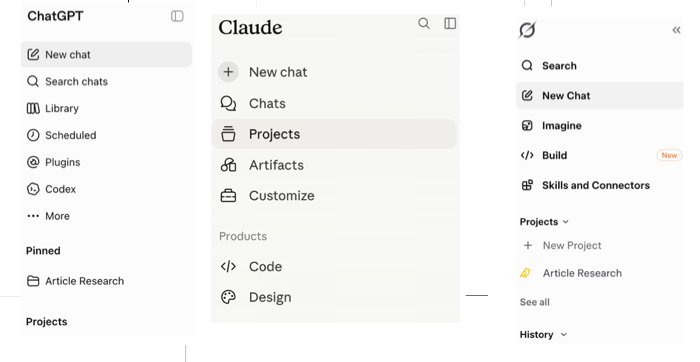
Something that worked yesterday may fail today because a model, permission, quota, integration, or interface changed. You may spend twenty minutes generating an application and another ten figuring out where the application lives.
The companies building these tools are understandably focused on the impressive parts. The administrative, billing, continuity, and operational pieces do not always receive the same attention. That does not make the tools useless. It means as fantastic as some of these things are, we’re using an immature product category that is changing while we’re learning it. I’ve seen job board postings for some of these companies looking for design people and such, because they know some of their experiences are really sub-optimal.
Sometimes It Really Is the Tool
People naturally assume they did something wrong when software behaves strangely. Often we did. But not always. Current AI development tools have real bugs, inconsistencies, and undocumented conditions. They lose context, mishandle account state, fail during deployments, misunderstand repositories, and behave differently across interfaces. Determining whether it’s you or the tool may require several documentation pages, tutorials, community posts, and experiments.
That can be psychologically difficult because the product itself sounds so confident. When the experience fails, the user assumes they missed something obvious. Sometimes you did. Sometimes the tool is actually broken. Sometimes both things are true, at least a little bit. Where and to what degree? That’s still for us to try to sort out.
Do Not Use Edited Success Stories as Your Baseline
When you look to judge how you’re doing, think of it a little bit like social media. Do not compare someone else’s edited highlight real with your real working session experience. Maybe the twelve-year-old in the golf shirt really did launch a middle-school navigation app earning $10,000 a month. That’s still not a useful baseline for your Tuesday afternoon.
Effortless AI success stories usually have one or more explanations:
- The creator is exceptionally skilled
- The creator understands the tools much better than we do
- The creator got unusually lucky
- The project was not used deeply enough to encounter the hard parts
- The story left out most of the work
- The creator may be full of it
The lesson is not to dismiss every success story. The lesson is to stop treating a polished demonstration as the standard for an unedited working experience. Major bumps remain in these roads.
We may misunderstand some of our tools. Sometimes we need three explanations before the concept clicks. Or perhaps the documentation got stale quickly. Maybe the product is actually broken. Sometimes starting a fresh session or stepping away for twenty minutes solves the problem.
The experience can still be transformative even though not as effortless as is often portrayed.
Stay Active and Read Your Chats!
Here’s a pet peeve of mine. And it’s for AIs, paper instructions, and people. Everywhere.
Have you ever gotten a long instruction or rule set, and you’re following them along, but then… near the end, it says something like, “BUT FIRST, Be sure to check for… whatever.” Now, you’ve already done those 10 steps. It’s pure luck whether or not the thing you had to check first means you have to undo things for an hour, or maybe broke something permantly.
Your AI will do this to you. So you need to read full responses before moving on. You can include behavior instructions in many markdown (.md ) files or just tell them, “Make sure to give me prerequisite checks, tasks or suggestions before you give me a task To Do. Do not give me critical instructions that need to be done before a task and present them after your task instruction. Give me any prerequisite instructions before suggesting to telling me to do something or giving me a prompt for another tool.” Even with this, sometimes they’ll fail. And this is a lesson. Actually, it’s at least two lessons. One, they don’t always listen. Two, they don’t always get things right even if they do. And maybe there’s even a third. If they ignore this instruction repeatedly, they may be “getting tired.” Their context window may be getting full. It might be time for a reset or new chat.
The Bottom Line
AI coding tools can help people build things they could not previously build, or build familiar things dramatically faster. This is all real and true enough.
However, the friction is also real.
And that’s ok.
The first lesson if struggling a bit is not that AI development is fake, dangerous, or overhyped. It’s that the five-minute demo we’ve maybe seen others complete with apparent ease, and actual complete working processes are different products. One can create an initial impression. The other creates the actual software. There’s probably some risk when the former starts to flow into the latter. Just something of which we should be aware.
We’ll move on to Part 2: Staying in Control soon.