
Part 3 was about building durably, so what happens after that? A successful prototype creates a new problem if you actually put it into some form of production. Not too long ago, if we built what we called prototypes, maybe they went to user testing, or we ‘sort of’ put them out there. But now? A lot of so-called tests really aren’t. That is, they’re really more actual rollouts. Just maybe not necessarily with the same rigor we used to give product launches. The line between that which was intended as prototype testing and so-called Minimum Viable Product (MVP) seems like it might get blurry.
The next challenge with launching a kind of prototype, but that which is maybe real product is someone may decide to use it. So… Is it really a prototype? Meaning… is this just some brochureware for testing or is there actual sign-up functionality, any kind of real billing, private information collection, and so on.
This is when the low-stakes experiment begins accumulating customers, private information, billing relationships, operational dependencies, and consequences. You have to make your own call on this kind of thing. I have to tell you, personally I’ve never loved the “false front door” thing for testing. I get that it can be useful, but sometimes it’s on the edge of unethical in how it seems to trick people. If your prototype is really a test and that’s understood, great. If the truth is it’s not much of a test, but a rollout? Then there’s probably some more risk elements and due diligence that should be covered.
Prototypes have a way of becoming products. Temporary credentials become permanent. Test data becomes customer data. A one-time API connection becomes a critical service. The final part of an AI-assisted build is not clicking Deploy.
It’s deciding whether the thing can be operated safely. One thing that I’ve done along the way when building is created something I’ve called “Launch Blockers.” This is different than a UI backlog or minor changes you find along the way. It’s things like purging schemas, or making sure live production feature flags are set properly. It means a real security review. Things like that.
APIs Are Operational Dependencies
Generating an API key and receiving one successful response can feel like the end of integration work. It’s really just a start. Making something get through a pipe always feels like an achievement. And it is. Sometimes the lousy part of plumbing is just getting setup parameters correct, permissions, and so on. But did you, or someone, really exercise the endpoint(s)? I’ll tell you a secret. I sometimes get a sense of both joy, but also relief when some new integration I’ve hooked up works. Why? The childlike thrill of just making something work never goes away. But the relief? That’s from just getting through a stage-gate and being able to move on. Except for one thing. Those of us who are building some of our own things, but aren’t actually pro developers may think we’re done once we’ve got something working. Or at least, we want to be so we can get back to product craft and not just the tech distraction, even if it’s interesting. But there’s a big difference between “getting it to go once” vs. “this’ll be ok when I walk away for long periods of time.”
Every API introduces possible failure points. And this might even get worse with agentic workflows. (Model Context Protocol (MCP) is all the rage right now. But are the ones you might want to use wholly reliable? Paying with crypto wallets? Are those properly funded?) The advantage of some new agentic flows might be that you don’t even need an API relationship at all. You might just need an agent with a crypto wallet that’s got rights to purchase some data you need. This may be a real game changer. It also can make things much harder. Part of the sell for this might be pay as you go, and you don’t need a whole formal relationship with a provider. But those relationships are fairly well understood. They usually come with some kind of Service Level Agreements, (SLAs), and so on. Sure, that’s sometimes baggage. But at least it’s known baggage. Agentic? We’ll see how it goes. It certainly has its use cases, but at the same time you’ll need a lot more rules around it.
In any case, here’s what to be considering:
- Authentication can expire
- Billing can stop
- Usage limits can be reached
- Endpoints can change
- Latency can increase
- Requests can time out
- Response schemas can change
- The provider can have an outage
If the product depends on an API, you need to know when it fails, just like any other. And if your building it with AI, you’re tool has to create all the safety nets around it. And you’ll have to take care as to where you put your API credentials, but we’ll get to that soon enough.
Depending on the stakes, you also need to consider:
- Logging
- Alerts
- Retry policies
- Timeout handling
- Fallbacks
- Dashboards
- Dead-letter queues
A joke site does not need the operational infrastructure of a hospital system. But “we connected it once” is not the same as “we can operate it.” Dependencies often fail after everyone stops watching. Usually late on a Friday after you’ve gotten on the plane for a long weekend somewhere. Or while you’re in the shower. Or swimming. Or… point made. If the thing you’re building ends up being live in production somewhere, did you build in good enough operational coverage; that’s the main thing.
Keep Secrets Out of Code

Never place private API keys, database passwords, service credentials, or signing secrets directly in source code. This may be obvious and you’ve probably heard it before. But it seems this gets missed a lot. And especially when troubleshooting it’s really easy to quickly cut and past things like API keys or passwords that were supposed to only be in a local file to someplace they shouldn’t be. It could never happen to you? See: CISA Admin Leaked AWS GovCloud Keys on Github, Employee Personal GitHub Repos Expose Internal Azure and Red Hat Secrets, Your API Keys Are Leaking — And You Don’t Even Know It. The list goes on. And these are full time pros. It’s a potentially @%$%#y way to end a job or career. Or even if not that dire… not a great experience.
Do not:
- Commit them to GitHub
- Paste them into tickets
- Include them in screenshots
- Put them in client-side JavaScript
- Leave them in documentation
- Copy them into chat logs
Use environment variables, secret managers, and platform vaults. (Or learn what these are.) Privileged credentials should normally remain server-side. The browser should never receive a secret that grants administrative access. Public repositories are continuously scanned for exposed keys. The best outcome may be an unexpected bill. The bad guys are scanning for these things all the time, and they’re using AI to target you and try to trick you better than ever before. Don’t make it too easy.
Worse outcomes include stolen data, service disruption, customer harm, contractual violations, and business failure. Sophisticated attackers are one category of risk. Publishing the keys for them is another.
By the way… Git Never Forgets…
Not without work anyway. Suppose you accidentally commit an API key. You notice the mistake, delete the key from the file, and create another commit. Did you know the secret is still in the repository history? Well, it is. And making the repository private does not undo the exposure. Neither does deleting the file.
So… Revoke or rotate the credential immediately and assume it has been compromised.
You can later rewrite history with tools such as git filter-repo or BFG Repo-Cleaner, but history rewriting is disruptive. Commit hashes change. Existing clones may need to be replaced. Cached copies and forks may remain outside your control. And actually, it’s generally bad form to re-write history anyway. We take note and add addendums, but try not to change. We just lose context that way. But in some cases if you really have to, ok. Just know it might be a hassle. I’ve never even personally done it. I had to get the info for this passage from research. I’d just change what needed to be changed and move on.
Rotation is the cure. Then you can use history rewriting as cleanup if you really must sort that out. The safest policy is to keep the secret out of Git in the first place. I get it. It really is easy to slip here. Maybe your AI told you to put it there. And you did. Then it says, “But first, make sure you….” but then it’s too late. Then it will say, “OK, we have to clean up now.” And that’s maybe any hour or more cleaning up a mess. Maybe worse.
Understand Which Keys Are Actually Secret
Not every value called a key is private. Some platforms intentionally provide publishable or anonymous browser keys. Their security depends on limited permissions and server-side rules rather than secrecy. Service-role keys, administrative credentials, signing secrets, and private API keys are different. You may need to spend some time to learn which thing is being used for what. Ask your AI. Then don’t believe it and ask another. Then ask for actual web references.
Treat anything labeled secret, private, admin, or service role as radioactive:
- Server-side use only
- No Git
- No screenshots
- No chat logs
- No client bundles
- No documentation
- And oh yes… watch the screen shares on Zoom or whatever. (Seriously, you’re in meetings… ever notice how much that’s private to kind of private gets incidentally shared; and maybe recorded? Madness.)
Local Agents May Be Able to Read Environment Files
A local coding agent with file-system access may be technically capable of reading .env files. A .gitignore rule helps prevent accidental commits. It does not hide the file from software running on your computer.
Use layered protection:
- Ignore environment files in Git
- Tell the agent not to reveal or embed values (Tell it strongly at the beginning of the appropriate .md files.)
- Review generated code for copied secrets
- Scope credentials narrowly
- Keep production values in the hosting platform’s secret store
The objective is not to pretend your local tools cannot access files they need. The objective is to keep secrets out of durable and shared locations such as Git history, public repositories, logs, screenshots, documentation, and client bundles. And be ready to rotate keys quickly if you have to.
Use Two-Factor Authentication
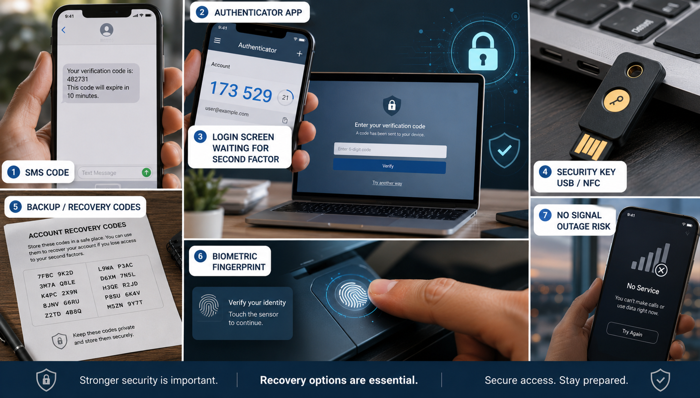
Enable two-factor authentication wherever it is available, especially for critical items. Yes, it can be a hassle. This is the tension with security. We all want ease of use and access, but also safety. When it comes to your development environment, you need to opt for the safety. There really are people out there actively scanning and trying to get to your stuff.
Store recovery codes securely. Back up authenticator access where supported. Consider hardware security keys for important accounts. Your phone has become part of the access system, so plan for what happens if it is lost, damaged, replaced, or unavailable. It’s bizarre how the cell company is now the arbiter of our identity and the verification point. This is a risk I’m not sure everyone is fully aware of. I think one day something bad will happen and they will be. Think about what a cell provider outage means nowadays. It’s not just you’re phone is useless. You might not be able to get to a lot of stuff.
Security controls are useful only if you can recover from them.
Separate Development, Staging, and Production
Do not give an agent production credentials because production is convenient. Use the least powerful credential that can complete the task.
Ideally:
- Local development uses local or isolated resources
- Staging uses separate test data and credentials
- Production access is restricted
- Most production database access is read-only
- Destructive operations require explicit human action
Multiple environments cost money, so use judgment proportional to the project. At minimum, do not point experimental code at the only copy of valuable production data. Staging is not overhead. It’s where mistakes are less painful and cheaper.
Backups Must Exist Outside the Thing Being Changed
An agent should not be able to erase the live system and its only backup through the same credential or command path. We’ve all heard the news story right? Where an AI deleted a production database? That’s not the only story. It’s just one that went viral early.
Backups should be:
- Automatic
- Retained long enough to catch delayed corruption
- Separated from primary access
- Tested
- Restorable through a documented process
A backup that has never been restored is an aspirational hope. For important systems, test recovery. The real questions are how long restoration will take and how much data will be lost. I’ll tell you another truth. I hate this part. It’s both annoying and scary. It’s annoying because it’s not really value producing work. It’s just a lousy checklist item, however important it may be. It’s scary because it could end up being time consuming if something doesn’t work. But that’s the thing, the perfect time to test this sort of thing is when the risk of a big failure is low to zero.
Know How You Will Roll Back Before You Deploy
Deploying new application code is often easy. Undoing everything the new version changed may not be.
Before deployment, ask:
- Can the previous application version be restored quickly?
- Is the database migration backward-compatible?
- Can the migration be reversed?
- Could the feature be placed behind a feature flag?
- What happens to data created by the new version?
- Can the deployment be stopped without damaging the database?
- Who has authority to trigger a rollback?
Rolling back application code does not automatically roll back data. A new version may have written records in a new format, removed fields, triggered jobs, or called outside services. The best time to design an escape route is before you need one. And yes, again, it can be very scary to actually test rollback and recovery. I’m sure there are those that would say it shouldn’t be. That if there’s any anxiousness, it’s lack of confidence in outcome. Okay, maybe true enough. But this is part of the point. If you have something you’ve built and it’s barreling into actual production, it might be time to get some help if not wholly confident in stability. This might be your internal team at a corp, or line up an external dev team if you’re doing some solo thing. Yes, this will cost. You have to weigh that against the risk of whatever it is you’re putting out there.
Billing Is Part of Reliability
A service that stops because a credit card expired is still an outage. AI-heavy products may depend on several separately billed services, each with its own quota, prepaid balance, renewal date, rate limit, usage page, and account owner. This is a really easy thing to lose track of. That is, who owns such tools at your company? Finance pays, maybe Product owns a P&L, or maybe not. But who owns the relationship? CTO/Development? Who’s paying attention to the actual burn rate here, if the account is being kept up, if something is about to expire. Sometimes it’s the person who left the company a couple of months ago. This is one of those really avoidable ways things can go bad. Get clear on who owns this kind of vendor management.
Maintain a simple inventory:
- What the service does
- Who owns the account
- How it is billed
- Where credentials live
- What happens at the limit
- How usage is monitored
- What fallback exists
Token costs can accelerate during long contexts, loops, retries, or badly scoped tasks. Set alerts where possible. Do not wait for the product to stop before discovering the usage page. One project I worked on had dozens of vendors. Some were multi-million dollar contracts in various states of completeness, others were $20/month subscriptions, and so on. Some, (here’s the scary part), had been set up and were “owned” by folks who hadn’t been with the company in months. Finance did know about most of them because bills had come in, been approved, and gotten paid, but there really wasn’t solid control here. Part of our answer in this case was making sure maintenance on such things was role-based in finance and a better tracking system. This may seem obvious and large corporate with sophisticated procurement systems may have this covered. But if you don’t, take a look because one cruddy $20/month subscription to a linchpin API could maybe break your whole deal. (And by the way, I’ve also seen some large procurement systems that were a mess, so… maybe that still needs a look if that’s your world.)
Ask for a Safety Review Before Building
AI can help identify missing requirements before implementation begins.
Ask:
- What security, privacy, and operational requirements are missing?
- Which actions should require human approval?
- Which credentials should be read-only?
- What happens if an external service fails?
- What customer data is collected, and is all of it necessary?
- How will failures be monitored?
- Which decisions are hard to reverse?
- What could create unexpected cost?
These questions don’t replace professional engineering, security, privacy, or legal review. They’re just a starter checklist.
The Working Rules
The practical rules are straightforward:
- Keep important decisions in the repository
(Personally, I keep them there, but also in a Confluence Wiki. Individual micro choices might be in specific Jira tickets or similar, but for larger scale product docs, Wikis seem to work best. They’re easy to share with teams, easy to see history, etc. Things like Word docs, etc. seem a bit harder to version and keep up to date.) - Give the agent narrow tasks with clear finish lines
- Clear context at natural boundaries
- Watch the work while it happens
- Never commit secrets and if something does leak, rotate keys
- Use scoped credentials
- Separate staging from production
- Maintain recoverable backups
- Plan the rollback before deployment
- Enable two-factor authentication
- Monitor dependencies, usage, and billing
- Ask the agent to explain, not merely instruct
- And I’m sure there’s more. Add items to fit your own situation.
The Bottom Line
The answer is not to avoid AI coding tools. That’s clearly just not going to be possible in most places. Nor likely is that a sensible approach. One answer is to use enough structure that speed does not eliminate judgment. Aviation did not become safer because pilots stopped using powerful equipment. It became safer through instrumentation, checklists, training, redundancy, maintenance, incident analysis, and clear responsibility.
AI-assisted development will need its own versions of those practices. You do not need to turn every joke site into a regulated enterprise platform. You need to apply appropriate safeguards based on risk. And you should know which habits you are practicing while the stakes are low, because sometimes prototypes flow into becoming products.
The tools are fantastic and do everything the boosters say. More of us can just have at it than ever before. And go faster. We can go faster to market. And faster right into brick walls. My hope is that some of the items in this series help whomever is reading this to understand this part of the world better. Even if you’re not the one directly performing these roles, you should now at least have a sense of what’s involved. If you’re doing some of these things yourself, great. If not, then without stepping on too many toes, you still need to ensure someone has them covered.
When all done with these things in the weeds? Come up. Did everything still get aligned with higher level goals? Are analytics hooked up? How are things tracking to business outcomes? All of these things… all of them… are to that purpose. Okay, maybe you’re not-for-profit or government and have other KPIs. Still, the point is, these tools produce the things, but the things have to drive towards outcomes. When the production work is done, (whether you’re guiding it or getting back into doing some of it), it’s time to check to see if any of it is working towards its purpose.
If you love this series so much you just need one more, I have good news for you: Part 5: Bonus Bits & Pieces.