
In Part 2, we went over Staying in Control of your build session. Now it’s time to start looking at consistency and reliability issues. AI conversations are useful working spaces. However, they’re not reliable long-term project memory. Sessions end. Context fills up and you have to switch chats. Maybe you switch models from Fable 5 to GreekTragedy-7.6 or ElonsNextWife-10.4. Files are edited elsewhere, etc.
An agent’s understanding of the project can become stale while sounding completely confident. That’s why the project must survive the chat and there’s ways to do that.
The Repository Should Be the Source of Truth
Durable continuity belongs in project artifacts. I know, that’s just a fancy way of saying documentation still matters. Or it actually matters. Or it always mattered. I’m aware some think it’s just not necessary at all and slows things down and never keeps up. Maybe. It’s also possible it’s even more important than it’s ever been. Think about it. Besides just always having been an agreed to state, kind of like a contract, documents serve as decision history. Sure, they get stale. Perhaps quickly. But look at now. Some people move so fast through interactive AI sessions, they can easily lose track of choices. And maybe that’s ok if the AI keeps track. But it often doesn’t because they lose context. And code… well… it’s not always all the way self-documenting. People can maybe see what’s it doing, but that doesn’t necessarily explain why a choice was made. Especially if the code your looking at is just wrong and it was just failing silently.
Maintain sources of truth…
- The code itself (Yes, I know what I just said. I didn’t say it was worthless.)
- Committed configuration(s)
- Requirements (Yes, that’s right PRDs can still matter. Long live PRDs.)
- Architectural decisions
- Database documentation
- Safety rules
- Migration history
- Issue lists
- Test results
Files such as CLAUDE.md, README.md, decisions.md, and a structured /docs directory can give every new session an authoritative starting point.
The principle is simple:
- The chat assists the work.
- The repository records the work.
- A critical decision should never exist only inside a conversation.
Here’s an example where I made a small mistake leaving a database setting on. Not a big deal while just building a prototype, but bad habits are bad habits. So we logged a decision to change this test procedure.
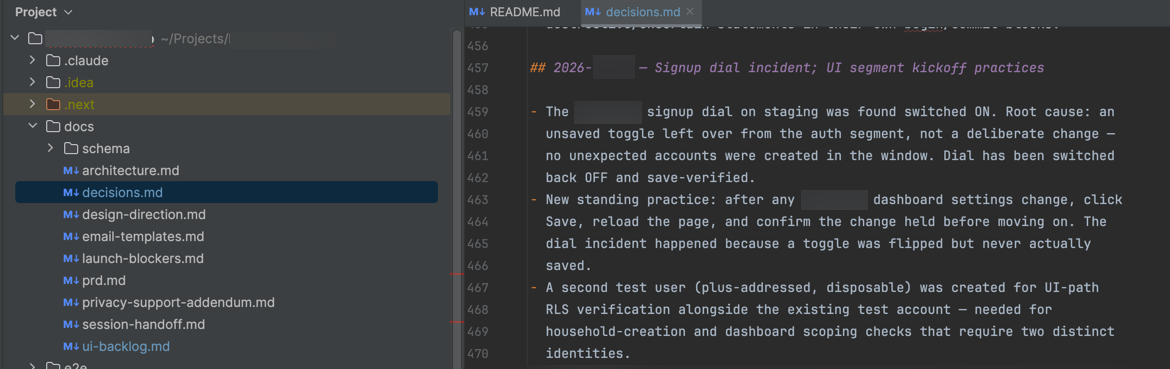
You can also create things like ui-backlog.md and launch-blockers.md. I’ve done that to keep track of things I learned along the way that need to be followed up later, and put back into earlier PRD versions. Or you can use whatever ticketing system you’re using. In any case, these things should make it back to docs. It’s still useful to have history as to how, when and why changes were made. Some seem to be disagreeing with that lately, but personally, I think that’s more just being lazy. And I also believe it adds potential risk. It’s easier than ever to trap these decision points now and you can have another AI take the files and update the PRDs. You don’t even have to open Word or Confluence Wiki yourself. Is that really so hard? If you’re a senior manager, explain you still want the docs. Why? History for one thing, is useful, also, as we’ll look at next, it’s not just about people. Know what else? It depends on the project, but for some things, you’ll need things like “as built” models and docs for various approvals and certifications.
OK, what it really gets down to – my personal opinion – is when we lose our decision criteria, we create risk. And it’s the same old story. If we do the right thing, the bad thing will never come up. But that one time… that one time we need that artifact? Look, you make the call, but your actual code repo isn’t just about code anymore. Some of it will hold directions and decisions now.
It maybe bears mentioning that the industry is moving towards more sophisticated “context engineering” for such memory items. That is, where you agents can mange their own memory systems. They say they started with .md files because their internal philosophy is “do the simple thing that works.” If you really want to dive into “what’s next” you can do so with this video. But for now, just try .md files to help yourself out. Lamis Mukta – Learning while you sleep: Beyond memory to dreaming – AI Native DevCon June 2026 (YouTube)
Artifacts Beat Memory
Project files are not merely documentation for humans. They are context infrastructure for agents. I somewhat touched on the values in the last section. And here’s how they actually help.
A concise instruction file can define standing rules:
- Use staging credentials by default
- Never reset a database
- Never reveal secret values
- Review existing patterns before creating new ones
- Prepare migrations but do not execute them
- Run required checks before declaring a task complete
A decision log can explain why a technology or architecture was selected. (And you can keep these in something like a decisions.md file so that context persists.) A backlog can show what remains unfinished, the same as now. A schema document can explain data ownership and lifecycle rules. A UI guide can preserve naming and layout conventions. A session summary can record what changed, what was verified, and what remains unresolved. And so on.
These artifacts reduce the need for the agent to reconstruct the project from fragments of conversation. It’s no different than when a person comes into a new project. These artifacts also make the project much easier for the next human collaborator to understand. Because, you know, we’re kind of still around, at least for now.
Here’s one example from a recent project of how a /docs directory might hold some context and history. You may notice there’s also a /schema directory below that, but that’s another topic. Among the static, only sometimes changes markdown files, (such as the PRD, or templates), there’s decisions.md. That’s where I’ll put choices that have been made over time, often choices that deviate from the PRD. This way, the tool knows the priority. At certain breakpoints, it makes sense to archive old PRDs and reconcile current ones with changes. Notice also that I’m using launch-blockers.md to keep track of things that come up that need to be done pre-launch. These might be things I even do myself if I’m actually launching something alone. In my case, I might be working on a project where I do that, have other people working for me that do that, or I’m handing off my own work. If I hand the whole thing off to a proper devops team, they’ll look at these things for guidance. There’s also a ui-backlog.md to keep track of things that come up along the way during unit testing. The point is, the AIs are occasionally going to lose context. Sometimes on purpose if you /clear them out to start with a less junked up context window. They’ll read these files, including something like a sessions-handoff.md to pick up where they left off, but at the same time fresh.

Clear Context at Task Boundaries
Long AI coding sessions cost more and can become less reliable. Each new message may force the system to reconsider a growing body of abandoned approaches, outdated assumptions, irrelevant details, and contradictory instructions. A fresh session has an initial cost because it needs to reread the project. That cost is often lower than carrying a bloated and confused context indefinitely.
There’s a funny – to me – parallel here with crypto. Crypto transactions will fail if they run of gas, which is what a user pays for a transaction. Or more specifically, a smart contract will stop running if it runs out of gas. Well, AI is sort of similar. Only it could run out of gas, (token money), or memory. Either way, that which is theoretically limitless can actually get stopped very short. And you have to manage this. The parameters will change over time and there’s no good hard and fast guidelines really. But you need a sense of it. For now, as of this writing, I’d suggest that any large project segment, or maybe any deep work session lasting over the course of a day, and certainly two, likely needs a breakpoint. Check status if you can. With Claude Code, you use /status to check current usage. (Just don’t interrupt a current task to do this. If you really need to know, you can maybe open a second terminal and run another instance of Claude Code. It shouldn’t interfere with the other running process. For other tools, check the docs. Others, Cursor, Codex, etc. may have similar functions, but different commands.)
And this is why the earlier mentioned artifacts are important. If you clear a session, you’ll likely start a new one, but still pick up context from .md files and other artifacts. Yes, this re-loads some of this context window we just cleared, but only with the known to be most pertinent efforts. The ‘working memory’ has more space.
To help smooth these transitions, there’s things we can do. Like use tasks with clear finish lines:
- Complete and verify things like a database migration or a UI fix
- Fix a specific bug
- Resolve a deployment failure
- Make sure things like md files are updated
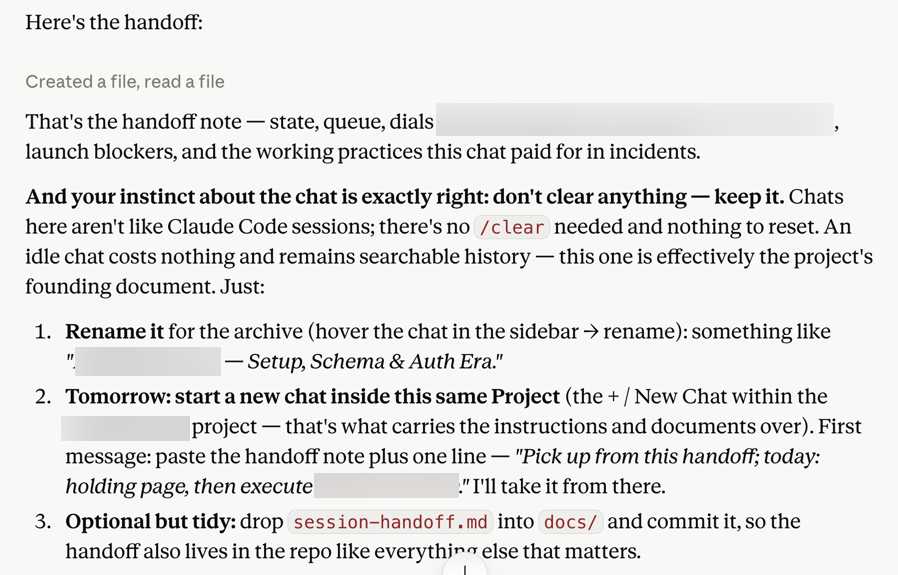
- Ask for a handoff or transition prompt to hand off to the next session
- We don’t always have to /clear a session; we can just leave it there as an old chat and start a new one
Consider restart when:
- A large phase is complete
- The type of work changes substantially
- The session has followed too many dead ends
- Responses become slow or confused
- The agent begins forgetting constraints
Here’s an example of creating a handoff. In this case, I was using Claude.ai to help generate prompts for Claude Code. Sometimes that take a bit of back and forth. You can of course just write your own prompts or use some other AI to do this. In any case, at a certain point, I hit /clear in Claude Code to clean it out to get ready for a next phase. However, in this case I used Claude.ai to maintain continuity along with the markdown / .md files in the project. So… on the Claude.ai side I’ll ask it to create it’s own handoff note. Then I’ll open a new chat, and paste that handoff in. However, there’s no need to delete the old chat. Unlike /clear in Claude Code, I can just leave that old chat there for reference. I’m going to abandon it, and will probably never go back. Eventually, I’ll probably clean up and delete it. But for now? It can just stay there until I’m at least well into the next phase. There’s no penalty for that.
One Task, One Branch
An agent should generally work on a dedicated branch. When several agents or tasks are running at once, separate Git work trees can provide even stronger isolation.
This creates several benefits:
- The scope of the task is easier to inspect
- Unrelated changes are less likely to become mixed together
- Failed experiments can be abandoned cleanly
- Two agents are less likely to overwrite each other
- The final pull request is easier to review
Give each task a clear owner, branch, and file scope. Do not let multiple agents casually edit the same migration, shared configuration, or core component without an integration plan. You can, but things could get really messy really fast. The more parallel the workflow becomes, the more important isolation becomes.
Define What “Done” Means Before the Agent Starts
An agent announcing that a task is complete doesn’t make it complete. “The code compiles” may not be enough.
Depending on the project, completion may require the same things we always had to do. Or rather, someone had to do. Maybe not “us” but someone:
- Type checking
- Linting
- Unit tests
- Integration tests
- A production build
- Database-policy tests
- Manual testing of the relevant user flow
- Testing empty and error states
- Reviewing logs
- Checking the deployed preview
- Inspecting the final diff
Define the checks before work begins and require evidence that they were completed. The agent should not merely say that the change works. It should show how the result was verified.
By the way, you really should look at the thing if there’s UX. Yes, of course these days chances are no humans are doing full regression testing of a UX. There’s tools for that. (Playwright, etc.) However, eyes on product, hands on keyboard, whatever, you need to “feel” your products. It’s similar to the agentic vibe coding. If you’re just blasting through approving things, you’re not really in control any more. And that could easily show itself. We need to try using our own products.
If you need to test some database things and don’t know SQL? Ask your other AI in a separate web window. Not sure what to click on? Ask. Yes, yes, yes, there are professionals out there who – if they read this – would be cringing and correctly thinking some of us are getting dangerous out here. Still, you / we are going to do what we do here. So let’s at least make fair attempts to do the right kind of testing. And if we’re way out ahead of our skis? Get help from pro developers.
Every New Dependency Is Like Another Vendor
Agents often solve small problems by installing another package.
This is supposedly because it’s needed as a critical path item or is maybe just somewhat useful. It may also be unnecessary, abandoned, vulnerable, malicious, incorrectly named, or accompanied by a large tree of indirect dependencies.
A one-line change to package.json can produce hundreds of lockfile changes. What’s a lock file? Good question. A lockfile (package-lock.json, yarn.lock, or pnpm-lock.yaml) records the exact versions of every package and all of its nested dependencies that were installed.
The lockfile exists to pin everything precisely for reproducibility, so even minor version bumps ripple through the whole dependency graph. The danger is mostly in reduced visibility. Big noisy diffs make it easier for bad changes (security vulnerabilities, supply-chain attacks, or unintended downgrades) to hide in plain sight, especially on teams or in security-sensitive projects.
Before accepting a new dependency, ask:
- Why is it needed?
- Does the project already contain this functionality?
- Could the task be completed with a small amount of local code?
- Is the package actively maintained?
- What permissions or installation scripts does it use?
- What changed in the lockfile?
- Is the package name exactly correct?
Generated code can create supply-chain risk just as easily as handwritten code. So don’t treat installation as a harmless implementation detail.
Match the Model to the Work
When an AI agent produces confused or repetitive work, switching to a more capable model may help. Sometimes switching to a smaller model helps too. And not just for your budget. It could be a “lesser” model is more suitable to the task at hand. This is hard to say right now. Looking at the marketing graphs of which version of what passed which new brilliant test task is daunting. Ironically perhaps, this might be something you feel your way through a bit even though there’s so much data. The effort to test multiple models on every little task is probably more costly than just picking a reasonably decent model. Especially since this moving target keeps changing models.
Some tasks may not require deep reasoning. A larger model can overcomplicate a simple change, reinterpret the goal, or consume more context and tokens than necessary. Try to choose sensibly, even if this is may be a bit of a fuzzy thing right now.
What you’re trying to do is match the model to the job. You don’t, (ideally), hire a master architect to just do a basement bathroom remodel. Just consider things like:
- Architecture and high-impact decisions deserve strong reasoning
- Routine code changes may benefit from a focused implementation model
- Repetitive cleanup may need speed rather than creativity
- Technical facts may require current official documentation more than raw model power
The biggest model should not automatically handle everything. If you pay just a little attention to some of the industry blather, you can maybe get a general sense of which tools are capable for particular tasks. Model selection is a fit-for-task tool choice, not a ranking contest, in spite of what it may feel like with all the marketing noise.
Knowing what to do here right now feels like more art than science. As of this writing, it seems almost every day, someone is posting on LinkedIn or somewhere with a chart as to what model is best for what kind of task from a cost / value perspective. This might require some experimentation. And it’s going to change quickly over time.
When Tokens Run Out, Skill Matters Again

If you exhaust your usage allocation, the AI-assisted workflow may stop abruptly. A small amount of technical competence keeps the project from becoming completely paralyzed.
You may still be able to:
- Edit copy
- Replace images
- Correct basic CSS
- Review files
- Organize the repository
- Test the site
- Prepare assets
- Write requirements
- Create issues
- Plan the next work session
Learning the environment is not wasted effort. The better you understand it, the less completely dependent you are on the agent. There’s tons of “in between” work that can be done.
Ask the AI to Explain the Environment
When an assistant guides you through GitHub, Vercel, Supabase, a cloud dashboard, or an IDE, or whatever you’re using, don’t use it only as a source of clicking instructions. (This is part of the whole “don’t just check your brain at the door” thing.)
Ask it to teach.
- What does each area control?
- Which settings affect production?
- Which changes are reversible?
- What could expose data?
- Where are logs stored?
- What should be verified before continuing?
- What is this thing?
- What am I missing?
- Anything you’re just curious. You may be surprised by what pops up and what you learn.
Taking this scenic route may mean you complete the immediate task slightly more slowly. However, it’s also likely you’ll complete the next similar task faster and more safely. More importantly, you’ll come away with better, larger context of your own.
The Bottom Line
A durable AI workflow does not depend on one long, perfect conversation. Over the course of a project, it will depend more on the systems around the conversation. So keep the repository authoritative. Use clear tasks. Isolate work. Define completion. Review dependencies. Record decisions. Learn enough to continue when the agent is unavailable.
The chat is temporary. But the project is not. You want to be set up so your work survives your furious vibey sessions.
Next up we’ll look at how to prepare for Production, whether you’re boldly trying to this yourself, or handing off to a professional team.