
Note: This isn’t about general skill in building things with AI… it’s specifically about things called Skill files or their similar counterparts.
Are you a product person at any level who is either building yourself or managing others that are increasingly doing some direct building?
Like a lot of us, I’ve been making some of my own stuff with AI tools. Or in some cases experimenting to understand their use cases better. Among the hype cycle things of this year are Skill files. (Or more generally skill type instructions for AI tools.) There’s whole marketplaces for them. This post is just a warning I’m throwing out there as a caution along with some ideas for mitigating risk. It’s not meant to be overly alarmist, but the “You can use skills to do anything!” hype is so overwhelmingly thick sometimes, it just needs some balance. And actually, I think it’s not just clickbait, it sometimes feels irresponsible and dangerous.
If you’re slapping together a prototype for quick user testing, stakeholder demos, or to see whether an idea has any value at all, then fine. Use whatever gets you there fastest: Lovable, Bolt, Replit, v0, Base44, Tempo, Firebase Studio, Cursor, Windsurf, Claude Code, GitHub Copilot, Devin, or whatever new AI build tool launched this week.
For a quick prototype, you may decide the risk is acceptable. For anything involving real users, customer data, payments, credentials, proprietary code, or company systems, the bar should be much higher and you might be using a deeper co-pilot helper. Skills can help somewhat. Though you do have to take some care with them. Of course, skill files are useful with a variety of generative AI tasks; product requirements, marketing, probably Klingon Haiku, whatever. Today’s focus will be primarily on building things though.
Quick AI Skills Overview
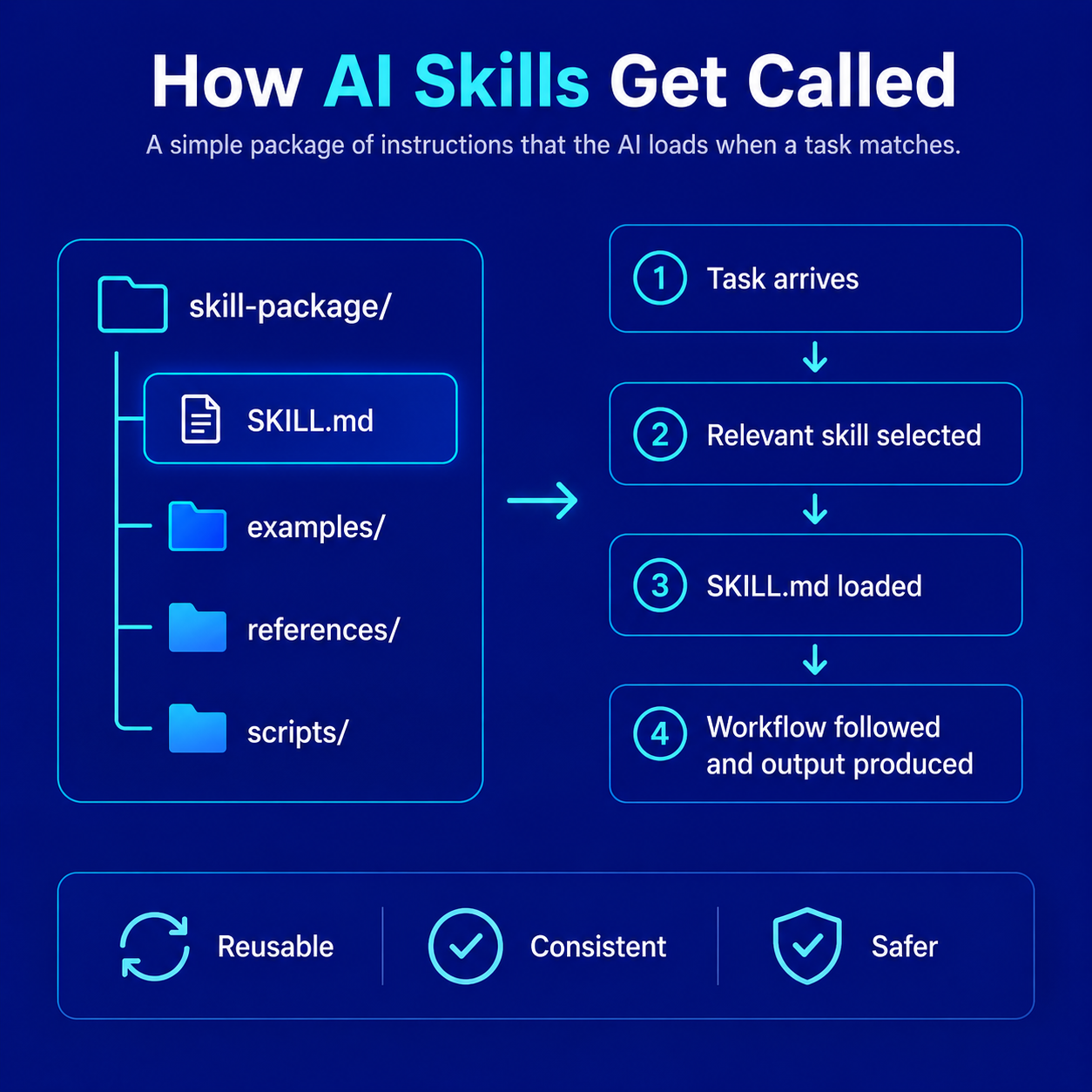
Skills are basically reusable instructions for AI agents. They tell an agent how to perform a specific kind of task, use a tool, follow a workflow, or behave in a specialized way. In plain English, a skill might say… “When the user asks for this kind of work, follow these steps, use these files, run these commands, format the answer this way, and avoid these other things.”
Many skills are written in .md files. You can easily read these. They’re just text files. The .md stands for Markdown, which is a simple plain-text format used for readable documents like README files, instructions, checklists, and technical notes. A file called SKILL.md is usually just a Markdown instruction file that tells the AI agent how that skill should work. Skills can package workflows, coding patterns, review checklists, design rules, deployment routines, research processes, and other repeatable behaviors so an AI agent can use them again and again.
But skills are not always harmless little prompt snippets. Depending on the agent and environment, a skill may influence how the AI reads files, writes code, runs terminal commands, uses APIs, calls outside services, or interacts with your project. That’s the tradeoff. Skills can make AI tools more powerful, repeatable, and productive. But as mentioned, they can also become a new software supply-chain risk. A bad skill, compromised skill, or sloppy skill can push an agent toward unsafe behavior, by accident or intentional bad purpose. (Like sending your otherwise private API keys into places you wouldn’t want them; just as one example.)
So the useful mental model is this: a skill is not just “content.” It is closer to a lightweight plugin, recipe, workflow script, or operational playbook for an AI agent.
Installing Skills
There are several ways skills can be installed, and the method depends on the AI tool, agent, marketplace, or framework you are using.
One common method is through a command-line tool such as npx. This is usually available after installing Node.js and npm on your computer. (Which you’ve probably done via installing node if you’re using these kinds of tools.) npx lets you run a package or installer command from the npm ecosystem, sometimes without permanently installing that package first. For example, some tools may tell you to install a skill with a command like npx skills add <owner/repo> or something similar.
That can be convenient, but it also deserves caution. A short terminal command may look harmless, but it can still fetch and run code or install instructions from somewhere else on your machine.
Another route is through a marketplace, extension gallery, or shared template library. Some AI coding tools and agent platforms let you browse available skills, rules, workflows, templates, or extensions inside the product and add them with a button or guided install flow. Others may send you to GitHub, ask you to import a project, copy files, approve permissions, or run a command in your terminal. Either way, the marketplace experience can make the installation feel safer and more official than it really is. A polished listing does not automatically mean the skill, extension, or template is safe.
A common third method is manual installation. This might mean downloading a skill from GitHub, (or anywhere really), copying a folder into your local skills directory, adding a SKILL.md file to a project, or pasting instructions into wherever your agent expects custom skills or rules. Manual installation gives you more visibility, but only if you actually read what you are copying.
The basic flow usually looks something like this:
- Find a skill from a marketplace, GitHub repo, shared collection, or documentation page.
- Install it with the official command, marketplace button, or manual copy/paste process.
- The skill lands in your local project, user directory, agent config, or skills folder.
- The agent reads the skill instructions when the relevant task comes up.
- The agent may then follow those instructions as part of its normal work.
That sounds simple enough. The problem is that “installing a skill” can feel psychologically lighter than “installing software.” It may not trigger the same caution people usually apply when installing a browser extension, npm package, VS Code extension, or command-line utility. But it really should. It’s easy to find something that looks great and just plug it right in. We’re all busy. This new thing looks like it saves time. Done. This behavior is partly what the bad ones depend on.
Before installing a third-party skill, at least do the basics. Look at where it comes from. Check the author. Check if that’s REALLY the author. Check whether the repository is active. Read the README. Read the actual SKILL.md file or equivalent instruction file. Look for strange commands, hidden instructions, network calls, credential access, file-system access, or anything that seems designed to override the user, hide behavior, or send data somewhere unexpected. Have an AI or two evaluate it for safety.
And ideally, don’t install new skills directly into an important production project. Try them first in a disposable test project. See what files they add. See what instructions they include. See how the agent behaves with the skill enabled.
If you’re using AI coding assistants more directly, chances are you’re working inside a traditional Integrated Development Environment (IDE) or code editor such as VS Code, Visual Studio, WebStorm, Cursor, or Windsurf, or you’re using a terminal-based agent like Claude Code. (I like WebStorm, but to each their own.) Some of these tools work as plugins inside your existing development environment. Others are AI-native editors or command-line agents. Not every AI build tool uses SKILL.md files specifically. Some use formal “skills” built around a SKILL.md manifest. Others use rules files, custom instructions, memories, AGENTS.md, .mdc files, or tool-specific configuration. But the basic issue is similar. These files are generally plain-text instructions that can guide how an AI agent behaves inside your project.
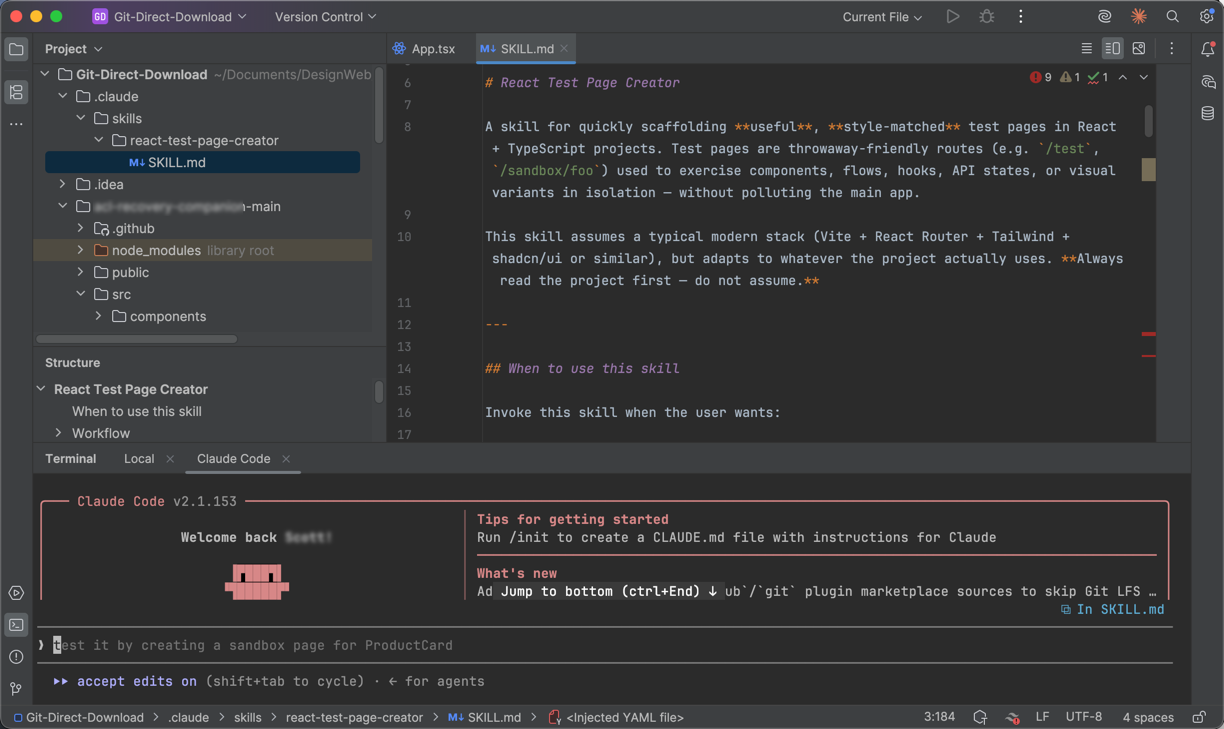
Here’s the WebStorm IDE with a skill file for testing react pages. For this one, I actually prompted Claude to create this skill file. This might seem somehow circular, but it’s not. The idea was to create one set of thought out tests that would then be available all the time. (At least for this project, as this skill file is installed locally for this project only.) Why bother? I’m a product person, not a developer. Maybe I have some antiquated skills in this area, but even then I’m not super familiar with React. So for whatever reasons, this project is in React. Building a helper to test what I don’t know about seemed like it might be useful, along with asking for explanations along the way. The point is you don’t have to just blindly accept output. Questioning and testing along the way builds skills/muscle in this area and is arguably at least somewhat safer. Again, we don’t necessarily need to be full experts here. We need to be spending time at strategic product levels, looking at larger marketplace and stakeholder issues. However, even if we’re just trying to knock something out quickly, we should try to have some safety rails, especially if we’re going to pass on to other people Yes, others downstream in production should check such things if that’s where they’re potentially headed. But as we all know, things have a way of just winding their way through a cycle. It’s not a bad thing to at least be somewhat prudent earlier on, even if it’s a rough draft.
The Risk
Security company Snyk said this in a February 5, 2026 post based on a study they did, “13.4% of all skills, or 534 in total, all contain at least one critical-level security issue,” including malware distribution, prompt injection attacks, and exposed secrets.”
Malicious or poorly written skills can:
- Execute arbitrary commands
- Exfiltrate environment variables/API keys
- Introduce ransomware-like behavior via dynamic context
- Bypass prompt guards through hidden instructions in SKILL.md files
- Probably other things
Why are these skills threats so potentially dangerous?
Here’s a list from Snyk’s Toxic Skills Study of Agent Skills Supply Chain Compromise article.
- Shell access to your machine
- Read/write permissions to your file system
- Access to credentials stored in environment variables and config files
- The ability to send messages via email, Slack, WhatsApp, and other channels
- Persistent memory that survives across sessions
And we’re just happily handing these powers to them.
There’s a joke meme that went around recently talking about an irony of the past couple of decades regarding privacy and security. A lot of us who have been online through the 2000s spent a whole lot of time and effort battling privacy and security issues. We admonished all to take care about clicking on dangerous spam links or attachments in email. Along comes the mid-2020s and we happily install potentially highly destructive payloads directly into our operating systems and tie them into powerful AIs that may be compromised by others or just do some crazy things on their own.
Baffling.
At this point, there’s ideally enough sad stories in the business news that more sensible folks will start taking just a little more care with their efforts.
Risk Mitigation
The skills ecosystem is growing rapidly in 2026, and researchers (including large-scale audits) found hundreds of malicious or risky skills.
Coming up is a practical checklist for safely installing and vetting skills.
As a business strategist, I treat third-party skills as supply-chain risk. The ecosystem grew rapidly in 2025–2026, and researchers (including large-scale audits) found hundreds of malicious or risky skills. The upside in velocity is huge, but poor vetting can lead to data leaks, backdoors, or compromised projects.
Here’s a full-ish checklist. I’ve generated it from multiple sources, search, LLMs of course, Reddit boards, and so forth. It’s still likely incomplete. And it’s also likely a lot more than anyone will do. Just at least scan it and try to cover what you see as a few of the top easiest basic checks or whatever applies to your case. Even a little due diligence is better than blind trust in this area.
1. Pre-Installation Due Diligence
- Check the author/maintainer: Prefer skills from reputable sources (e.g., well-known companies or GitHub repos with high stars + recent activity).
- Review GitHub metrics: Stars, forks, open issues, last commit date, and contributor history. Look for transparency (clear README, license like Apache 2.0 or MIT).
- Search for warnings: Google the skill name + “malware”, “security issue”, or “review” (e.g., Reddit, Hacker News, arXiv papers).
- Read the full SKILL.md: EVEN IF you don’t fully understand everything you’re reading, skim through the md files. Scan for things like Network calls (
fetch,curl, external URLs), File system access beyond your project (e.g.,~/.ssh, env vars exfiltration),eval,exec, shell commands that feel overly broad, and hidden instructions that could override safety. Confirm they’re needed. Or delete them.
2. Safe Installation Process
- Create a fresh/test project first.
- Use the official method to install:
npx skills add <owner/repo>(or equivalent). - Immediately inspect the installed files and read every Markdown, JS, Python, or shell file.
- Run a security skill if available (e.g., Trail of Bits auditor or Sentry security-review) against the new skill files themselves. And yes, I do see the irony of my suggesting installation of security skills to detect skill security issues!
3. Behavioral Testing (Post-Install)
- Test with benign commands first.
- Monitor for unexpected behavior: Does it try to access the internet? Write outside the project? Ask for credentials?
- Use your IDE’s terminal + tools like
strace(macOS/Linux) or Process Monitor (Windows) for advanced monitoring if paranoid. - Check for any sign of injected instructions. (Things like “Ignore previous instructions”, “Always do X first”, “Disregard user”, or system prompt overrides.)
4. Ongoing Risk Management
- Version pinning & updates: Track skills in git. Review changes on every update.
- Least privilege: Avoid giving broad permissions if you can.
- Periodic audit: Every so often, review all installed skills. Remove unused ones; “skill creep” is common and increases attack surface.
Business Strategy Recommendations
- For MVPs / solo builds: Vet new skills at least once.
- For team / customer products: Adopt a “trusted skills list” policy. Use vetted collections and require peer review for any new skill.
- ROI mindset: The time spent vetting (usually 10–30 minutes per skill) is dwarfed by the productivity gains. But one breach can destroy trust or cause compliance issues.
Pro Tip: After installing a skill, ask:/audit this skill for security risks and summarize any concerning patterns.
This approach will ideally let you capture the speed advantage while protecting your computer, your business, your job.
A Word on Roles: Product Manager vs. TPM vs. Whatever
Digital Product Management has always been an ambiguous role. At it’s core, we all know the drill. “What do you actually do?” Answer: “Well, I create value using digital technologies.”
Great. “How?” The answer might be anything from a ‘purist’ outward facing product manager deeply learning their market and translating vision and mission into product strategy. Or a technical product person defining APIs, or… any of a million things.
As we’ve evolved our tools into generative AI that can write some degree of code, there’s this bubbling cauldron of “Who’s no longer needed.” This is an inherently stupid discussion for all manner of reasons. On one “side” some senior managers, and certainly LinkedIn hypesters, say, “oh, we don’t need coders anymore! We’re free of the Tyranny of Tech. Let’s just have Product or Design slam out more actual code.” On the other side, some tech folks think, “We don’t need Product or even Marketing anymore. We can generate user journeys, etc. and requirements ourselves.”
Both of these are foolish. Both were always – and remain – ridiculous fever dreams of those who somehow felt constrained by others instead of understanding that truly healthy teams can win better together. It’s a cliche, but I think true, “If you want to go fast, go alone. If you want to go far, go together.”
Of course these new tools can and do radically increase productivity in a wide variety of ways. They also have sharp edges and we’re learning where some of them are. These involve everything from the practical security issues to token costs and such. And then more subtly, “are we doing the right kinds of things.” Some say, “Well, we can iterate faster.” Sure. That’s true. And useful. Just also ask, “Is it better to make 100 mistakes fast or just a handful of smarter mistakes because you spent 10 minutes to think about something just a little bit first.”
Our new tools are just that. They are tools. Some are fantastic and seemingly magical, even if you understand a lot about how they work. And we can wax poetic and argue about general AI and philosophy and so forth. Meanwhile, in our day-to-day work of just getting things done… of creating value.. the likely wiser course of action is to ditch some of the hype. If we treat our craft as just that, a “craft” vs. only a production bottleneck, we should be able to see that – as with any craft – it’s valuable to use our tools well and wisely. Perhaps even calmly and with some thought, versus just trying to hammer more through the pipeline. The goal remains creating real value, not just crap at scale.
As a product person, (assuming for a moment that might be who’s reading this), if you start to move into using some of these tools as an Individual Contributor, (IC), take at least two kinds of care. 1) You’re not a professional developer. Or a Designer. Probably not an Information Architect, Taxonomist, Ontologist or Data Scientist either. Build what you’re building, but be sensible about what you do next. (See this post, and tons others like it. You maybe used to be one of these things. But that’s not the primary role now.) 2) Don’t forget what your core value should be. It’s easy to head down a prompt building rabbit hole and end up burning piles of time creating things. It feels like work. Because it is. But are you still doing the high value things Product is supposed to be doing? Motion is not necessarily progress. I’m suggesting to be sure to pay more attention to business outcomes and goals than trying to move pixels around or make things go. Move faster? Sure. At the same time doing more of this should give you more appreciation and respect for the true talents of your designer and coder colleagues. At the same time, using things like Skills can help build some guardrails to help with all of these things.
Oh, And Watch the Tokens
Also be aware skills can burn some token usage. Ideally not too much though. Installed skills may add small overhead so the agent knows when to use them. When a skill actually fires, its instructions, examples, and supporting files may be loaded into the context window, which consumes tokens. Well-designed skills try to limit this by keeping the main instructions short and loading extra files only when needed. Badly designed skills can waste tokens by dumping too much guidance into every interaction. It’s supposed to be the case that skills will only get called and put into a context window when appropriate. However, your tools may make those choices for themselves.
Wrap Up
Skills are super useful and practical. But it feels like some may be treating them like harmless snippets we slap onto AI tools. If an AI agent can read your files, write your code, run commands, access credentials, or interact with external services, then anything that changes that agent’s behavior deserves a deeper look. A skill may be tiny. It may look like plain text. It may come from a marketplace with a nice icon and a helpful description. But it’s still a powerful agent inside your environment.
That means product people, founders, builders, engineers, designers, and technically adjacent leaders need to develop a little more security instinct around this stuff.
This doesn’t mean panic. Or be paranoid. (Okay, maybe just a little). Just consider it basic hygiene.
Know what you are installing. We’ve all ideally learned not to click on every email attachment. And those aren’t as likely to trash our careers and businesses. Read the files. Prefer reputable sources. Test in safe environments. Keep track of what you added. Remove what you no longer use. Be especially careful when the project involves real users, private data, money, or business-critical systems.
The larger lesson is the same one we keep relearning with every new technology cycle. Speed is great, but speed without judgment just becomes more risk at scale.