Postman is useful when you want to look closely at one API conversation: send a request, inspect the response, change a parameter, see an error.
A workflow platform such as n8n.io becomes useful when you want to watch several of those conversations turn into a workflow. That makes it a useful product-literacy tool even if you are not trying to become an automation engineer. A requirement such as “get a location, retrieve the forecast, decide whether rain is likely, then return a useful result” can stay abstract on a whiteboard. In n8n, we can wire the real calls together and watch data move from one step to another.
So we’re going to build a single companion workflow that goes with the article. It supports a manual learning path, useful failure handling and an externally callable webhook path, all using the same underlying geocoding, forecast and product-decision logic.
The completed workflow, its README and the downloadable n8n JSON are available in the public GitHub repository PM API Literacy Lab — Umbrella Weather Check. You can inspect the workflow structure there before importing it, or download the JSON and import it directly into your own n8n instance. (Note that there’s no guarantee that this will be continually updated, but it’s all been checked and working as of this writing.)
The Scenario: Should I Carry an Umbrella Tomorrow?
We will use Open-Meteo because its public geocoding and weather APIs are straightforward for a learning exercise. We will deliberately use the same Open-Meteo request contract as the Postman bonus article so you can see the same API calls move from direct inspection into an automated workflow.
The core path will look roughly like this:
City input
→ Geocoding API
→ Latitude + longitude
→ Forecast API
→ Tomorrow’s precipitation probability
→ Is probability greater than 60%?
- Yes: Bring an umbrella
- No: Probably fine
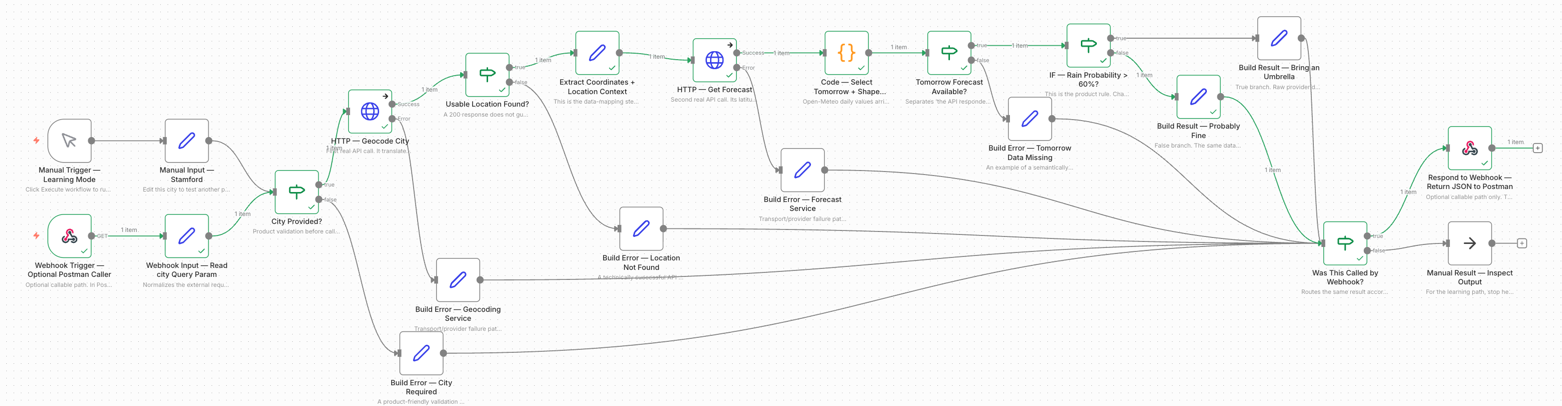
This small workflow contains real product architecture: a trigger, two API calls, JSON responses, data mapping, business logic, branching and an output.
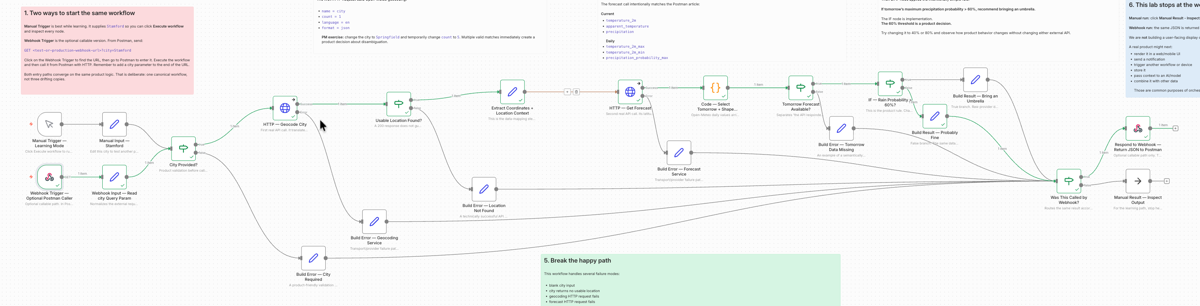
One boundary is worth making explicit. For the manual learning path, the workflow stops with structured JSON in n8n’s node output. We are not building a webpage, dashboard, mobile notification, device action or AI handoff. The optional webhook path returns the same JSON to Postman only so we can demonstrate that the workflow can expose a callable interface. So you can see how a webhook works. In a real product, sending the result onward to a user interface, notification service, device, another system or an AI would often be the actual purpose of the orchestration. We are deliberately stopping at the workflow boundary so the interface mechanics stay visible. And so I don’t have to build and host a web page somewhere. I know it’s challenging to see all the nodes in the image below. Just take it as a depiction of the full flow and we’ll get to some clearer segments later. Of course, if you just grab the workflow itself in a free instance of n8n, you can see the whole thing clearly.
The n8n Concepts That Matter
The exact interface will change over time. The durable concepts matter more than the precise location of a button.
A workflow contains connected nodes. A trigger starts it. The HTTP Request node can call an external API. Output from one node can be mapped into fields in a later node. An IF or Switch node can branch based on rules.
n8n describes data mapping as referencing output from previous nodes. In the UI, you can often drag a value from incoming data into the field that needs it and n8n creates the underlying expression. n8n data mapping
The downloadable workflow includes descriptive node names, notes on the functional nodes and sticky notes on the canvas. Those annotations are part of the exercise. They are intended to make the imported workflow understandable even if you are opening n8n for the first time.
Step 1: Give the Workflow a City
Start with a manual trigger so the workflow can be run on demand while learning.
Then create a field such as:
city = Stamford
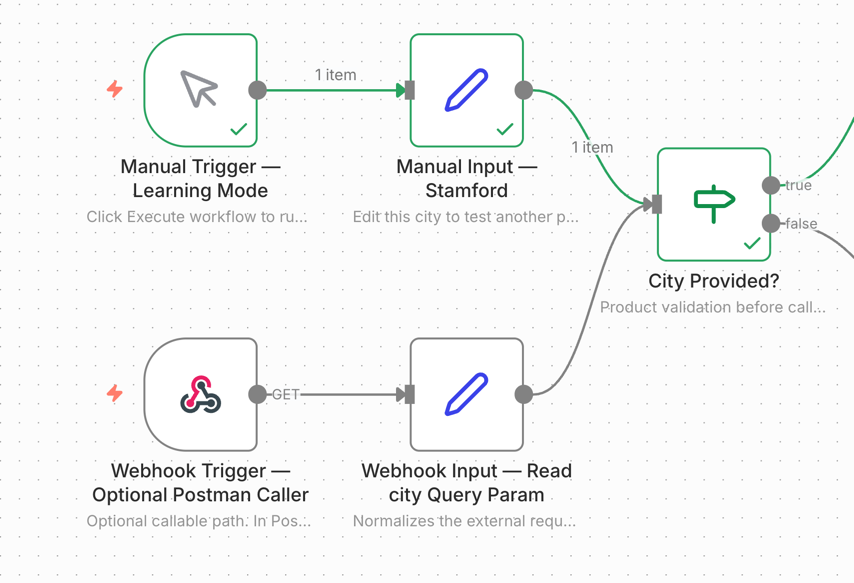
A Set/Edit Fields-style node is enough for the manual learning path. Later in the same workflow, we will add a Webhook trigger as a second entry point. Each trigger will normalize its input to the same city and input_source fields before entering the shared workflow.
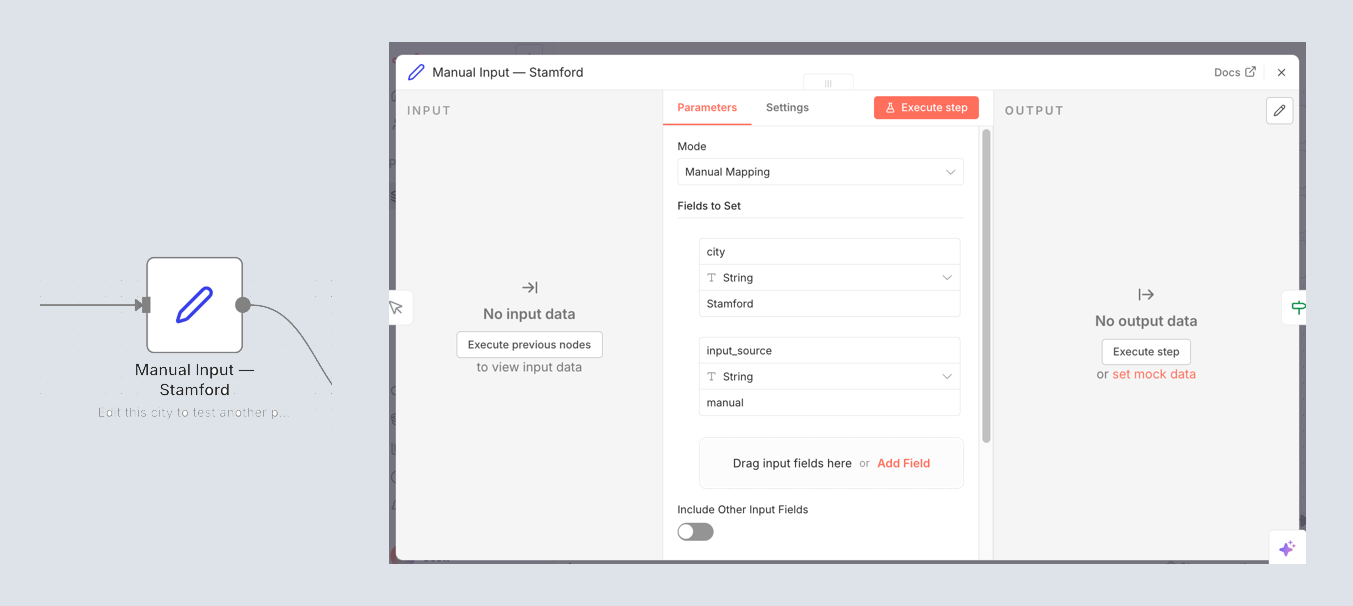
For a PM, the mental model is: something starts the workflow, and something supplies the first piece of data. The source of that data can change without requiring the rest of the product logic to be rebuilt.
Step 2: Turn a Human Place Name Into Coordinates
Add an HTTP Request node and call Open-Meteo’s geocoding service.
The request is:
GET https://geocoding-api.open-meteo.com/v1/search
with the same parameters used in the Postman exercise:
name = Stamford count = 1 language = en format = json
Instead of typing Stamford directly into the request node, map the city field from the previous node into the name parameter.
When it runs, the API returns structured data including latitude and longitude.
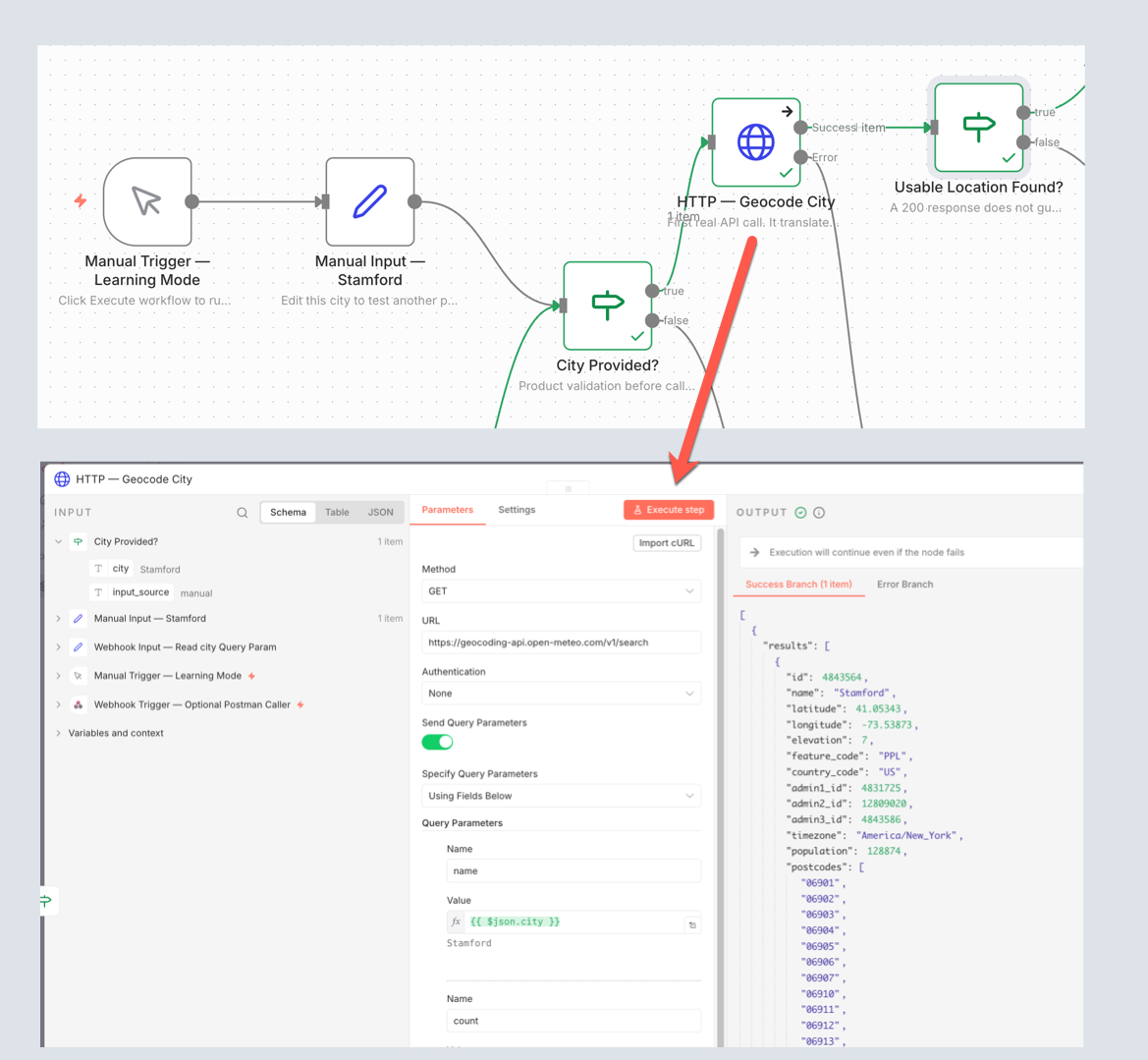
What should a product person notice? The user understands Stamford. The weather service needs coordinates. The geocoding interface translates between those two needs.
That hidden intermediate dependency can disappear inside a requirement such as “show weather for the user’s city.”
The canonical workflow will keep count = 1 so the main example stays simple. As an optional experiment, change the city to Springfield and count to 5, just as in the Postman article. You may get several legitimate matches. That is a useful reminder that a production product would need an explicit strategy for ambiguous place names rather than silently assuming that the first result is always the user’s intended location.
Step 3: Feed One API’s Output Into Another
Add a second HTTP Request node for Open-Meteo’s forecast service.
GET https://api.open-meteo.com/v1/forecast
This time, do not manually type coordinates. Map the latitude and longitude returned by the geocoding node into the forecast request.
Conceptually:
Geocoding latitude → Forecast latitude Geocoding longitude → Forecast longitude
Use the same forecast fields as the Postman exercise:
current = temperature_2m,apparent_temperature,precipitation daily = temperature_2m_max,temperature_2m_min,precipitation_probability_max timezone = auto
So the full request contract is the same one the reader already inspected directly in Postman:
GET https://api.open-meteo.com/v1/forecast ?latitude=<mapped latitude> &longitude=<mapped longitude> ¤t=temperature_2m,apparent_temperature,precipitation &daily=temperature_2m_max,temperature_2m_min,precipitation_probability_max &timezone=auto
This is one of the most useful things to see on the n8n canvas. The output contract of one interface becomes the input contract of another.
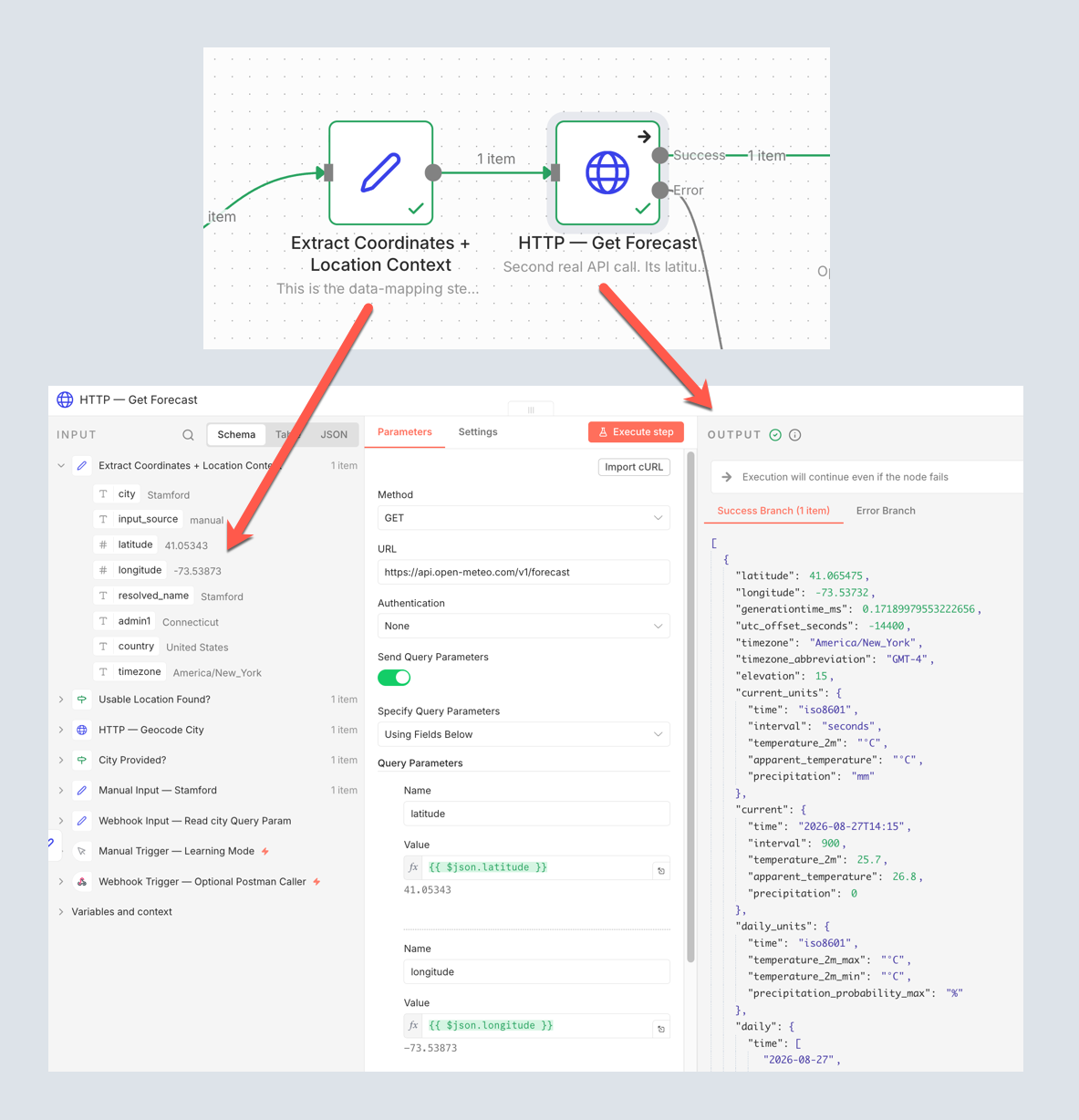
Thankfully, we now know if we can leave the umbrella home. Really, is there any other way you possibly could have known? Maybe. But not quite as much fun.
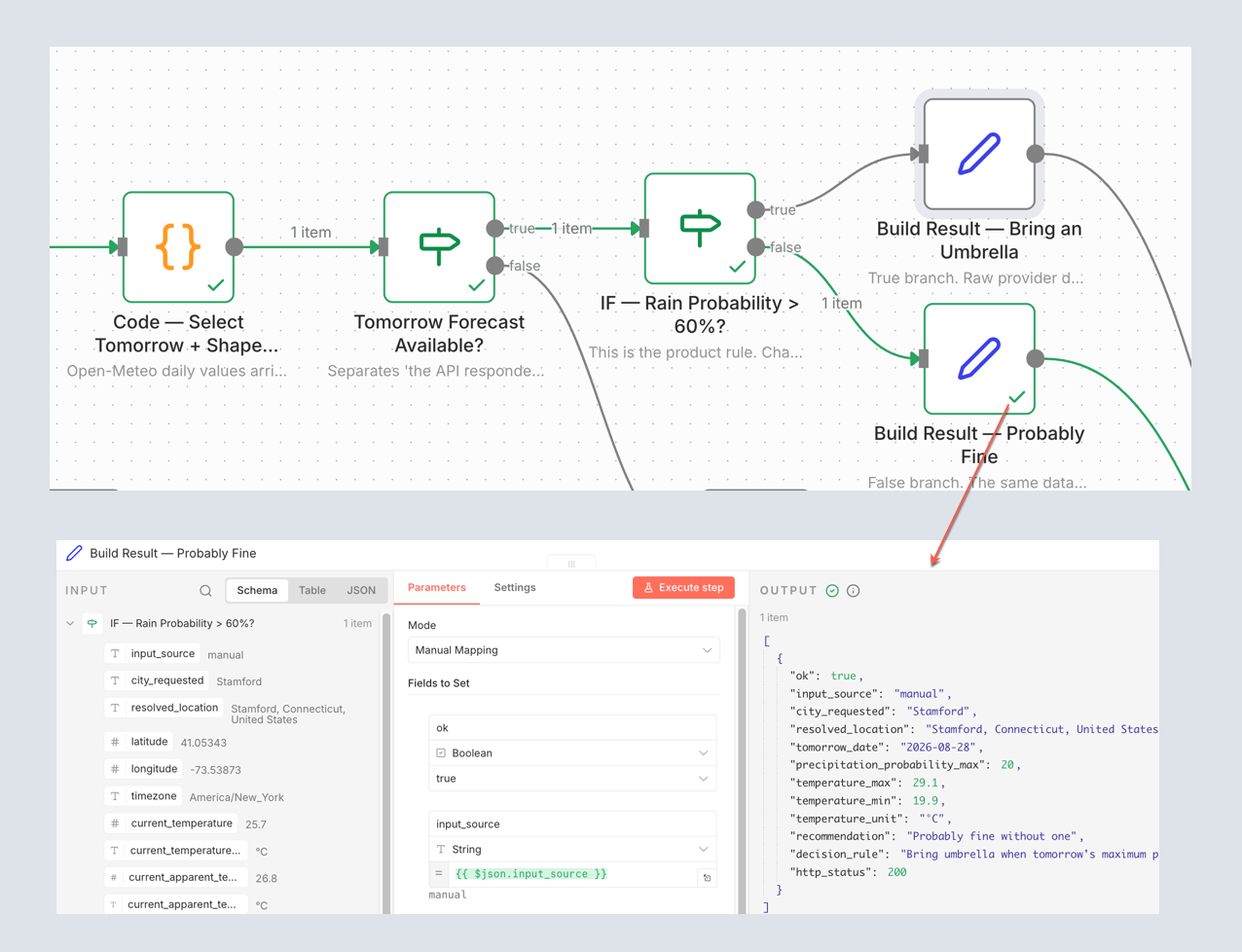
Open-Meteo returns daily dates and daily values as corresponding arrays. For this exercise, today is the first element and tomorrow is the second element, index 1. Rather than asking the IF node to reason about an entire weather payload, the workflow should first derive a small product-facing field such as:
tomorrowPrecipitationProbability = daily.precipitation_probability_max[1]
That is another useful product lesson. The external API’s data shape does not have to become the internal product contract unchanged. A workflow or backend layer can translate a large provider response into the smaller pieces the product actually needs.
Step 4: Turn Data Into a Product Rule
Now add an IF node using the derived tomorrow value.
For our intentionally simple example:
If
tomorrowPrecipitationProbabilityis greater than 60%, recommend bringing an umbrella.
A vague product phrase such as “warn the user when rain is likely” has now become executable logic.
What does “likely” mean? 40%? 60%? 80%? Should expected rainfall amount matter? Should the user control the threshold?
The IF node is implementation. The threshold is a product decision.
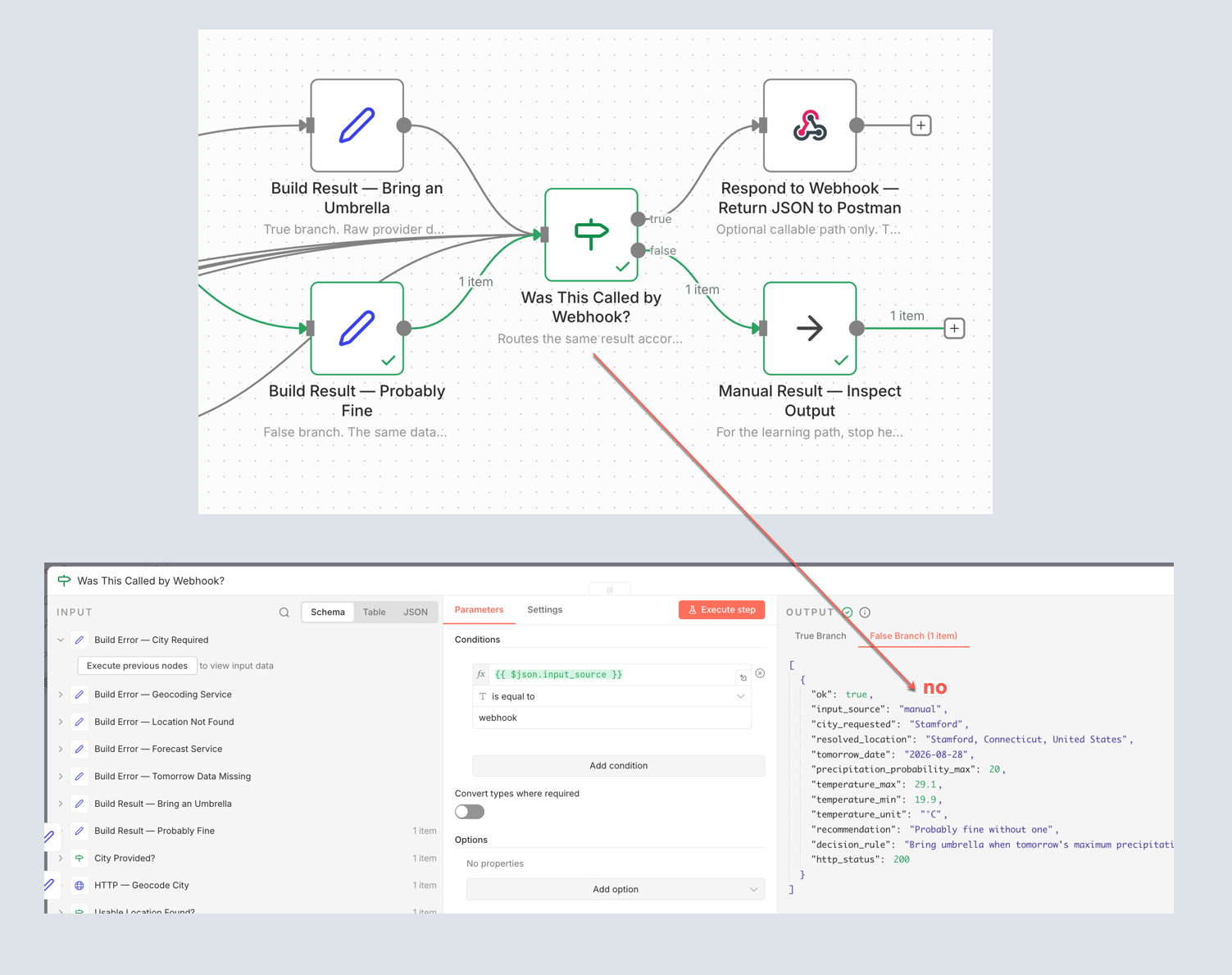
Step 5: Produce Something a User Could Understand
Each branch can create a simple result, for example:
{ "recommendation": "Bring an umbrella" }
or:
{ "recommendation": "Probably fine without one" }
The final workflow can also include useful context such as the city, tomorrow’s date and the precipitation probability that caused the recommendation.
The point is not weather advice. Raw API data has moved through a business rule and become a product-level outcome.
For the manual walkthrough, that product-level outcome is where we stop. Click the final result node and inspect its JSON output. We are not creating a polished end-user presentation layer. If the workflow were part of a real product, this result might next be rendered in an app, sent as a notification, stored, handed to another workflow, used to control a device or passed into an AI/model. Those downstream uses are intentionally left out of this lab.
Step 6: Click Backward Through the Execution
Run the workflow and inspect each node in sequence.
You should be able to see:
- the city entering the workflow;
- the first API request;
- the JSON geocoding response;
- latitude and longitude passed forward;
- the weather response;
- tomorrow’s value selected from the daily arrays;
- the IF decision;
- the final output.
This is the central value of n8n for this series. The canvas can act as an executable architecture diagram. A less technical product person can watch systems interact without reconstructing the entire path from source code.
Step 7: Break the Happy Path
Change the city to something that should not resolve.
What happens when the first API does not return a usable location? The forecast step no longer has valid coordinates.
That immediately raises product questions:
- What should the user see?
- Do we stop immediately?
- What gets logged?
- When should something retry?
- What happens when the external provider is unavailable?
- What if the forecast call succeeds but tomorrow’s expected field is missing?
These are better workflow-level failure exercises than repeating the Postman article’s deliberately invalid count = 101 request. Postman used that example to show what an API contract violation and HTTP 400 response look like. Here we want to see how a workflow responds when a dependency or required piece of data fails.
The companion workflow therefore includes a blank-input check, location-not-found path, explicit HTTP-request error outputs, a missing-tomorrow-data branch and readable JSON error results before downstream nodes try to operate on missing data.
Add a Second Entry Point: Make the Same Workflow Callable
Once the manual path is clear, add a Webhook trigger to the same workflow rather than creating a second copy.
The manual trigger supplies:
city = Stamford input_source = manual
The webhook path accepts a query parameter and normalizes it to the same shape:
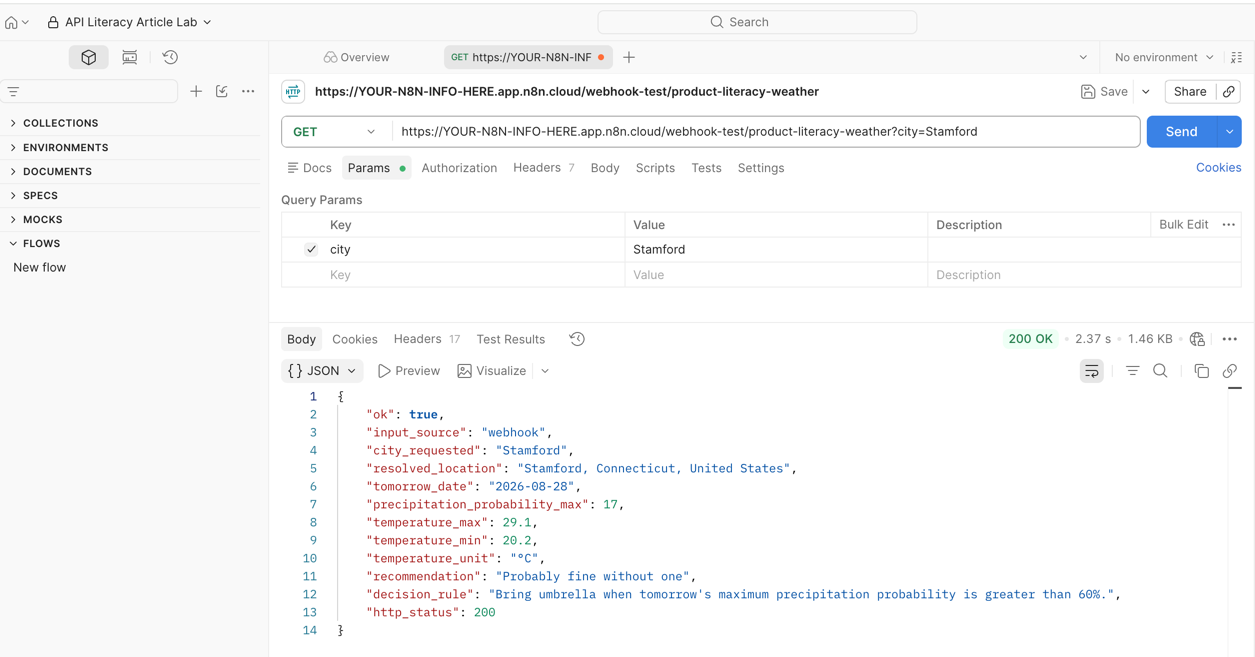
GET <n8n webhook URL>?city=Stamford city = Stamford input_source = webhook
From that point forward, both entry paths use the exact same geocoding, forecast, transformation, decision and error-handling logic.
That lets us demonstrate the relationship in both directions:
n8n consumes APIs to geocode the location and retrieve weather.
Another system calls n8n to request the finished result.
Now we’ll use Postman as that external caller so this article connects directly to the Postman bonus lab.
At the end of the shared logic, the workflow uses the input_source field to decide whether to simply expose the result for manual inspection or return the same JSON to the webhook caller.
The Open-Meteo endpoints used here do not require an API credential for this learning exercise, so there are no paid external-service subscriptions or secrets to configure in the companion workflow. If a later version adds a service that does require credentials, those should be stored in n8n’s credential system rather than embedded in workflow JSON.
Anyway, here’s where we call the webhook from Postman
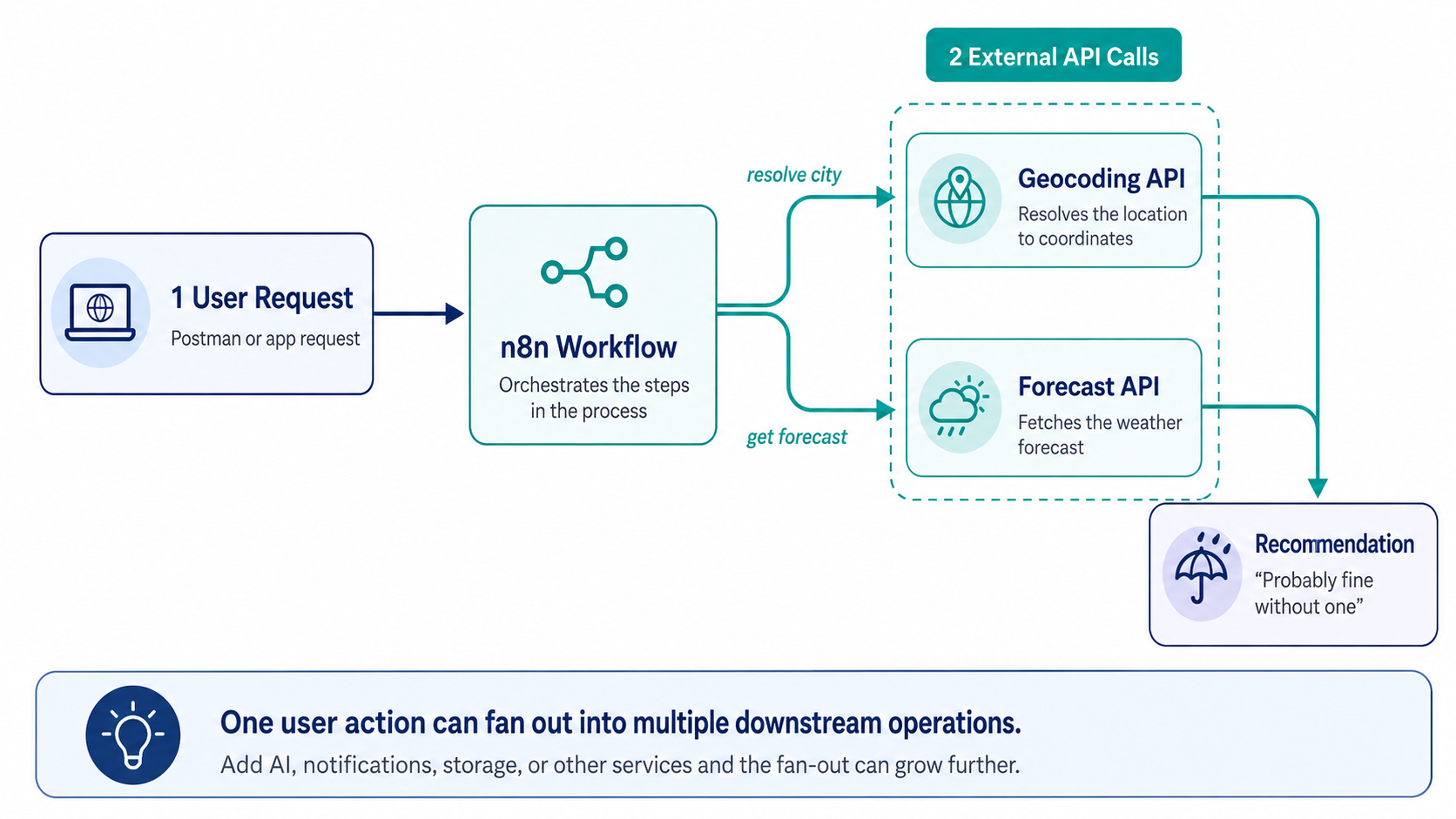
Count What One User Action Actually Causes
This workflow also provides a bridge to the API-cost bonus article.
One visible user request may cause:
1 geocoding API call 1 forecast API call
Add an AI summary, notification service or additional enrichment and the same user action can fan out into more external operations.
The product-economic question becomes:
How many external services and billable operations does one successful customer outcome actually trigger?
One Companion Workflow, Not Three
My original draft was going to separate Learning, Error-Aware and Callable versions. But we don’t really need all that to accomplish all three goals. We can keep that progression without maintaining three different JSON files.
The final companion download is one canonical workflow containing:
- Two entry points – Manual Trigger for the walkthrough and Webhook for an external caller.
- One shared product path – city → geocode → validate location → forecast → select tomorrow → IF → result.
- Integrated failure paths – blank input, location not found, provider failure, missing forecast data and readable error output.
- Two ways to finish – inspect the result directly when run manually or return the same JSON when called through the webhook.
- Built-in teaching annotations – descriptive node names, visible node notes and sticky notes explaining what a product leader should notice.
That gives us one artifact while still letting the original article about APIs reveal the workflow progressively. Early screenshots focus on the simple happy path.
Download the Companion Workflow
The finished workflow is available in the public GitHub repository:
PM API Literacy Lab — Umbrella Weather Check
The repository contains the importable n8n workflow JSON and a README that explains the architecture, APIs, entry points, product rule, failure paths and suggested exercises. The workflow itself also contains sticky notes and node annotations, so much of the teaching material travels with the file when you import it.
To use it:
- Open the GitHub repository.
- Download the workflow
.jsonfile. - Import it into n8n.
- Start with the Manual Trigger – Learning Mode path and execute the default Stamford example.
- Click backward through the executed nodes and inspect the data at each step.
- When you are comfortable with the manual path, use the webhook entry point and call the same workflow from Postman.
The repository is intended to stay aligned with this article. If the downloadable workflow evolves, the GitHub copy should be treated as the current companion artifact rather than copying an older JSON snippet out of the article.
Where We Can Go Next
n8n already has useful API-learning material, including an interactive API fundamentals workflow covering GET requests, parameters, POST bodies, headers, authentication and timeouts.
The difference here is the product lens. We are not learning nodes simply to learn n8n. We are using the workflow to make system relationships visible:
Who initiates? What data is exchanged? What does the next system require? Where does product logic enter? What happens on failure? And what does one customer action actually cause?