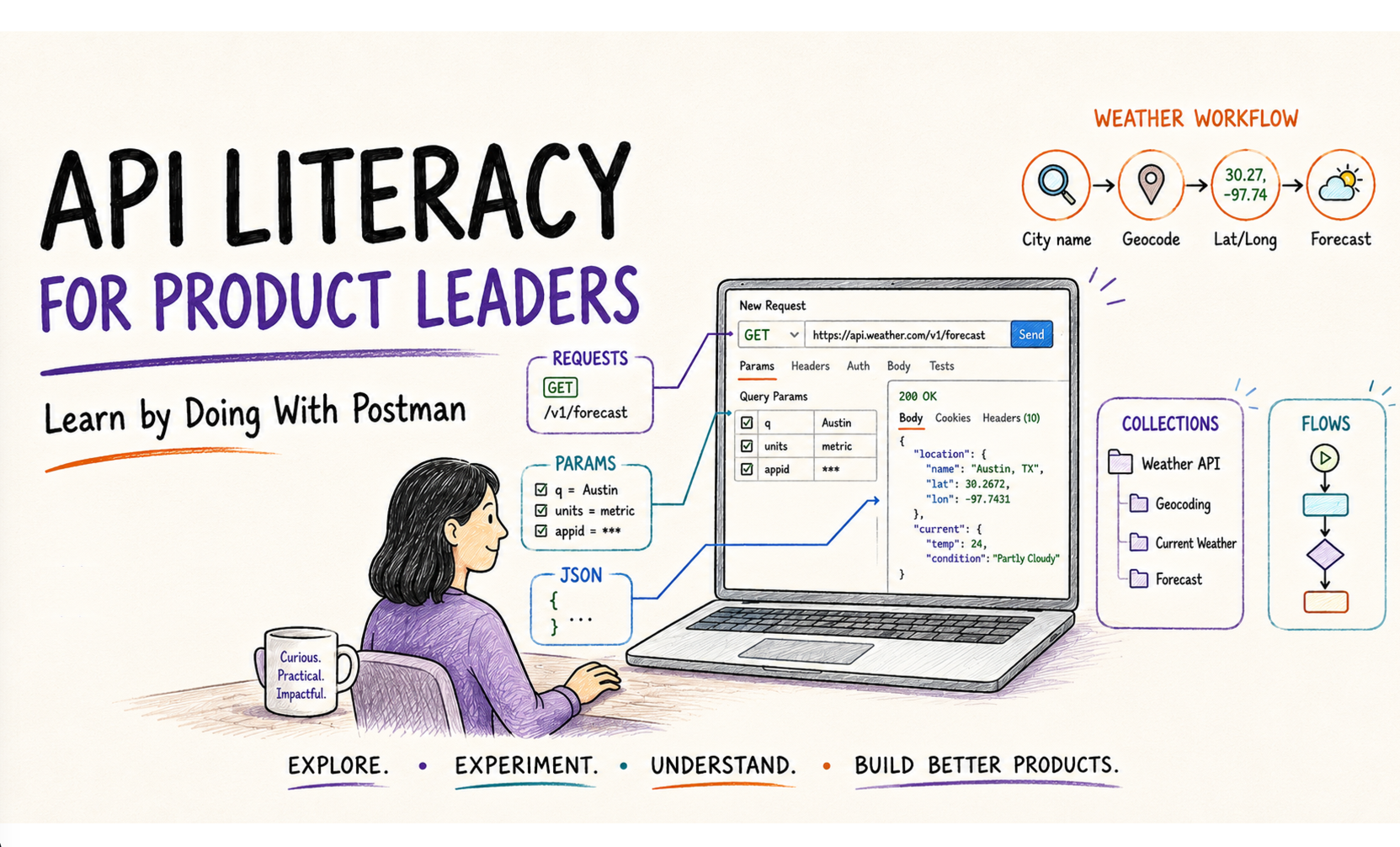
Bonus Hands On article for the product manager’s guide to digital connectivity series.
There’s a point where reading about APIs stops being very useful. At least this was true for me. The theory is fine. You can learn what an endpoint is, what JSON looks like, what a GET request does and why a 404 is different from a 500. But sometimes the fastest way to make those ideas stick is to actually send a request and look at what comes back. As I’ve pointed out elsewhere, our goal is not necessarily to become experts here. Though that’s ok. It’s to have a reasonable depth of understanding as to how the plumbing works so we can participate meaningfully where such tools impact product craft or P&L if we have financial responsibilities as well. This will be mostly about hands-on learning for some basic API usage; nothing to do with actually designing them or considerations for AI-first or revenue. Those are larger scope topics for another time.
This is where Postman can be useful for a product person.
This is also not an argument that every PM should become an API tester, write test automation or start doing engineering work on the side. Nor that Postman should become the operational user interface for nontechnical teams. Those are different questions.
The narrower argument is that we can use Postman as an API literacy lab. A PM can use it to inspect real requests and responses, test assumptions, reproduce an integration problem, explore edge cases, work with shared developer collections and visually prototype multi-step API workflows.
Postman’s current API client supports several request types, including HTTP, GraphQL, gRPC, WebSocket and MQTT. That makes it a useful companion to the wider interface-literacy discussion in this series. Postman API Client overview
Before We Start: Web App or Desktop?
You can do a lot in the Postman web app. Postman’s current interface lets you create an HTTP request from a workspace by using the Add control or starting a new request in the workbench, selecting HTTP, entering a URL and clicking Send. The exact location or wording of controls may move as Postman changes the UI, so treat the screenshots here as orientation rather than permanent navigation instructions. Current request documentation
If you use the web app, Postman uses an agent to actually send requests. For ordinary public HTTP APIs, the web experience may be all you need. If you run into browser/CORS restrictions, private-network access, or want the fullest feature set, Postman recommends either its Desktop Agent with the web app or the full desktop application. The desktop app does not require you to choose a separate agent for requests. Postman Agent overview · Install/use Postman
For the exercise below, start with whichever version you already use. If the web app refuses to send a public request, try changing the agent or use the desktop app rather than assuming the API itself is broken.
In this annotated example of a screenshot of the desktop app, we’re calling a basic http service to get a geocode. These are typically latitude and longitude. Getting local is a whole other topic. And even in 2026, that’s still a mess. (My opinion.) Think about it. Most cities are near water of some kind. So your dealer locators show you the closest stores are only 2 miles away, but don’t understand it’s 20 miles to get to the bridge because the store is on the other side of the river. Or your internet provider gives you a dynamic IP address that resolves to 30 miles away, so that your streaming TV service maybe doesn’t give you the right market channels. This really isn’t today’s topic per se. But I wanted to bring up these practical realities because depending on what you’re doing with APIs and products, these are the kinds of things you can maybe delve into a bit with direct research using API tools like Postman. What you decide to do about it? If anything? That’s your call. But at least you can have views that let you see what’s going on.
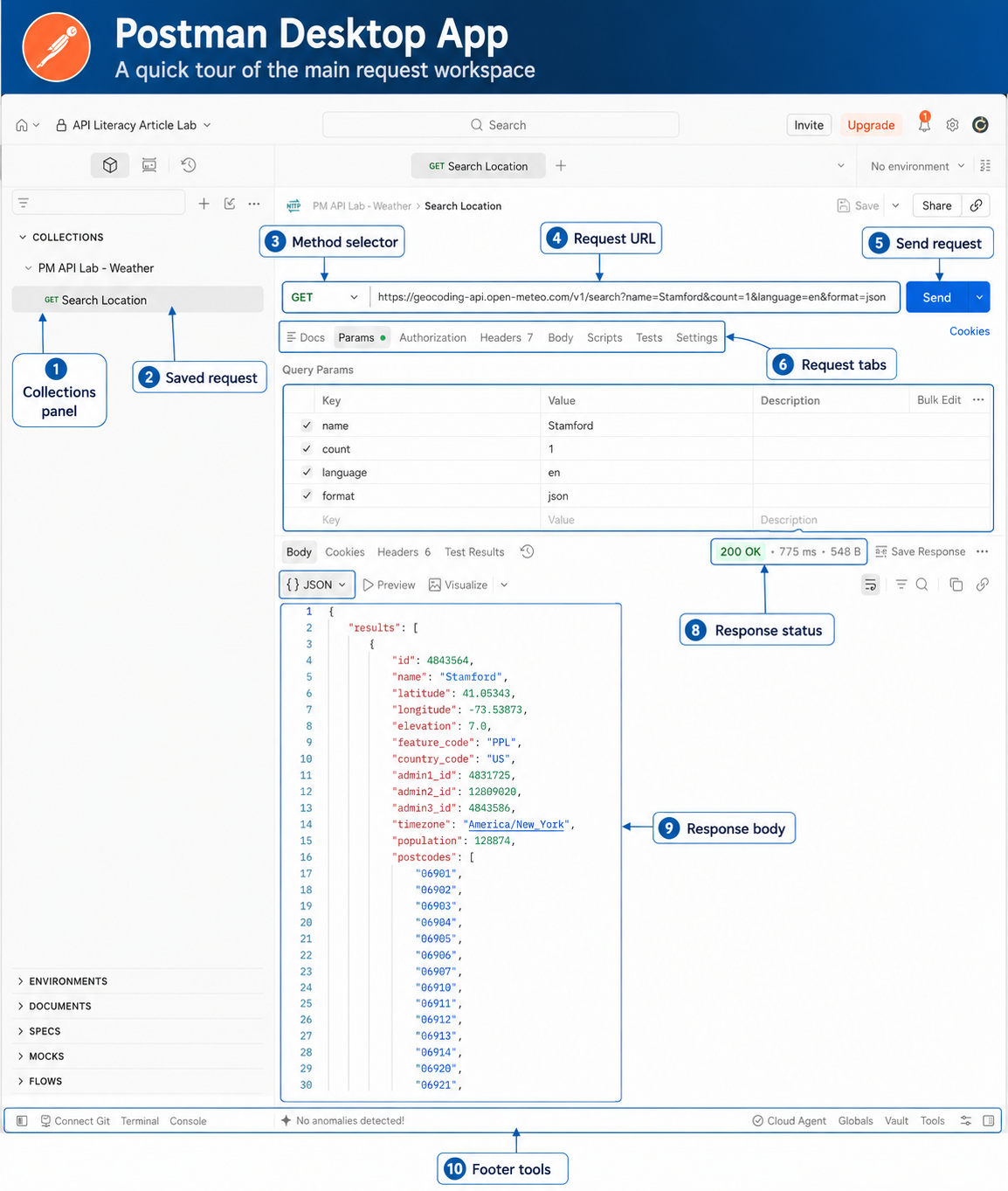
This example used the following as its GET request:
https://geocoding-api.open-meteo.com/v1/search?name=Stamford&count=1&language=en&format=jsonYou can see the same information broken out in Postman’s Params area. The request has four query parameters:
name = Stamfordcount = 1language = enformat = json
This is worth calling out… The URL looks like one long technical string, but Postman lets us work with its individual parameters as separate fields. Change a parameter in the Params table and Postman updates the request URL for us. In this first example we are asking, essentially:
Search for Stamford, return one result, use English, and return the data as JSON.
The API responds successfully with 200 OK, and the JSON contains a results array with information about Stamford, including latitude, longitude, country and time zone.
Already, terms like endpoint, query parameter, HTTP status and JSON response are ideally a little less abstract.
A Real Product Scenario: Could We Add Local Weather?
Let’s make this more useful than calling an imaginary /customers/123 endpoint.
Suppose you are a PM exploring a feature that needs local weather. Maybe you are working on travel, outdoor events, delivery planning, aviation, field service or simply a consumer dashboard. You do not yet need production architecture. You just want to answer some basic product questions:
- Can we search for a location by name?
- What data comes back?
- What happens if a location name is ambiguous?
- Can we get current conditions and a short forecast?
- What do failures look like?
- How awkward would it be to pass the result of one API call into another?
For this exercise we will use Open-Meteo, a public weather service with documented geocoding and forecast endpoints. Its public/non-commercial API can be exercised without setting up an API key, which makes it useful for learning. Geocoding API documentation · Forecast API documentation
I created a collection called PM API Lab – Weather for the examples below. You don’t have to do that before experimenting with a request, but saving requests into a collection gives us something durable that we can come back to and eventually connect into a workflow. (Changes should sync between your desktop and native app. I’m going to switch which one I use for screenshots just for variety. Just note that for the sync to happen, you have to be sure to Save your requests.)
Step 1: Turn a City Name Into Coordinates
Create a new HTTP request in Postman.
Select GET and enter the same info as I did in the first example:
https://geocoding-api.open-meteo.com/v1/search?name=Stamford&count=1&language=en&format=jsonThen click Send.
You should get a successful response containing a results array. Inside the first result you should see fields such as the place name, latitude, longitude, country, time zone and administrative region.
Don’t be concerned if the exact values differ from the screenshot above. This is live data. The important thing is to recognize the structure.
At this point, a few API concepts should become much less abstract:
- The endpoint is
https://geocoding-api.open-meteo.com/v1/search. name,count,languageandformatare query parameters.- The returned content is a JSON response.
resultsis an array because a location search can return multiple matches.latitudeandlongitudeare data fields we may need for a second request.- The green
200 OKin Postman tells us the server successfully handled the request.
That is already more useful than merely knowing the definitions. Imagine the product requirement originally said: User enters a city and we show the weather. That sounds straightforward. But now we can start asking what “city” actually means to the service underneath the product.Does one search term always identify one place? Not necessarily.
Step 2: Change a Parameter and See the Contract Move
Instead of editing the URL by hand, open Postman’s Params area for the request. You should see the query parameters broken out into names and values.
For the first request we used:
name = Stamford and count = 1
Now change them to:
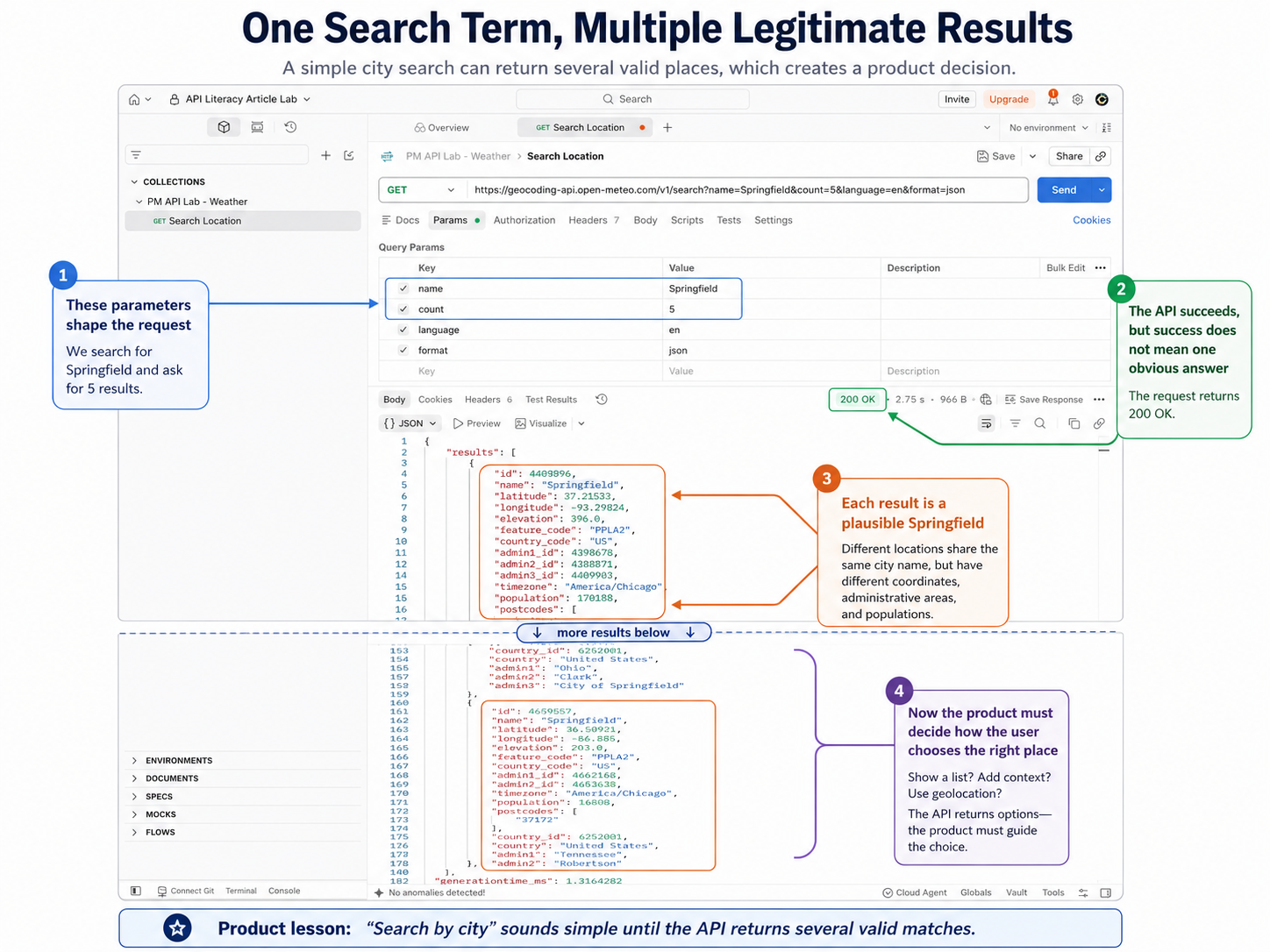
name = Springfieldcount = 5
and send the request again.
A common place name like Springfield is more interesting because the service may return several legitimate results. All of a sudden, this tiny exercise is more important than it looks.
Requirements often casually say things such as:
- “Search by location.”
- “Filter by date.”
- “Return the first ten.”
- “Show nearby stores.”
- “Use the customer’s city.”
Those statements frequently become parameters somewhere underneath the user experience. Seeing those parameters and their actual results in Postman helps connect the product behavior to the interface contract implementing it. And now we have a real product question. If the API returns five Springfields, what should the product do? Should we just use the first one? The largest city? Try using the user’s device location to guess? Show the state and ask user to choose? What? Those are product decisions created by behavior that’s easy to miss if the requirement remains at the level of “search for a city.”
Step 3: Let’s Deliberately Break It
Hazards of my youth perhaps, but sometimes it’s just fun to break things. So now let’s make the API fail on purpose.
Change the location back to whatever you want, but set:
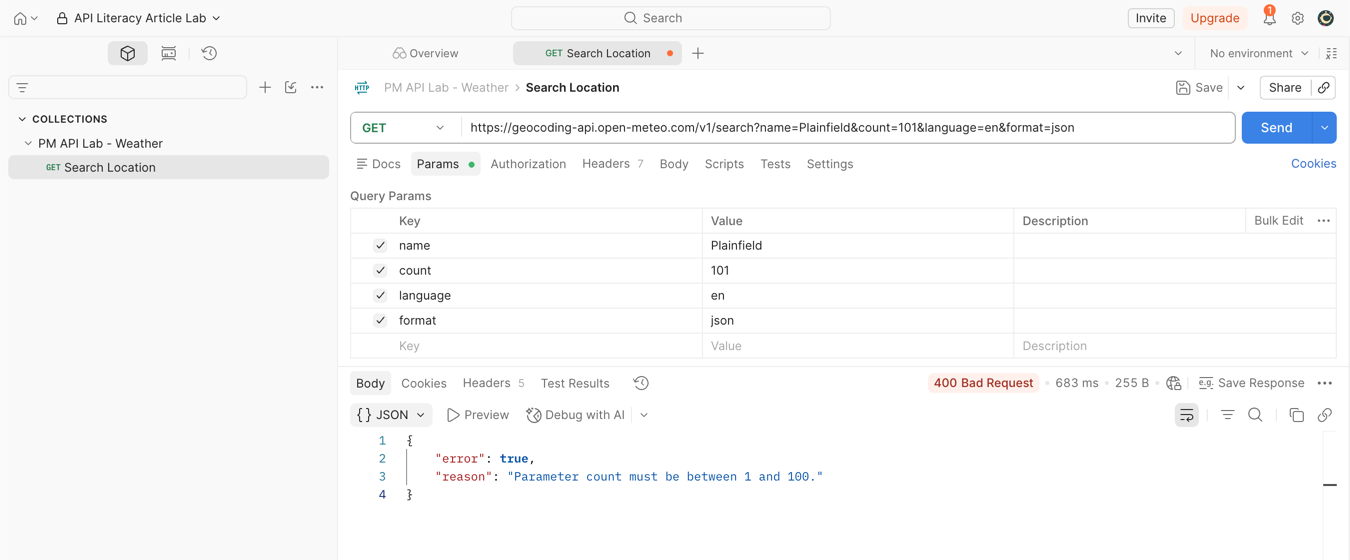
count = 101
and send the request again.
Open-Meteo documents count as accepting values from 1 through 100, so 101 deliberately violates the contract.
Instead of a successful result, you should get an HTTP 400 response with an error object explaining that the parameter is invalid.
This is the sort of thing PMs should occasionally see firsthand. A requirement may say, “Show an appropriate error if the location service rejects the request.” That sentence is abstract to consider. Looking at an actual error response tells you what the application receives and what it does not receive. The API may return a perfectly useful technical explanation for developers. Something like “Parameter count must be less than or equal to 100.” But this doesn’t mean those exact words should appear in the product. Your application may need to log the technical cause while showing the user something much simpler, such as “We couldn’t complete your location search. Please try again.” Or perhaps something better. Or better yet, the user should never be able to produce this particular error in the first place because your own interface constrains the input.
This distinction matters. The technical error is not necessarily the UX copy. Now change count back to a valid number.
Step 4: Use the Coordinates in a Second Real API Request
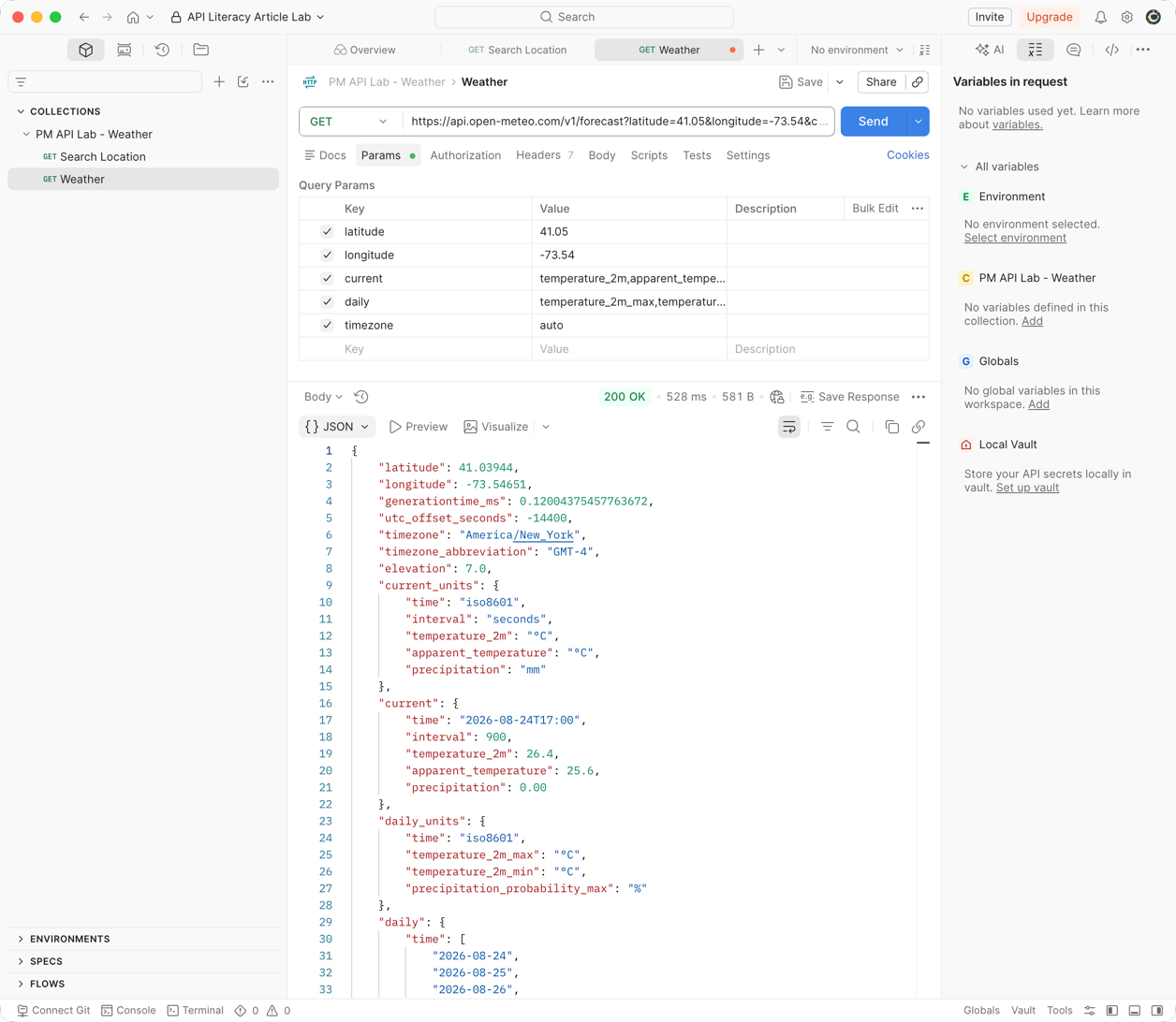
Go back to a successful location response and find the latitude and longitude from the result you want to use.
For Stamford, for example, those values should be roughly:
latitude = 41.05longitude = -73.54
Your exact response may contain more decimal places. Be careful here. For this example, we’re using a particular format. But different geocoding standards exist and even where the same standard is in use, the number format may be slightly different in terms of what systems accept. If you’re thinking, “Really? We still don’t have all this settled? That’s crazy.” Well, no argument. If we really dug in, we’d probably find reasons for the decisions. But as a practical matter, it’s just another thing we have to take some care with otherwise we’re the ones with the broken products. (And oh yes, you did notice the minus sign, right? Missing it puts you someplace rather else in the world, maybe in the middle of an ocean. This would be what we’d call a sub-optimal dealer locator experience if that’s what you’re building.)
Now create another GET request in Postman.
Use this pattern, replacing the coordinates with the values you actually received:
https://api.open-meteo.com/v1/forecast?latitude=LATITUDE&longitude=LONGITUDE¤t=temperature_2m,apparent_temperature,precipitation&daily=temperature_2m_max,temperature_2m_min,precipitation_probability_max&timezone=autoConceptually, that request says, “For this latitude and longitude, give me current temperature, apparent temperature and precipitation, plus the daily high, low and maximum precipitation probability. Use the location’s time zone automatically.”
Click Send.
The returned JSON should contain sections such as:
currentcurrent_unitsdailydaily_units
and information about the time zone.
Now we can start asking product questions against real data:
- Are temperatures numbers and units separate fields?
- Does the API tell us the local time zone?
- Are daily dates and daily values parallel arrays?
- Does each day have the same fields?
- What happens if precipitation probability is unavailable?
- How much of this payload does our UI actually need?
- Should our backend transform this into something simpler before the client sees it?
This is one of the main reasons Postman is useful for PM literacy. “The weather API returns forecast data” is vague. Seeing the payload tells you what the product actually has to work with.
This screenshot is subtly different as it’s from the native app, not the browser. But essentially the same info.
Save the Workflow, Not Just the Request
As you build these examples, save the requests into a collection.
I’m using:
PM API Lab – Weather
with:
- Search Location
- Get Forecast
A Postman Collection is an organized group of requests along with related information such as parameters, examples, documentation and tests. This is why Postman isn’t just a fancy address bar. It’s a reusable interface artifact that’s easy to modify and save examples.
In our cases, we did a first request to answer which location does this city name refer to? And a second to answer what is the weather for those coordinates? Together, they represent a tiny product workflow. If your development team already maintains Postman collections, a PM often doesn’t even need to build requests manually at all. You may simply be opening a collection the team already uses and examining the workflow underneath a product capability.
Optional: Make the Two Calls Into a Tiny Postman Flow
Our two-request sequence is now:
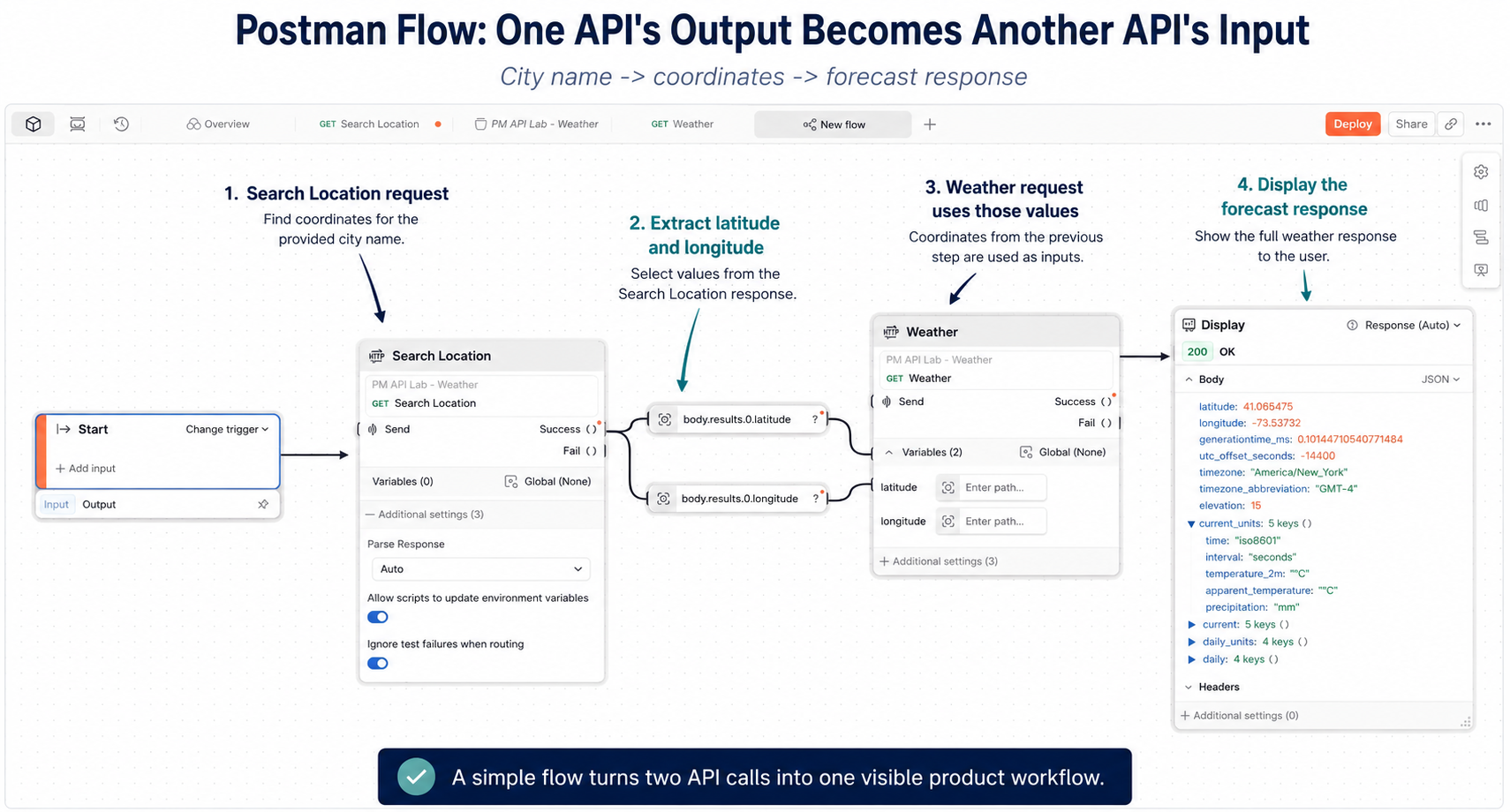
City name → location lookup → latitude/longitude → weather forecast
That is a nice use case for Postman Flows, Postman’s visual environment for connecting API calls and logic. Flows documentation. We’re not going to worry about making this production-grade. The point is simply to see real information travel through a workflow. A Postman Flow can use HTTP Request blocks that execute requests saved in a collection. Output from one block can then influence the inputs of another request. HTTP Request block · Connecting blocks
This might be a little challenging to follow until you get use to the interface. A reasonable beginner path is:
- Create a new Flow in your workspace. (This can change, but as of this writing, in the Postman UI, inside a workspace, look at the left sidebar. Look near the bottom and you should see “Flows” so hover over than and use More Actions or Create Flow or whatever the similar verbiage might be.)
- Add an HTTP Request block and select Search Location. (You may need to select the workspace first.)
- Run it once, (via the Run button at bottom), and inspect its successful output. (You may need to click on “Output” in a lower box.)
- In the top box, you may have to click on Success and in the Output box below, drill down into the body, results and keys, (or similar), to see actual field values. Select the latitude and longitude from the first result. Drag each of them to the right so they become blocks in the flow design screen.
- Modify your earlier Get Forecast request so latitude and longitude use Postman variables such as
{{latitude}}and{{longitude}}. (The URL will look something like this: https://api.open-meteo.com/v1/forecast?latitude={{latitude}}&longitude={{longitude}}¤t=temperature_2m,apparent_temperature,precipitation&daily=temperature_2m_max,temperature_2m_min,precipitation_probability_max&timezone=auto) - Add Get Forecast as another HTTP Request block in the Flow. (Use right click and + or whatever shows to select another HTTP request.)
- Connect the latitude and longitude produced by the first request to the values needed by the second.
- Hover over the Success output port on the Weather block and click, then scroll down or search for a Display block. (Or you can just inspect the successful output of the forecast request.)
- Run the Flow.
If that sounds like more than you want to tackle, stop after the two normal requests. You’ve already learned the important part. Flows is useful because it lets you cross the line from “I understand each API call.” to “I can see how several calls combine into a product workflow.” This flow actually feels a bit like other products, such as n8n, that make workflows and potentially agentic workflows. Either way, stitching it together like this can offer a really fast idea of what kinds of simple data flows can be done.
What the PM Should Notice About the Flow
The most interesting part is not the block diagram. The interesting questions are:
- What data from step one is required by step two?
- What if location search returns zero results?
- What if it returns five results?
- What if the forecast call fails after geocoding succeeds?
- Where would the user make a choice?
- Which state needs to persist between steps?
- Which parts belong in UI logic?
- Which belong in backend logic?
- Which belong in the integration layer itself?
This might not be in a fancy UI, but it can function as a base level working prototype that can make those questions visible faster than a requirements meeting sometimes can. We’re of course not building the production application in Postman. Yet we can use this tool to make the interaction concrete enough that we can reason about the product.
A Two-Minute Warm-Up: Postman’s Own Echo API
If Open-Meteo changes someday, or if you simply want to make sure Postman itself is working before debugging an unfamiliar external service, use Postman Echo. Postman maintains Echo specifically for testing requests. It does not require authentication and simply sends information about your request back to you.
Try:
GET https://postman-echo.com/get?product=sampleapp&role=pmThe response will echo the query arguments and request details. That makes it useful for learning parameters, headers, methods and authentication behavior without wondering whether an unrelated external service is doing something unexpected. Postman’s own quick-start documentation uses Echo for this sort of experimentation. Postman quick start
Other Public APIs Worth Keeping Around for Practice
Free public API are guaranteed to exist forever, so always check its current documentation before publishing or teaching with it. I actually think more of these might go away soon, or at least require registration. Why? Because of AIs, both good and bad. Many sites, including search, suffer from a lot of bot traffic that’s essentially valueless and may even be harmful. AIs will likely make this even worse, especially as they might try to consume just about any raw API feed they can get their data suckers on to. And when they do, they’re could be a lot more points out there drawing too much too fast. So providers will likely have to rein in how much free stuff they just toss out there at public endpoints. That said, several established public APIs exist and are useful for learning because they demonstrate different characteristics.
JSONPlaceholder
JSONPlaceholder is explicitly a free fake REST API for testing and prototyping. It has familiar resources such as users, posts, comments, albums and todos. Good beginner calls:
GET https://jsonplaceholder.typicode.com/users/1
GET https://jsonplaceholder.typicode.com/posts?userId=1
It also supports fake POST, PUT, PATCH and DELETE interactions, which makes it useful when you want to learn request bodies and HTTP methods without modifying real data. The service makes clear that writes are simulated rather than permanently saved. JSONPlaceholder guide
PokéAPI
PokéAPI is a long-running public educational API with a large dataset and no authentication requirement for its REST endpoints.
Try:
GET https://pokeapi.co/api/v2/pokemon/pikachuIts deeply nested response is useful for learning how JSON objects and arrays can become much more complicated than the tiny examples typically shown in API tutorials. It’s also a good place to practice finding one useful field inside a very large payload. A service may technically return 200 fields while your feature needs four, and that’s something to know about as it could have impact on throughput, parsing efforts and costs.
Open Library
Open Library offers public APIs for book and author discovery. Its Search API is particularly easy to explore:
GET https://openlibrary.org/search.json?q=the+lord+of+the+rings&fields=key,title,author_name,first_publish_year&limit=5
That gives you practice with search parameters and explicit field selection. Open Library asks users to respect its usage guidelines and rate limits, so it is better treated as a low-volume learning or public-good integration example than as a free backend for a high-traffic commercial product. Search API documentation
Open-Meteo
The Open-Meteo APIs are particularly useful because they are real rather than fake, the documentation exposes many selectable parameters, and the geocoding-to-forecast sequence naturally demonstrates how one API result can feed another call. That makes them especially useful for product-oriented experimentation rather than simply proving that an HTTP request works.
Inspect the Real Payload Before Writing Around It
Once you have done the weather walkthrough, this habit should become fairly obvious. Suppose a partner API says it returns an address. What does that actually mean? One formatted string or separate street, city, state and ZIP fields? Just one address? Or are there many for that lookup? Those details can affect UX, acceptance criteria, error states and even whether a proposed feature is feasible without additional backend work.
The same applies to things such as:
- customer identities
- prices
- dates and times
- permission states
- eligibility decisions
- shipment status
- search results
- financial balances
You don’t always have to infer all of that from a diagram or ask engineering to screenshot a payload. With the appropriate access and a safe environment, you can inspect it yourself. And oh yeah, there’s ideally some documentation.
Test the Awkward Cases
Happy paths are usually easy to imagine. Product work often becomes expensive around exceptions. We can use Postman to ask questions such as:
- What comes back if the ID does not exist?
- What happens if a required field is blank?
- What if a date is malformed?
- What if the user lacks permission?
- What if the partner API returns an error?
- What if a service returns a valid response but leaves an important field empty?
None of this replaces QA or other staff. These tools just give product another way to understand whether the behavior being built actually matches the intended experience. It can also make bug reports much more useful. “The profile page breaks” is one level of report. “This request returns a 403 for this role even though the requirement says the role has read access” is a considerably more actionable conversation. So if you do have to troubleshoot something yourself, maybe you got some vague poorly formed report that you can now narrow down better to make a more informed request from your engineering colleagues.
Read the Collections Your Developers Already Use
If your engineering team maintains Postman collections, a PM may not need to build requests manually at all. Open the shared collection and explore it. That can answer basic but useful questions:
- What endpoints actually exist today?
- Which requests belong to the same workflow?
- Which environments are available?
- What parameters does a request actually accept?
- What example responses have been saved?
- How is authentication handled?
- How complicated is the integration we are casually describing as “just call their API”?
Collections can be grouped around workflows rather than merely technical endpoint lists. That makes them potentially useful as a bridge between a product scenario and the implementation underneath it.
Mock Something Up Before It Exists
Postman also supports mock servers.
A mock server can simulate an API and return predefined or programmed responses before the real backend is finished.
Suppose a future endpoint is expected to return:
{
  "eligibility": "approved",
  "limit": 5000
}
A mock can return that response while teams test the surrounding experience.
You could also define an example such as:
{
  "eligibility": "denied",
  "reason": "insufficient_history"
}
Now design, product, frontend engineering and other teams can reason about both outcomes before the real service exists. You can also model service failures. That starts to turn API requirements into something people can interact with rather than merely approve in a document.
Collaborate Where the Interface Actually Lives
Postman supports shared workspaces, collections, activity history and comments. Inline comments can be attached to request details and examples. Postman collaboration features · Comments documentation
For a PM working closely with engineering, this can make a discussion much more specific. Like, “What should the user experience do when this returns zero results?” The point is not to move all product discussion into Postman. It is to use the most useful context when the discussion is specifically about an interface contract.
Where I Would Draw the Line
There is a separate debate about giving nontechnical operations, sales or support users Postman collections instead of building proper internal tools.
A Product Management Reddit discussion captures the trade-off fairly well. Some people report success using Postman for simple internal operations. Others point out usability, training, credential, permission, logging and audit problems that can appear when a developer-oriented API client becomes somebody’s production business interface. Those concerns are legitimate, but they are largely separate from the use case here.
A PM learning an API in development, exploring services, or testing a staging environment is not the same thing as giving fifty customer-service representatives production credentials and telling them to update customer records through raw API calls. You have to consider your own business needs and risk decisions.
What I Would Actually Ask a PM to Do
If you have Postman, I would not ask you to spend a weekend “learning Postman.” I would ask you to try these things at least once:
- Send a real public
GETrequest. - Read the response JSON.
- Change one parameter and see how the result changes.
- Break one parameter deliberately and inspect the error.
- Use a value from the first response in a second request.
- Save the requests into a collection.
- If you are curious, connect the requests in a Flow.
That is enough to remove a surprising amount of mystery. You’re not trying to become proficient in Postman in an afternoon. Or even at all. You’re trying to get closer to what your product is actually doing when one system talks to another. And perhaps more importantly, you are giving yourself another way to investigate the assumptions hiding underneath apparently simple requirements.
That’s the kind of base technical literacy this series is arguing product leaders should have. But not necessarily more. As always, situations vary and it’s your call. This was just meant to be a relatively easy step-by-step starting place.
See Also
There’s already useful product-oriented Postman/API material, although most of it approaches the subject from API product management or collaboration rather than general PM technical literacy, which is why I made this page. If you want deeper, here you go…
- What API Product Managers Need – Postman / Deepa Goyal – Product-management discussion around API maturity, developer experience and measuring API products.
- Working With Your Team in Postman – Postman Intergalactic – A collaboration-oriented session tagged for product managers as well as developers and testers.
- Level Up Your Postman Game to Land Your Dream Job – Older Postman article with a specific section describing how product managers can use Postman for sign-off, collections and visibility into API work.
- BigCommerce Uses Postman Before a Single Line of Code Is Written – Case study describing product managers and strategic business-development staff using shared collections and Postman for data exploration and troubleshooting.
- Commerce API – Postman API Network – A demo workspace created to support product-management training for public and partner APIs, including onboarding, reference, workflow and mock-server examples.
- What Is an API Client? – Postman – Postman discusses API clients as useful to non-developers including business analysts and product managers.
- Exploring Postman Use by Non-Technical Teams – r/ProductManagement – Useful mixed practitioner discussion about where direct Postman use works and where a proper business UI is preferable.
- Postman – ProductGrowth.in – Third-party overview written with an explicit product-manager lens, especially around understanding integrations and engineering complexity.