In Part 2, I focused on the practical build layer: workflows, prompts, context, observability, and evals. This last section is about control and judgment, governance, kill switches, cost discipline, complacency, and the perhaps underrated skill of knowing when not to use AI in the first place.
Stop the Humanoid, Stop the Intruder!
Governance, Permissions, and Humans in the Loop
Got Kill Switches?
Kill switches are not just about shutting a thing down after it misbehaves. They’re about deciding in advance what the thing is allowed to touch in the first place.
If your bot can send email, write to databases, publish content, call external tools, trigger workflows, spend money, or move crypto, then permissions should not be an afterthought. Give it the minimum access needed. Separate read from write. Separate low-risk actions from hard-to-reverse ones. Put approvals in front of anything that can create legal, financial, operational, or reputational damage.
This is also where human-in-the-loop belongs. Not every task needs a human hovering over it, but some absolutely do. High-risk actions, unusual edge cases, first-run outputs, customer-facing changes, and anything involving money or regulated data are good candidates for a review gate. The goal is not to make the whole system manual again. It is to be deliberate about where autonomy stops and accountability resumes.
And someone has to own the keys. Who can change prompts or skill files? Who can grant tool access? Who can approve live deployment? Who can hit the stop button? If the answer is “sort of everybody,” then the answer is nobody.
Let’s Talk Money
AI cost is not just a token problem. It is a workflow design problem.
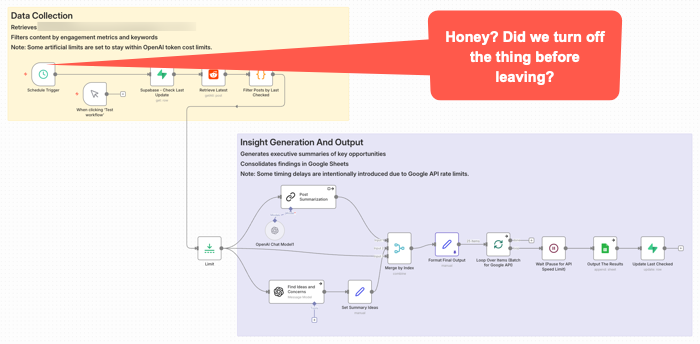
This workflow got triggered late Sunday night. It was left on for a couple of months after no longer needed. It quietly went about it’s weekend, burning some tokens along the way for no good reason.
This is one way teams can get surprised. They price out prompts and tokens, maybe even a few tests, and think the economics look fine. Then the real thing shows up. Retries, loops, oversized context, verbose outputs, multiple tool calls, background checks, agent wandering, and a tendency to use the expensive model for work that does not deserve it. OpenAI’s guidance now explicitly pushes developers to reduce both tokens and requests, not just stare at one price per million tokens number. (OpenAI Developers – Batch API)
Prompt caching is one of the more practical levers. Not every tool exposes it cleanly. At least not yet. I’d assume more or all of them will add it as it’s a competitive checkbox thing. They may all have it within a week after I write this given how fast releases are coming in this area. The point is, if you are reusing the same big instruction block, system prompt, tool definitions, or repeated context in a workflow, caching can materially cut input cost and latency. OpenAI says prompt caching can reduce input token cost by up to 90 percent and latency by up to 80 percent on repeated prefixes. Anthropic similarly prices cache reads at a small fraction of normal input cost and notes that caching repeated content can also help effective throughput against rate limits. (OpenAI Developers – Prompt Caching 201 – Seriously, click this link and at least take a quick look at the charts.)
Other ways to save are less exciting, but could matter more.
Use the smallest model that can do the work. Do not send every classification, cleanup step, extraction task, or formatting pass to the premium brain. Google explicitly positions Flash-Lite as the budget option in the Gemini family, while more capable models cost more and should be used where they are actually needed. Again, nothing I write here will likely survive being accurate for more than a few hours. Okay, maybe weeks or months. But you will want to schedule a model review with some frequency for both quality and costs. (Google AI for Developers)
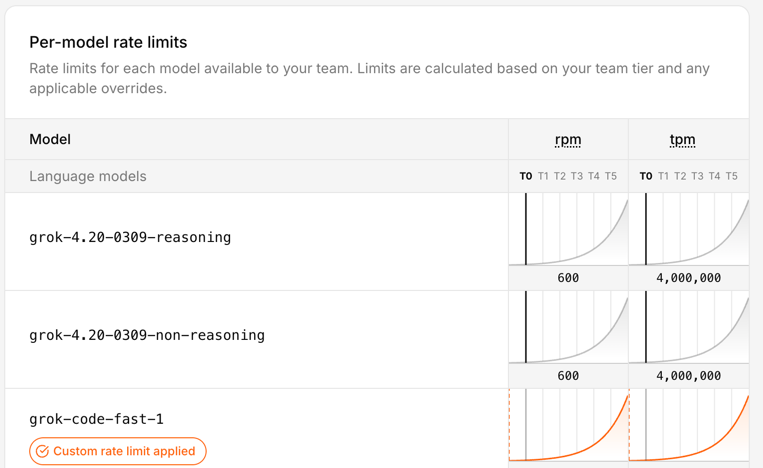
Keep context tighter. Some teams might treat the context window like an attic and just keep throwing boxes into it. That is sloppy technically and financially. If the model only needs three chunks, do not give it thirty. Anthropic’s caching and pricing docs make clear that long repeated context is a major target for optimization, and that pricing modifiers stack in ways people often overlook. (Claude’s Prompt caching API Docs) Remember, getting the context somewhat reasonably correct will be a quality issue. It’s probably impossible to tune this perfect. (That’s maybe just my personal opinion for now anyway. I’m just saying think about it and be explicit about choices.)
Use retrieval instead of brute-force stuffing. Pull in what is needed for the task instead of replaying whole documents, giant chat histories, or every rule you have ever written. This saves money, improves latency, and often improves output because the model has less junk to sort through. OpenAI’s cost guidance treats reducing input size as a core optimization lever.
Batch work when it does not need to happen live. This is one of the easiest practical savings opportunities. OpenAI’s Batch API offers a 50 percent discount compared with synchronous APIs, which makes it a pretty obvious choice for offline scoring, enrichment, summarization, or bulk transformations that do not need an immediate response. Anthropic also notes that prompt caching savings can stack with batch discounts. (OpenAI Developers) (I have not personally used this. It seems to make sense though, if a project is amenable to the treatment.)
Also watch the hidden multipliers. The real budget killers are often not the first call, but the dumb repetition around it: retry storms, long agent chains, double-check passes on low-value tasks, debugging with full production prompts, and overbuilt orchestration for work that should have stayed simple. A workflow does not have to be broken to be a bad product decision. Sometimes it works fine and still costs too much. (OpenAI Developers – Batch API) This is really similar to what you might do if looking at a cloud architecture data flow. Take AWS for example. You might put data in different storage containers depending on your reasons for needing it. There’s a lot of cost savings in putting data in long term storage. So the buckets may be different for AI workflows, but the idea is the same. We’re still cost constrained.
And that’s the practical PM point. Cost control is not one trick. It is discipline: model routing, smaller context, caching, selective retrieval, batching, and resisting the urge to let an impressive workflow become an economically stupid one. Not every PM has direct P&L responsibility. Many don’t. But even if you’re a junior feature owner or individual contributor, understanding these cost drivers helps you make better trade-off decisions and communicate effectively with stakeholders who do own the budget. If you do have P&L or budget accountability, this discipline needs to sit high on your priority list.
Perhaps the Worst Thing About These Tools
You know what I think maybe the worst thing is about most of these tools once you get some of the gunk blown out of the pipes and they’re kind of going?
Give up? OK, I’ll tell you.
I think one of the worst and most dangerous aspects of these things is that once they’re kind of working, they’re mostly pretty good most of the time.
Huh? How could that possibly be bad or dangereous?
Complacency. We are maybe creating things that lull us into a sense of security before we really should. You maybe get used to vibing/prompting along some changes. So you’re not backing up work or designs or files or databases or whatever. You’re moving. Wind in your hair. You’re like a whirling productive Tasmanian Devil. Then you, or it, screws up. Kaboom. No breakpoint. No restore point. No going back. You’ve maybe lost a whole lot of work. And worse, maybe all that’s left is what you kind of barely remember was on the screen because you were only kind of barely even involved in the process. Yes, you were there. Typing. Prompting. Vibing. You were maybe “in flow” during your build, but at the same time, not wholly situationally aware. S$^%.
More tools will be adding restore points. Or execution logs, depending on the tool. Still, you may want to look at various types of backups. Losing things here is not like losing a few edits in a document. It could represent a whole stream of thought process. So it’s not just about time to rebuild.
You need to keep up with best practices in terms of backups or find your own means for doing so even if not built in to your tools of choice.
This has become fairly well known at this point, but some of the worst things you can hear from your AI co-pilot buddies are things like this: “Now I can see the full picture, you have a node that does XYZ. Here’s your bulletproof solution.” Maybe it is. Or maybe you should just generate an nice big image that says “Welcome to the Rabbit Hole. Enjoy Your Stay. You’ll be here awhile.”

When not to use AI
One more thing. Not every problem needs AI.
Some workflows are stable, rules-based, low-ambiguity, and already well served by traditional software and processes. Some products need determinism more than flexibility. Some are too sensitive, too regulated, too expensive, or too easy to screw up for an LLM-shaped layer to make sense. And sometimes the right answer is not an agent. It is a script, a form, a queue, a dashboard, or a human with a checklist. One issue right now is some may feel if they’re not doing AI, then they themselves are just using medieval tools. There’s nothing wrong with experimenting with such things slowly. You have to judge your risk levels depending on your product type. What I’m suggesting is pay attention to what we’re seeing in the marketplace right now. Yes, amazing tools. And also a variety of failure modes, some of which I personally think may be insidious. That is, outright wrong answers for mission critical applications will hopefully show themselves in obvious ways. But more quiet failure modes in customer service areas might not. You could, for example, be happy with what seem like better customer service handing metrics when in fact you’re losing customers because they’ve had a bad experience.
This may not be as exciting as everyone seems to want right now. Too bad. Product work should not be about sprinkling AI on everything that moves. It is about choosing the right tool for the job, with eyes open to risk, cost, and operational reality. Sometimes the smartest product decision is not where to stuff something in, but where to leave it out completely.
AI Deeper Value Content
A lot of “about AI” writing is still pretty surface level. Mine included. There is nothing wrong with summaries and practical explainers, but some of the better understanding still comes from reading the people actually building and studying these systems. You do not need to master all the math to get value from that material. You just need enough curiosity to go a layer deeper than the usual feed chatter.
If you want better signal, Anthropic has been publishing strong practical work on how agents actually fail and how to make them more reliable. Their pieces on Building Effective AI Agents, Effective context engineering for AI agents, and Writing effective tools for AI agents are especially useful because they focus less on mystique and more on concrete workflow design, tool choice, and context control. Also, Building effective agents.
Google has also been putting out material worth reading, especially where workflows and agents are concerned. A good recent example is Towards a science of scaling agent systems, which is useful partly because it treats agent systems as multi-step workflows where small errors can cascade, not as isolated one-shot prompts. For more practical builder guidance, Google’s docs on Using Tools with the Gemini API and prompt design strategies are also worth keeping around. (Google Research)
Some of the deeper material here is challenging. I don’t pretend to understand al of it. Still, if you only absorb part of it, you will usually come away with a better mental model than you get from another round of “LIKE and COMMENT SuperPrompt for my list of average prompts” content.

Practical YouTubers
If you want more practical things, here’s a few YouTubers I suggest checking out.
Nate B Jones is good for strategy-meets-execution content. (YouTube)
Nate Herk is a good one if you want hands-on AI automation, especially around workflow building and business use cases. He is very much in the “build the thing and show the steps” camp. He’s also very much into n8n.io which is my personal go to workflow automation tool, though he’s been very big on Claude Code recently as well. (YouTube)
Matt Wolfe is more mainstream and tool-focused, good for keeping up with what’s shipping and what people are actually trying in the market. (LinkedIn)
My general rule is ignore most of the polished “look what I built in 11 minutes” stuff. Favor the people who show workflows, failure points, tradeoffs, and actual implementation friction. That is usually where the value is.
Final Wrap Up
That’s it for this series. AI product work is not just about clever prompts or shiny demos. It is about judgment under messy conditions: what to build, what to trust, what to monitor, what to shut down, what to pay for, and what to leave alone. The tools are real. The value can be real. The sharp edges are real too. This three article series is basically based on my notes and learnings across a few AI projects over the past year or so. I’ve just wrapped some text around them to try to share some points with others who may be facing similar issues. Due to our interests, we’re are likely inundated with LinkedIn feeds that may be generally true, but often overly gush about the virtues of some latest new thing, rather than get deeper into the weeds and deal with day-to-day realities. Regardless of level in an organization, Product is often about floating across the stack from Strategy to Tactical. I hope these writings have helped navigate those transitions a bit when it comes to these types of projects.
See Also:
- MLOps
- What is MLOps? (Databricks)
- What is MLOps?(AWS)
- LLM Observability for AI Agents and Applications
- Mastering AI agent observability: From black-box to production-ready
- The Role of OpenTelemetry (OTEL) in LLM ObservabilityObservability for AI & LLMs
- What Is AI Observability: Best Practices, Challenges, Tips, and More
- AI Observability: How to Keep LLMs, RAG, and Agents Reliable in Production