In Part 1, I focused on why AI product work gets messy so quickly. Strategy theater, bad data, dependency problems, and workflow brittleness. This next section moves closer to the machinery itself: workflow tools, notebook sandboxes, exception handling, observability, skill files, context, and prompt engineering.
Workflow Operations – Langchain Type Tools
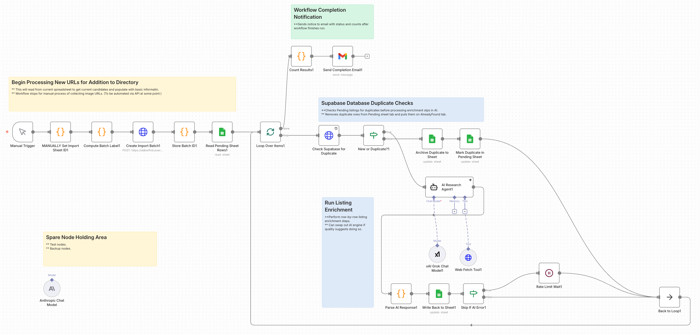
I use n8n.io for several tasks; a couple professional and several personal. If I was a real developer, maybe I’d be using something closer to pure code. But I’m not. Still, I think tools like these are more than just a crutch. And they’re certainly a fast way to wire things up for some basic testing.
Regardless of platforms, the thing you really need to do with these tools is have an MLOps view from a Product perspective; either something you built yourself or in partnership with your AI/ML/Dev team members. Ideally you have a skilled architect on staff, however you should be collaborating on these things or at least in the loop. In a startup, there might be some more heavy lifting on the product side.
Testing with Google Colab Notebooks
If you haven’t tried Google Colab, consider giving it a shot. It’s really a no-risk way to play around, with some things; especially folks like product managers. There’s no crazy configuration or setup needs. Same for Hugging Face. For some experiments, it can also be useful to test pieces of a workflow in Google Colab or a Hugging Face notebook space before wiring them into a larger system. That is not the same thing as production engineering, of course, but it can be a practical way to learn and try things, without immediately tangling with your full workflow stack. If you want some starting places, you can go to Slides 29 – 32 in this presentation I did for an AI course on Product Management ML / AI Analytics. It’s over a year old now, but the notebook files are still there and you can freely copy them. (I won’t even make you post “I’m a Tool” in my comment feed.
When Exceptions are the Rule
Part of what’s going to happen with workflow and AI execution is more downstream discovery of exception processes that got missed or not fully elaborated in earlier discovery.
Be ready for these. In practice, a meaningful part of workflow design is not just making the main path work, but deciding what should happen when things get weird. And they will. Because as smart as we all might thing we are, chances are we’re going to miss things. The best Business Analysts are going to miss some processes, especially exception processes or things that were tacit assumptions that are now only surfacing once being turned into explicit workflows. Sometimes such speed bumps will just be annoying time wasters, other times we may learn something interesting, and in the worst case we end up finding challenging blockers. Remember as well, that a lot of these work flows are probabilistic, not deterministic. This is a whole new special area of challenging to test product types.
Observability / monitoring
You also need to see what the thing is doing.
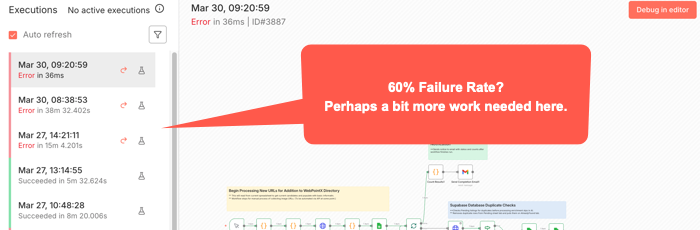
A surprising amount of AI workflow pain is not just failure. It is opaque failure. The run stopped. Or drifted. Or looped. Or produced garbage. But where? Why? On which step? With what inputs? Against which tool? Good luck fixing what you cannot see. For some workflow tools, (like n8n), you can usually see where a workflow stopped. But not always exactly where the causal error happened. Some bad data may have been injected three nodes back or something.
That means logs, traces, alerts, and some kind of run history are not nice-to-haves once a workflow matters. Again going to n8n, there’s an Execution log you can check to try to see exactly went on while it ran. Other tools have other mechanisms. Or at least they should. You want to know what prompt ran, what tool got called, what response came back, where latency spiked, where retries happened, and where a human had to step in. Otherwise your “agent” isn’t just a black box in terms of the common idiom. It’s really something over which you probably don’t really have full control.
Among the more annoying aspects of a paused or stopped workflow is how you start it again. Will it pick up right where it left off? Do you have to undo some of what’s already run and start something over? You can’t always just flip the switch back on without some re-start procedures happening first.
Openclaw
You know what this thing does, right? And newer variants have even more access to your OS level tools. Maybe a bad idea. You choose. But making the core openclaw solution go depends on some kind of API and keys. Here’s the practical takeways:
- Security Mindset for skill files.
- Limit skill files to avoid overloading the context windows. The size of the context window still matters, both for results and for costs. (See: Effective context engineering for AI agents.)
- You can use a variety of AI engines. Just by way of example, let’s look at Claude/Anthropic. For something like Claude / Anthropic, you’ll want to set up an API key just for your bot. Just note that there are two completely different billing systems for claude.ai and direct API access. For APIs, there’s both credit balance and monthly spending limits. You have to manage both of these or your agent will just stop. There’s also rate limits, depending on your account. Whatever workflows you have will stop if you bump into any of these limits, and perhaps others. You might not get an alert unless you’ve set up some other aspect of workflow to do so.
- Remember that your model selection directly impacts your costs. Maybe try some experiments with your typical use cases to find a cost / quality balance.
- API keys can also go stale or expire or have an error. Any of these things will stop you cold. If you get just stopped somewhere, consider generating a new key and updating your config file. Remember, they only show you the key once, so copy it and stuff it in a password manager or other secure file. Are you vibing your way through things? Be careful not to accidentally cut/paste your key into a prompt window. If you do, you’d better generate and reset a new key.
- For configuring this, your initial setup will ideally work. Otherwise, unless you’re already somewhat familiar with Unix file systems and editing config files using tools like vi or nano, you probably want to stay in the basic configuration tool. Just type “openclaw configure” and enter to get there. It’s still a bit non-intuitive for typical GUI users, but using arrow keys and spacebar to select and move, [Enter] to select final options, things should go ok. Just remember if you use this to update API keys, this is Unix and an old school editor. You’re mouse might not work as usual; though maybe right click to cut/paste might. Look at the Ctrl key options at bottom of any editor screen. And understand that Ctrl or Command plus Shift-V is probably what’s needed to get something from your clipboard into this editor. (For, example, to change an API key.)
- Last point, which maybe should have been first. If you have problems with your bot hanging, try just running /reset within the TUI, (Terminal User Interface), before going crazy with other changes. That alone might fix things. But sometimes you may have to find the proper terminal commands to reset the whole gateway, depending on why it may have crashed.
- My goal here is not to teach you OpenClaw. There’s tons of videos for that. It’s to point out that there’s gotcha’s here and you should just be ready to deal with them.
Skills
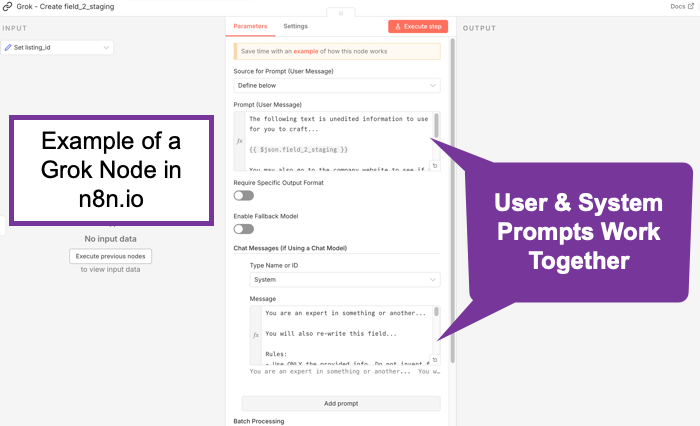
Skill files seem all the rage. Definitely flavor of the month. (See: Claude Skills for Baseline Competitive Analysis for an example and How To.) What do they do? They scope things. They’re really just instruction files. In some ways, they’re kind of like Retrieval Augmented Generation. (RAG) Not exactly perhaps, but what happens is the bots generally scan the available skills descriptions and if one applies, it gets read in. It’s a manual lookup, not a vector search. So maybe it’s more like a table of contents. No embeddings. No search index. When considered though, at least a few AI/tokens help with that choice. And if something does get loaded, it goes into context as additional instructions. Essentially, it’s functionally identical to a system prompt extension. You maybe can think of them as on-demand system prompt fragments. Or maybe as a menu of playbooks, AI reads the menu titles, (an inexpensive action), then loads the full playbook(s) when needed, (costs more tokens). Let’s review what the messages to an AI are. A system message sets up the context of who’s asking, rules, capabilities, constraints, maybe more. It’s sent once at the start of a session, (though perhaps each turn by some bots), and is supposed to treat such instructions as “ground truth / authoritative.” This might typically be behind the scenes, but you might set it yourself, especially if using agentic tools, such as an n8n AI node. The user message is typically just what you type in. It’s the request/question/task. These matter because the system message should have higher weight. They’re more likely to be followed than those in a user message. In any case, all of these go through the context window and cost tokens.
Context
Skills are deep tactical. Let’s go back up to a more abstract layer.
You should understand Context. It’s a big concept and it finally seems to be catching on. It’s catching on in AI to a large degree because it’s about how we can be effective regarding our use of Cognitive Load. This isn’t necessarily what others are calling it. But it’s essentially what this is about. We built these things a little like us. They take in some information, (just as we might sense our world), they embed it, (or encode it, similar to how we might lay down neural pathways in our brain), and then upon a query, they decode it, (much as we might try to search our memory and then use whatever ineffable human qualities we have to craft an answer).
As the smart kids have taken us from rule-based, (heuristic) systems, through encoder, decoder models though attention layers, we’ve run into some of the same problems humans have. We can only hold so much and consider just so much in terms of context. AI’s are the same. A question I wonder about is this: Is this actually a technical challenge that’s solvable, or is there something fundamental about reality here that might be a natural limit here? Whatever. The point is, for now we’re dealing with context windows to try to extract understanding or generate objects towards desired outcomes. To do that, we’ve layered onto our AI foundational models things like super fine tuning, Retrieval Augmented Generation, (RAG), and now more ideas about smaller models or context windows. We’re tying to hone what our models might use to solve their problems.
Essentially, context is the surrounding situation that gives meaning to information. It is not just the content itself, but who is involved, what they are trying to do, what came before, what constraints matter, what environment they are operating in, and what should or should not be in view. Strip away that surrounding frame and even technically correct information can become confusing, misleading, or useless.
So, when you plan out what you’re doing to do and what information you’re going to use, the experiments you choose should consider such things. AI may be amazing, but there’s still real costs in both money and time to design, build, deploy, etc. Starting with some insights as to what general large scale pieces you put together can help you get from start to finish more effectively than just slapping a model on to a problem you might not even fully understand yet.
It’s worth mentioning here that the word “context” is also ironically ambiguous with regard to digital concepts. The idea of how it’s used for prompting is somewhat constrained. To understand the concept in a more global way from an Information Architecture perspective, see Understanding Context: Environment, Language, and Information Architecture, by Andrew Hinton.
What is Prompt Engineering Really About?
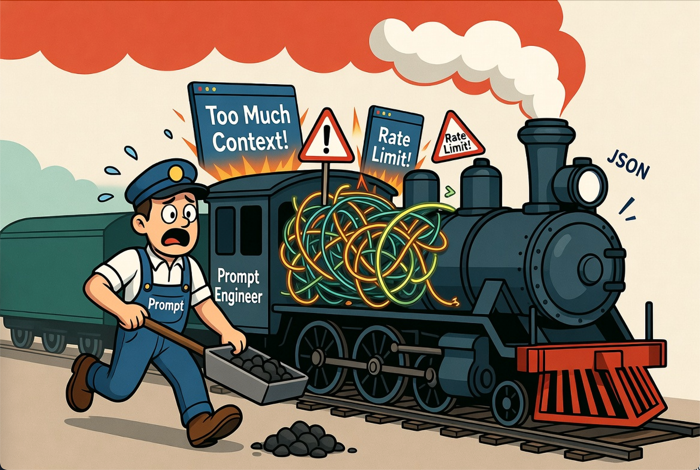
It is really about scoping context.
Prompt Engineering seemed to emerge quickly as a method for just writing fancy queries for AI. Kind of like how users who could do boolean well could get more out of early search engines. And it’s true eough that following any of the many strategies for better prompting can take you far. But this has evolved quickly.
The latest thinking is that prompt engineering still matters, but not in the old “learn these magic phrases and unlock the machine” sense. The more serious view now is that prompt engineering is useful as a practical steering layer. It helps in clearly defining the task, supplying the right context, setting constraints, specifying output format, and helping the model focus on the right slice of the problem. OpenAI still treats prompt engineering as an important way to get more consistent outputs, while also emphasizing evals and iteration rather than one-shot cleverness. Anthropic has gone a step further and explicitly framed the evolution as “context engineering,” meaning the real leverage often comes from what information, tools, memory, and instructions you place in the model’s working environment, not just from clever wording. Google’s guidance is similar place. Prompts help, but they work best as structured instructions plus relevant context and examples. (OpenAI Developers – Prompt engineering)
So prompt engineering is not dead, but it has been demoted from mysticism to craft. For product managers, that is actually good news. It means the job is less about becoming a “prompt wizard” and more about disciplined scoping: what does the model need to know, what should it ignore, what tools may it use, what output shape is acceptable, and how will you test whether the result is actually useful? In practice, prompt engineering is increasingly about building a bounded working context for the model, and much less about clever phrasing tricks. (Effective context engineering for AI agents)
GPTs… Imagery to Full Site
There’s Generative Pre-trained Transformers (GPTs) or similar for all manner of things. Images, Sounds, Videos, Lions, Tigers, Bears, and more.
Understand the costs. Plan your prompts. It’s not always true that the more you put in the better, but a lot of times, having one clear longer prompt is better than multiple turns. Prompt Engineering tips likely different per tool output type. One funny aspect of all this is the layers of specificity that may – or may not – be required. These things are supposed to understand us, but how well do we even understand each other? Traditional rules of communication apply: Sender > Channel > Receiver, with perceptual filters and context at both ends. The language within a realm or object type area may also be unfamiliar, which is why traditional experts will still do better here for awhile. Natural Language is sometimes anything but natural when it comes to industry jargon. You’ve probably heard someone speaking in some industrial jargon you’ve not understood and you’ve probably done it yourself. Is there a difference between, “move that blue thing a little to the left” vs. “Move the dark blue polygon near center of screen to the left from the viewer’s perspective, approximately 10% of it’s own current width.” Or “…to the left such that it’s equidistant from both objects on either side of it and below the circular object above it by a distance equal to the radius of that object.” Whatever. Have you ever played or seen anyone play a game where one person describes an object and another tries to draw it? This is kind of the same thing. The point is, the clearer the instructions, whatever they may be, the less prompting is likely needed and therefore the less cost. It’s similar to when we hire general contractors. Or Product Managers. When people ask about what Product Managers do, there’s the usual thousand different perspectives. But among the tasks is “interpreter.” Of course, we all do this every day in every way as we function as communicators. But for PMs it’s fundamentally part of the job. Theoretically, we should be be the best at working with these things. Not because we can be more specific than a designer or a programmer with more detailed task syntax. But because we’re supposed to be the balance point of needs with the most across the board stakeholder sensitivity.
Evals and Rubrics
If you are building with AI tools and not thinking seriously about evals and rubrics, you are mostly just vibing your way through quality control. That may be fine for casual experimentation. It is not fine for more serious product work, especially anything mission or safety critical. Evals are how you test performance. Rubrics are how you define what “good” even means. Without them, teams tend to confuse “looked pretty good in a demo” with “ready for repeated real-world use.”
I wrote more on this earlier in Intro to AI Rubrics for Product Managers. The short version is that product managers do not need to become evaluation scientists, but they do need to make sure their teams define criteria, run repeatable checks, and not pretend that anecdotal success is the same thing as reliability.
Wrapping Up for Now
So that is the middle layer of the problem. It is not just “pick a model and prompt it better.” It is workflows, exceptions, visibility, permissions, scoped context, and having some actual standard for quality. Once you start wiring these things into real behavior and real systems, the next questions become even more serious. Who controls them, how do you stop them, what do they cost, and when should you just not use AI at all?
See the exciting conclusion next in Part 3: Practical Tactical AI Tool Challenges: Governance, Cost, and When Not to Use AI.