The following goes over a fast way to get a jumpstart on a basic competitive analysis using Claude.ai along with the increasingly popular Skill function, complete with a slide deck and an Excel workbook. Spoiler Alert: Just skip down to “How to Install…” if you want to skip the explanations.
The catch: AI can accelerate the first draft, but it can’t replace judgment. Treat the output as a structured hypotheses, not truth. You’ll still need to validate claims, metrics, and positioning with primary sources and customer reality.
- Understanding Your Own Work: When doing strategic analysis, I believe part of understanding is in doing some of the discovery yourself. As great as AI is, it’s increasingly clear we sometimes lose at least a little something when we just have all the work done for us. That being said, the tools can help us get a big jump on things as a starting place.
- About Claude Skills: Claude.ai from Anthropic is one of many AI tools we have for generative language tasks. All these tools are bulking up with everything from training models, to agent tools collecting data, project organization and more. “Skills” are structured instruction files that shape how an AI behaves. It’s like an operating runbook for an assistant. They’re especially helpful for repetitive tasks.
About this Skill and a Warning
As product managers, we have many eclectic tasks, and for some of us that includes high-level strategy. The role varies among and within industries along several continuum, from technical to business and then depth and breadth within each. Most of us work in competitive marketplaces with rare exceptions for truly new categories. Some of us have colleagues focused on strategy, others might be solo in a startup. Truly great strategic analysis isn’t just data gathering and pretty slide decks. There’s insight, which can vary from intuition born of deep experience, studying the larger industry and so on. Some of the rote data collection work often helps in understanding a market space. This Claude skill helps build some of those basics. At the same time, you skip wallowing deep in the data and discovery, which can sometimes be instructive as well. Just realize as awesome and maybe magical these tools may be, the output is a probabilistic synthesis from just one AI tool. Depending on your Claude plan and settings, it may browse the web, cite sources, or rely on its internal knowledge. Treat outputs as hypotheses and verify with primary sources. As with the other AIs, it will confidently weave a story, that might be off or outright wrong in some places. The insights it may offer are basically an amalgam of others’ thoughts. Some may seem deep, but that’s likely because you just didn’t happen to know them. However, someone else did.
The main point of this writeup is to offer a starting place, not an ending place. There’s plenty of people who use search engines and stop at the first list of 10 blue links. Maybe that often works. And the AIs even let us skip that information foraging part and try to get right to answers. Just consider if this is enough depth for your goals or just a beginning.
What this Skill Will Do
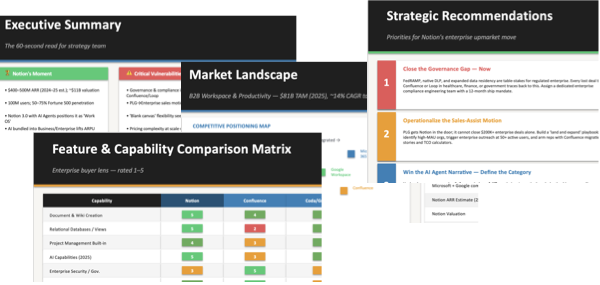
The skill is designed to generate a competitive analysis of a company’s marketplace in the form of a PowerPoint and spreadsheet backup data. I’ve included a variety of strategic and competitive analysis frameworks to offer several perspectives. There are of course more frameworks, and you can modify the skill files yourself if you want to add, update, or delete any of these.
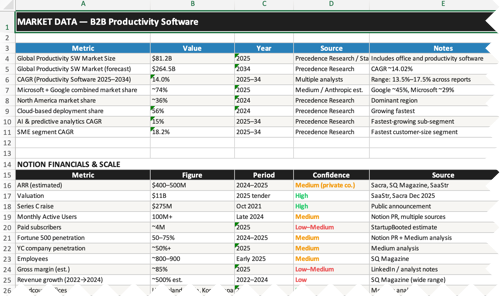
Skills are usually made of at least one, but more often several files that get installed in your AI instance, in this case Claude. (And specific install instructions are coming up.) Following are some of the frameworks explicitly in the skill files. There’s a few more optional ones in the SKILL.md file. And Claude may add some more. If you’re not thrilled with the output, just ask it for an update with your requested additions and deletions.
- Competitive Positioning Map
- Feature & Capability Scorecard
- SWOT Analysis
- Porter’s Five Forces
- Jobs-to-Be-Done / Buyer Segmentation
- Ansoff Matrix (growth vectors)
- Enterprise Readiness Scorecard (gap analysis)
- Battle Cards (competitive win/loss framework)
About the Output
The output may be a bit sloppy. There’s a variety of tools specifically for making slide decks or spreadsheets into better formats. I’m not doing anything overly polished here. This is a “get it done, knock out the basics” effort intended as a fast starting place. The slide deck will likely have some rough formatting; the value is in the first-pass structure and hypotheses. Regarding the information itself, assume it’s incomplete. I can’t say it enough, this is an overview starting place. If you want to, extend the capabilities and share back any updates.
Remember your goals, whatever they are. We study the past and present to try to predict or change the future. Doing so to good effect towards our goals depends on having as complete and true a view as possible. There is always the “paralysis by analysis” risk, and we often need to make choices with partial data. But there’s a difference between deciding you have enough info vs. just being lazy or cheap. The fact that some information or insights may just be hidden is, after all, part of seeking opportunities. Let me ask you something though… “When do you stop looking for something?” The answer? “When you think you’ve found it.” For your cell phone or house keys, that pretty much a binary thing since looking further after finding them would be ridiculous, but for information? You’ll likely never have it all or even know what percentage of relevant and pertinent info you’ve found, and that’s ok. Knowing, or at least choosing, when to stop collecting and analyzing and start deciding is part of the game.
Additional Paywall Sources
My instructions include providing additional reference sources at the end of the report, though I do this as part of the prompt as you’ll see coming up. These may have been unavailable due to paywalls or subscription costs, but this way you have a guide to some premium options if needed. There’s talk of how AI might impact paid services.However, there’s plenty of expensive to collect data and skilled analysts that produce amazing work. Understandably, a small business or solo consultant might not be able to justify these costs. And true, sometimes such things aren’t necessary. However, the higher cost sources often do add value. There’s usually a reason they’re so expensive. (Not always though. But evaluating research is another topic.)
It’s likely more sources will eventually be available to AI agents directly with some payment. You’ll probably have to set thresholds or rules for your agents to choose the value of such things and budget or bid accordingly. Whether that’s via subscriptions to data marketplaces, payment in stablecoins or other tokens, at some point you may want to add those capabilities to skills like this. For now, this skill set operates on its own within what its core AI engine alone can do. The likely bridge for this will be MCP (Model Context Protocol) connections, which are already how Claude and other tools connect to external tools today. This whole area is still nascent, but we can expect these things to start popping up over the next couple of years.
What You’ll Need
This skill was built for a basic Claude.ai paid subscription. It should work on a free plan, but possibly very slowly and might not complete before you run out of token allotment. Pro Tip: You can probably run it using an OpenClaw bot as well. Maybe just point it at the repo and ask it to install. However I have not tested that path. I realize OpenClaw bots are all the rage right now, but I don’t fully trust mine. He’s not evil, but like any child, he misunderstands things and causes some hassles. So he stays in a box on a separate sandboxed computer, which is probably not where you want the final output to be for this task anyway. If you know about OpenClaw you are likely familiar that there are major security risks with it.
How to Install the Competitive Analysis Skill
Alright then, here we are. Let’s get this done…
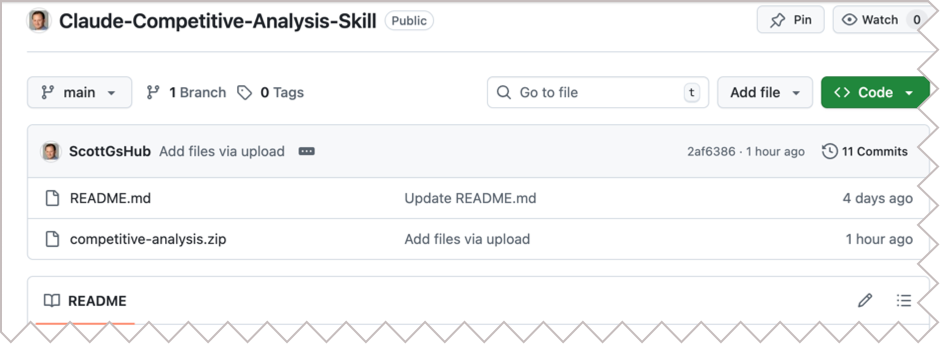
- Go to my personal GitHub Repo for this skill: Claude-Competitive-Analysis-Skill
- Check the README.md file for any updates.
- Download the competitive-analysis.zip file.
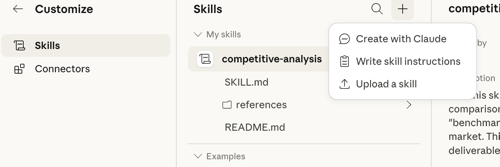
- Go to Claude, open the sidebar and select “Customize”. (Note: this may change. If you don’t see this menu choice, hunt around or just ask it where to update skills.)
- Select the [+] option, then “Upload a Skill”, then drag and drop the zip file.
- That should do it.
- If something is not working, check all the steps in the README file on my GitHub. Sometimes you may need to flip a switch allowing the tool to do something. Sometimes, they move these controls around. Worst case, if something isn’t working, tell Claude what you did and ask it to help you troubleshoot. And let me know so I can update these docs.
This will upload all the associated files to the correct places. If you like, open the zip file yourself on your computer and look at the individual files. These are the skills. These are markdown files (.md) You can just pull them into a plain text editor, (or drag them into your browser), to take a look. (“markdown” is just text with some simple formatting symbols like # for headings and – for bullet points.) You’ll see they’re just text instructions; the same as if you were trying to give specific instructions to an assistant. Which you are!
How to Use It
Set Up a Project First
This is optional. You do not need to run these tasks in a Project area, however I recommend using the Project feature to build particular outputs. With Project, you can set up some initial conditions that can help. So your first step is to set up a Project called “Competitive Analysis” and in the project instructions area, add this, and as with all things, modify it as you see fit:
------
Use the competitive analysis skills for this project.

Consider additional business analysis frameworks that might be appropriate beyond what the skills may include.

Use whatever publicly available data you can reach.

In an appendix, list any other data sources, (up to 10), which might be useful, but were unavailable as they're behind paywalls or subscriptions.
------
Run the Skill
This example will build an analysis for the Notion product, a productivity software service. Just enter whatever other company you like instead. Make sure it’s an unambiguous name though. Microsoft is easy. But if you use “Apple” you could get the computer company, the bank, or others. Or worse, have data mangled up from all of them. There’s a lot more ambiguous names than you might think, so make sure your scope is correct.
One tip: if you created a Claude Project area for competitive analysis as suggested, make sure to start the chat inside that project. That way any custom Project instructions you added like “consider additional frameworks” or “list unavailable data sources in an appendix” will apply automatically without you having to repeat them.
Just start a new chat and say something like:
“Run a competitive analysis for Notion in the B2B productivity and workspace software market.”
That should be enough to trigger the skill. Claude may ask you a few scoping questions before diving in; things like who the audience is, what decision this is meant to inform, and how deep you want to go.
If you want to skip back-and-forth questions, you can front-load the details in your first message:
“Run a competitive analysis for Notion in the B2B workspace and productivity software market. Main competitors to include: Confluence, Coda, Microsoft Loop, and Notion’s own positioning against Google Docs/Microsoft 365. The goal is to understand Notion’s competitive strengths and vulnerabilities as they move upmarket into enterprise. Your audience is a product strategy team. I want the full output: PowerPoint deck and Excel backup.”
That single message should give Claude everything it needs to go straight into research without stopping to ask clarifying questions, though it might anyway.
Validate
In the “trust but verify” category, consider manual validation.
- Confirm competitor list is complete for your segment.
- Spot-check top 5 claims with primary sources.
- Double check numbers and replace with real metrics where necessary.
- Confirm any positioning map axes match reality.
- Identify 3 hypotheses to test with customers/sales.
- Log citations and update any assumptions.
Make Changes
You can ask for updates if something is missing. Just be aware this may burn a lot of tokens to re-build such a report. As mentioned, you can change the rules here easily. If you do, I’d appreciate you sharing any updates back. You can do this the technical way by forking the repo on GitHub and submitting a pull request, or just send me a message with what you changed. Getting back to just design for a moment, when you get your PowerPoint slide deck, you can always clean that up yourself, or you can import into Beautiful.ai, Canva, or Gamma and have those work on the deck. Or use Microsoft Copilot Pro Plan to clean up directly in PowerPoint. As fast as things are progressing, some tools aren’t as integrated with Claude or other AIs as they likely will be soon. For example, we’d ideally be able to just call an API to do something or another, but not all of these services have APIs amenable to agent treatment as yet, nor do they have MCP (Model Context Protocol) running to easily connect to AIs. This will likely all come soon enough.
See Also:
- Extend Claude with skills
- The Complete Guide to Building Skills for Claude (pdf)
- The Busy Person’s Intro to Claude Skills (a feature that might be bigger than MCP)
- Master 95% of Claude Code Skills in 28 Minutes (YouTube)
- Free Red Team Competitive Intelligence (CI) Gem Tool (for Gemini, not Claude)