
This extensive write-up is not a warm, fuzzy post about some AI strategic theater, though there are both strategic and tactical issues below. It’s a walk down some paths regarding practical issues. It’s about some of the challenging practical realities once product people try learning about or making tools work in actual workflows. You may feel some of my personal scar tissue in some of these passages. This is for semi-technical product people working with several AI tools and dealing with some of the practical gotcha’s in making them go. It’s also raising a hand and calling BS on the spew of feed drivel about how “all you have to do is just set all this stuff up and crap magically happens.”
What’s Ahead?: failures, data, workflow ops, context and prompting, evals, governance and kill switches, costs, complacency, and when not to use AI. This is a rather long post, even for me. But when I study things, I tend to go deep. As is often the case, this post is really based on my notes to myself in my person wiki over time, cleaned up somewhat and posted here to share.
These tools are great and I really enjoy them, even if there are some challenging spots, which we’re about to explore. Some of this stuff feels magical! And fun if you have that attitude. It really can be just fun and satisfying to see a workflow executing well. However, others can quickly become a major hassle. It’s rarely as it is in so much of the feed fawning I see. On the surface, it looks like product managers, all of us really, are being sold a fantasy of frictionless AI tooling. It makes me wonder if some of these folks are actually using these tools for real. My own experience, and interacting with others or via Reddit and so forth, shows a usually more challenging and meandering path. That’s ok. I get it. The Happy Path is easier to write about and slap together a Loom or YouTube or whatever. Unfortunately, it also obscures some likely realities.
Here’s my message as we drive through the messy parts. You’re ok. It’s not you. These things can still be a little sloppy. Just keep pushing through.
Time to go deeper now. Maybe not all the way into the engine, but at least under the hood. We’re going somewhat hands on wheel here for some selected use cases so we’ll have more of a clue as to what’s going on when we come across things.
As long as this particular article is going to be, it’s still only scratching the surface.
Basics
If you’ve bothered reading past the first section to here, chances are you’re a real practitioner, working with these tools at either or both strategic and individual contributor levels. There’s so many use cases and so many perspectives you the reader may have come with that there’s no way I can possibly hit them all. What’s below is a handful of use cases by which a lot of us are using these tools. I’ll try to give you the real deal practical advice on overcoming some of the basic obstacles you’d never think were there if you read so much of the feeds we’re seeing today. “JUST CONNECT YOUR AGENTS AND YOU CAN DO ANYTHING IN A DAY! Fire your staff, you contractors, even your mom. Like, Subscribe and Follow Me for More Tips, Great Looks and Wild Fortunes.”
Yeah.
It’s rarely that simple. Often, once you get going things are fairly smooth. But just configuring workflows can be challenging on occasion. Skim through here to see if there’s any use cases that apply to what you might want to experiment with and you’ll ideally find some tips that can get you over the problematic parts.
Just to level set my perspective, I did some dev type work early in my career, but those skills are long since atrophied as I’ve been doing core product work for a long time now. Still, I’m not sure how well I’d be navigating some of the bright shiny new things without having some historical comfort at an ancient-looking and yet still contemporary Unix shell prompt. For some of you/us, it may be worthwhile to take a quick back to basics course at that level if you want to learn/play/test some of these tools yourself. As I’ve suggested before, I believe even at senior management strategic levels it can be useful to get your hands dirty such that there’s some depth of understanding, even if your day-to-day is not going to be in these spaces. In any case, I’ve vibed my own trading bots and dashboards and lots more, partially for learning and work, but also for personal use. However, many of these things run in sandboxes or tightly controlled standalone environments. Where I’ve built or consulted on production projects, there’s a wholly different standard of care. My reactions here are in response to what I perceive as way to much noise vs. signal in the AI Boosterville crowd. Sure, we can wax philosophic about Singularities, and so on. But day-to-day? These are new tools in our toolboxes to make things. That’s it. Tools can be amazing, powerful and interesting. But really, we’re either building value or we’re not. What I’m trying to do is use their power while at the same time respect their sharp edges. I realize that’s a bit pragmatic, maybe even boring. It’s also what I see as a reasonably safe means to crafting new value vs. diving headfirst into the shallow end.
General Failures
If you own product, there’s a variety of elements in your business where you likely have limited control. This is where that fun saying comes into play, “It might not be your fault, but it is your problem.” There’s a variety of excessively stupid discussions going on, (my opinion anyway), about how we’ll replace product folks with engineers who can do that job now or the opposite, how we won’t need coders because anyone can just spew syntax now. That’s a post for another day, though others are already covering a lot of this. The short version is this: all of us working in digital live along some continuum of technical vs. business focus. That’s almost always been the case. There’s some exceptions. There’s some senior leaders who “own” the digital portion of a business for whom the entire product is just a line item on a spreadsheet and a few direct reports. Regardless of where you are as a product person along those lines, chances are you’re often the “one throat to choke” when things go wrong; whether strategic, KPIs, or technical, whether you really “own” that pieces or not. So it behooves you to at least ask the right questions, and make sure someone has a hand on certain aspects of things.
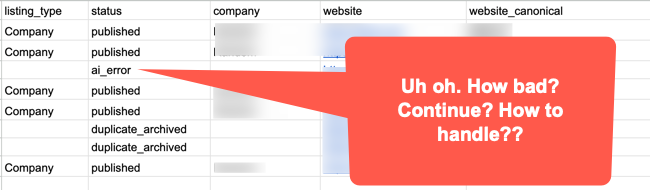
So. For AI tooling… It almost doesn’t matter what tool you’re using, these things are potentially risky in terms of usage failure modes right now and will likely continue to be so for the next several years. The risk spectrum runs from a bit of waste, to losing significant money, to the terrible liability and emotional costs of potentially hurting people. Even spending billions on data centers and availability seems to not always keep up with the growth in any case. There are still major and minor failures here or there, from actual customer facing product to internal platform billing consoles. There’s obviously use case differences between using AI for internal studies, learnings, analysis, etc. vs. production tooling. But right now, I’m focused on production tooling. Have backups and failovers for any mission or safety critical MLOps; just as you likely always have for other aspects of your business. People seem to be putting AI tooling into critical paths for some ops, but “vibing” DevOps is probably not the best idea. Now, if the failure is someone can’t order the latest widget from an eComm site, that sucks, but ok, fixable. On the other hand, failures with something medical? Mission or safety critical? Maybe that vibey solution just turned into someone’s introduction to liability law.
If you’ve read any of my writing, you know I’m a huge fan of irony and can be a bit sarcastic on occasion. (Just somewhat.) Well, I personally think one of the greatest ironies of our whole interwebs is that they were designed to be distributed and decentralized for robust access. And yet, we tend towards centralization in a variety of ways that trashes this. We’ve all seen how an outage at a major AWS location can trash multiple products. This, in spite of multiple availability centers and such. What about Crypto? This is supposed to be the magically decentralized answer to sovereign finance and identity! Yet, as a practical matter, something in excess of 80% of dApp traffic goes through just two gateway providers. These should all be lessons for AI. Perhaps even especially so as agentic flows pile on multiple tooling dependencies, as we also scramble to slap on some crypto payment rails. (Because why not.)
What’s the point?
Learn from the history of “failure of imagination” in terms of failure modes. We seem to be building some potentially brittle workflows that may have cascading points of failure stemming from the smallest of of weak links. (Not to mention just a wrong path chosen by an AI.)
Data First
We’re not going too deep into data analytics or science here. However, a quick mention on data quality just has to have an honorable mention.
The atomic data elements themselves matter. Taxonomy matters. Ontology matters. General data hygiene matters. (BTW, Go re-read Heather Hedden’s Accidental Taxonomist. I say re-read becuase you likely already should have. If not, go get it. Or find other intros to taxonomy and also ontology. There’s a reason taxonomy issues are becoming more emergent when we build with AI.) It all matters… and it matters well before we starting messing with things and trying to deliver anything of value with the fancy tools.
Before you even get to any tools, this all bears consideration. One hobby I have is woodworking. Usually fine furniture. Before I cut a thing, I’ve got some plans. Or at least a clear idea. Then I need quality boards. They need checking for dryness with a moisture meter, checks for warping, cupping, and more. If I skimp and use crappy materials? Well, sometimes there’s some skills or cheats that can be used to cover things up and move forward. More often though when using poor inputs, you not only have a sub-optimal outcome, you end up amplifying bad precursors into worse outcomes.
Now let’s leave aside things like ontology and taxonomy.
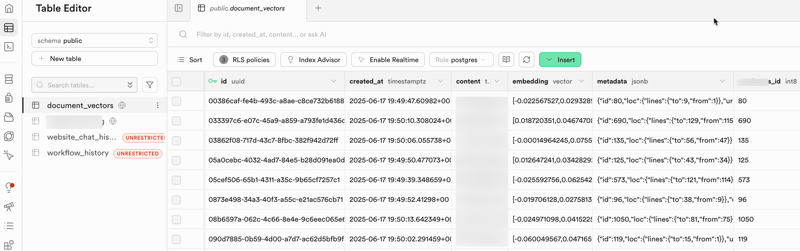
What happens downstream with even simple data? Things in workflows can break. And when they do, one thing that can happen is you now have records or files that are wrong and maybe not synced with other systems. How are you going to fix just those and move on? Did anyone set up batch numbers assigned to loads? Are there restore points? Is it easy to search for and fix the flaw? What else is runtime moving against all this right now, if anything? How big of a mess is there? How hard to clean up? All it takes is something dumb like phone numbers or zip codes with the wrong data type all of a sudden dropping zeros from the wrong places. What about conversions? Is this a product person’s responsibility anyway? Maybe not. You still better make sure it’s all on someone’s checklist. If your dev counterparts say, “#$# off, I got this,” that’s fine. I worked on a healthcare project once where IoT devices might report blood pressure in mmHg (the standard most clinicians expect) but sometimes in kPa (kilopascals) instead. Without explicit unit labeling and normalization, a machine will just process the raw number, potentially turning a normal reading into a critical alert, or missing a real problem entirely. That’s a case where it might be obvious to human eyes, but a machine will just process. It’s also a case where a real critical clinical workflow for sick or injured people might be impacted. How’s that vibecoding speed looking now?
Another one of these things where it’s maybe not your fault, or your job, but it’s still your product. Did you allocate the right resource(s) to deal with this? It’s an old story about garbage in and garbage out. But AI workflow can amplify the crap out of bad upstream data showing up later in tragic ways. Or worse, it won’t amplify right away. It’ll be hidden. Until it’s not. More work needs to be done upfront to get data pristine clean. It’s boring, messy work. Someone needs to be assigned to it early on.
Fire, Ready, Aim
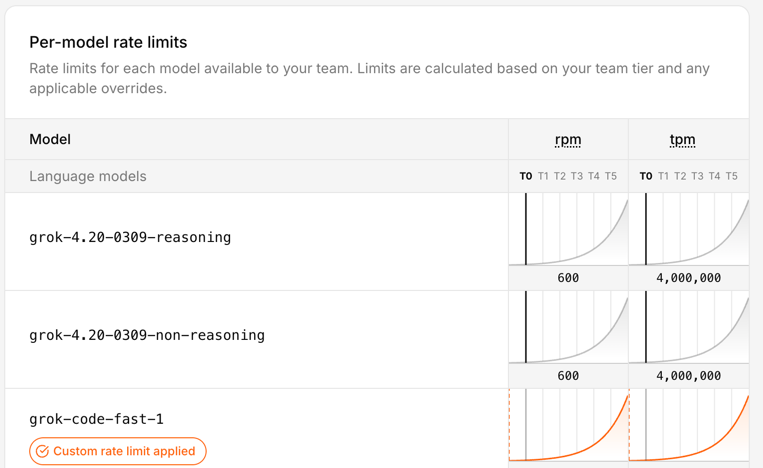
If your agentic workflow uses five different tools with different usage caps, time windows, and rate limits, what happens when one stage runs faster than the others can handle? It does not “win.” It can create retries, dropped work, or cascading failures across the workflow. This is not quite the classic kind of race condition from concurrent computing. It’s closer to a throughput mismatch or dependency-coordination problem in a distributed workflow.
The lesson here isn’t just about rate throttles for agents or tools. It’s about any form of dependency. Are your workflows robust enough to deal with it? Or if you’re putting more faith in the reasoning capability of an agent, are it’s skills up to the task of handling delayed or stopped processes? What might it do. What will it do? Tune in next time for the exciting conclusion of… WTF did your agent just do. Or not do. Who does the deals in your shop? Is it tech leadership? Product? Strategy? Someone has P&L here.
Let’s add in one more of today’s realities. Regardless of your Service Level Agreements (SLAs), you’re AI feed could fail these days. Even the top providers, (especially the top providers), are sometimes victims of their own success. The compute availability for the entire industry may be outpacing demand. Some more extreme solutions are people actually burning base foundational models right on to chips. That has or will have its own issues. It’s also not something most of us are going to do anytime soon. If your AI workflow is a critical path for your core product, you have some serious challenges. If it’s “just” one aspect, you should have solid failure modes.
Workflow Operations – Langchain Type Tools
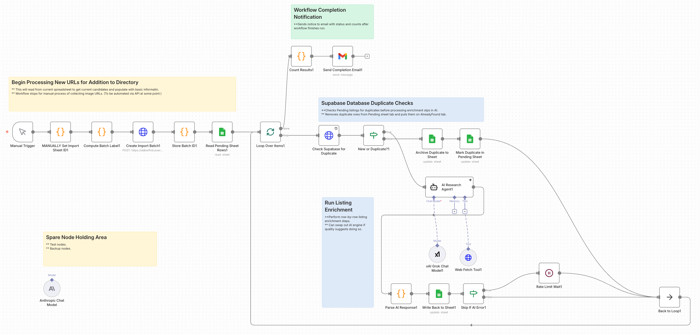
I use n8n.io for several tasks; a couple professional and several personal. If I was a real developer, maybe I’d be using something closer to pure code. But I’m not. Still, I think tools like these are more than just a crutch. And they’re certainly a fast way to wire things up for some basic testing.
Regardless of platforms, the thing you really need to do with these tools is have an MLOps view from a Product perspective; either something you built yourself or in partnership with your AI/ML/Dev team members. Ideally you have a skilled architect on staff, however you should be collaborating on these things or at least in the loop. In a startup, there might be some more heavy lifting on the product side.
Testing with Google Colab Notebooks
If you haven’t tried Google Colab, consider giving it a shot. It’s really a no-risk way to play around, with some things; especially folks like product managers. There’s no crazy configuration or setup needs. Same for Hugging Face. For some experiments, it can also be useful to test pieces of a workflow in Google Colab or a Hugging Face notebook space before wiring them into a larger system. That is not the same thing as production engineering, of course, but it can be a practical way to learn and try things, without immediately tangling with your full workflow stack. If you want some starting places, you can go to Slides 29 – 32 in this presentation I did for an AI course on Product Management ML / AI Analytics. It’s over a year old now, but the notebook files are still there and you can freely copy them.
When Exceptions are the Rule
Part of what’s going to happen with workflow and AI execution is more downstream discovery of exception processes that got missed or not fully elaborated in earlier discovery.
Be ready for these. In practice, a meaningful part of workflow design is not just making the main path work, but deciding what should happen when things get weird. And they will. Because as smart as we all might thing we are, chances are we’re going to miss things. The best Business Analysts are going to miss some processes, especially exception processes or things that were tacit assumptions that are now only surfacing once being turned into explicit workflows. Sometimes such speed bumps will just be annoying time wasters, other times we may learn something interesting, and in the worst case we end up finding challenging blockers.
Observability / monitoring
You also need to see what the thing is doing.
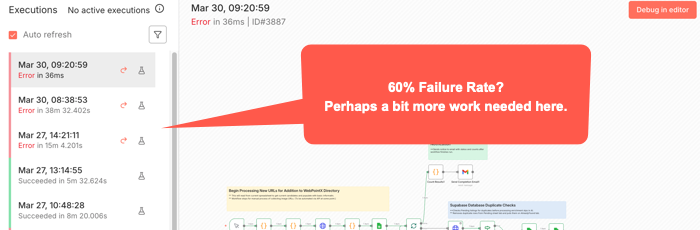
A surprising amount of AI workflow pain is not just failure. It is opaque failure. The run stopped. Or drifted. Or looped. Or produced garbage. But where? Why? On which step? With what inputs? Against which tool? Good luck fixing what you cannot see. For some workflow tools, (like n8n), you can usually see where a workflow stopped. But not always exactly where the causal error happened. Some bad data may be been injected three nodes back or something.
That means logs, traces, alerts, and some kind of run history are not nice-to-haves once a workflow matters. Again going to n8n, there’s an Execution log you can check to try to see exactly went on while it ran. Other tools have other mechanisms. Or at least they should. You want to know what prompt ran, what tool got called, what response came back, where latency spiked, where retries happened, and where a human had to step in. Otherwise your “agent” isn’t just a black box in terms of the common idiom. It’s really something over which you probably don’t really have full control.
Among the more annoying aspects of a paused or stopped workflow is how you start it again. Will it pick up right where it left off? Do you have to undo some of what’s already run and start something over? You can’t always just flip the switch back on without some re-start procedures happening first.
Openclaw
You know what this thing does, right? And newer variants have even more access to your OS level tools. Maybe a bad idea. You choose. But making the core openclaw solution go depends on some kind of API and keys. Here’s the practical takeways:
- Security Mindset for skill files.
- Limit skill files to avoid overloading the context windows. The size of the context window still matters, both for results and for costs. (See: Effective context engineering for AI agents.)
- You can use a variety of AI engines. Just by way of example, let’s look at Claude/Anthropic. For something like Claude / Anthropic, you’ll want to set up an API key just for your bot. Just note that there are two completely different billing systems for claude.ai and direct API access. For APIs, there’s both credit balance and monthly spending limits. You have to manage both of these or your agent will just stop. There’s also rate limits, depending on your account. Whatever workflows you have will stop if you bump into any of these limits, and perhaps others. You might not get an alert unless you’ve set up some other aspect of workflow to do so.
- Remember that your model selection directly impacts your costs. Maybe try some experiments with your typical use cases to find a cost / quality balance.
- API keys can also go stale or expire or have an error. Any of these things will stop you cold. If you get just stopped somewhere, consider generating a new key and updating your config file. Remember, they only show you the key once, so copy it and stuff it in a password manager or other secure file. Are you vibing your way through things? Be careful not to accidentally cut/paste your key into a prompt window. If you do, you’d better generate and reset a new key.
- For configuring this, your initial setup will ideally work. Otherwise, unless you’re already somewhat familiar with Unix file systems and editing config files using tools like vi or nano, you probably want to stay in the basic configuration tool. Just type “openclaw configure” and enter to get there. It’s still a bit non-intuitive for typical GUI users, but using arrow keys and spacebar to select and move, [Enter] to select final options, things should go ok. Just remember if you use this to update API keys, this is Unix and an old school editor. You’re mouse might not work as usual; though maybe right click to cut/paste might. Look at the Ctrl key options at bottom of any editor screen. And understand that Ctrl or Command plus Shift-V is probably what’s needed to get something from your clipboard into this editor. (For, example, to change an API key.)
- Last point, which maybe should have been first. If you have problems with your bot hanging, try just running /reset within the TUI, (Terminal User Interface), before going crazy with other changes. That alone might fix things. But sometimes you may have to find the proper terminal commands to reset the whole gateway, depending on why it may have crashed.
- My goal here is not to teach you OpenClaw. There’s tons of videos for that. It’s to point out that there’s gotcha’s here and you should just be ready to deal with them.
Skills
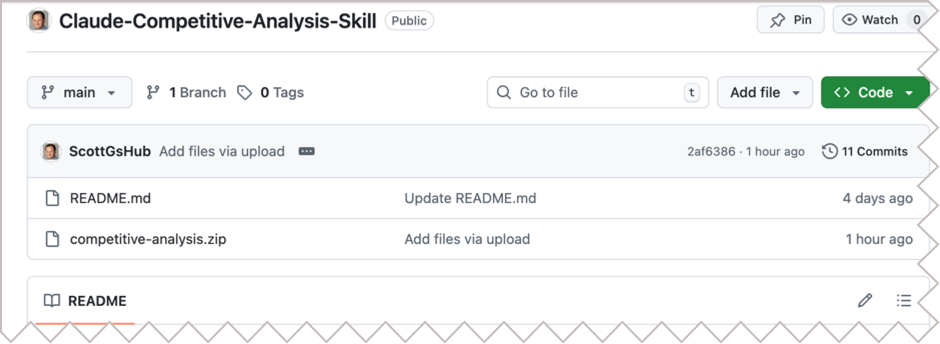
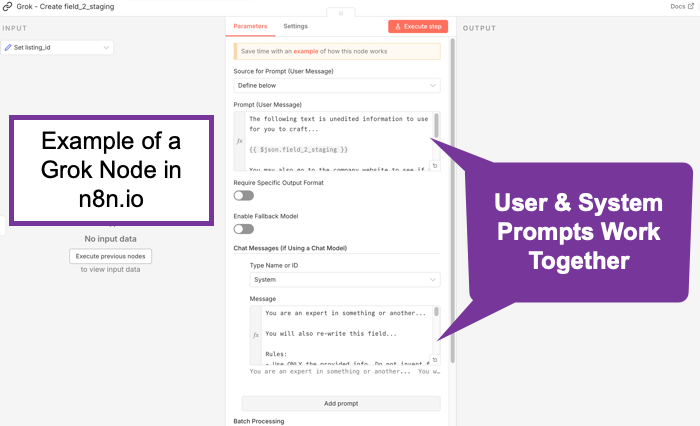
Skill files seem all the rage. Definitely flavor of the month. (See: Claude Skills for Baseline Competitive Analysis for an example and How To.) What do they do? They scope things. They’re really just instruction files. In some ways, they’re kind of like Retrieval Augmented Generation. (RAG) Not exactly perhaps, but what happens is the bots generally scan the available skills descriptions and if one applies, it gets read in. It’s a manual lookup, not a vector search. So maybe it’s more like a table of contents. No embeddings. No search index. When considered though, at least a few AI/tokens help with that choice. And if something does get loaded, it goes into context as additional instructions. Essentially, it’s functionally identical to a system prompt extension. You maybe can think of them as on-demand system prompt fragments. Or maybe as a menu of playbooks, AI reads the menu titles, (an inexpensive action), then loads the full playbook(s) when needed, (costs more tokens). Let’s review what the messages to an AI are. A system message sets up the context of who’s asking, rules, capabilities, constraints, maybe more. It’s sent once at the start of a session, (though perhaps each turn by some bots), and is supposed to treat such instructions as “ground truth / authoritative.” This might typically be behind the scenes, but you might set it yourself, especially if using agentic tools, such as an n8n AI node. The user message is typically just what you type in. It’s the request/question/task. These matter because the system message should have higher weight. They’re more likely to be followed than those in a user message. In any case, all of these go through the context window and cost tokens.
Context
Skills are deep tactical. Let’s go back up to a more abstract layer.
You should understand Context. It’s a big concept and it finally seems to be catching on. It’s catching on in AI to a large degree because it’s about how we can be effective regarding our use of Cognitive Load. This isn’t necessarily what others are calling it. But it’s essentially what this is about. We built these things a little like us. They take in some information, (just as we might sense our world), they embed it, (or encode it, similar to how we might lay down neural pathways in our brain), and then upon a query, they decode it, (much as we might try to search our memory and then use whatever ineffable human qualities we have to craft an answer).
As the smart kids have taken us from rule-based, (heuristic) systems, through encoder, decoder models though attention layers, we’ve run into some of the same problems humans have. We can only hold so much and consider just so much in terms of context. AI’s are the same. A question I wonder about is this: Is this actually a technical challenge that’s solvable, or is there something fundamental about reality here that might be a natural limit here? Whatever. The point is, for now we’re dealing with context windows to try to extract understanding or generate objects towards desired outcomes. To do that, we’ve layered onto our AI foundational models things like super fine tuning, Retrieval Augmented Generation, (RAG), and now more ideas about smaller models or context windows. We’re tying to hone what our models might use to solve their problems.
Essentially, context is the surrounding situation that gives meaning to information. It is not just the content itself, but who is involved, what they are trying to do, what came before, what constraints matter, what environment they are operating in, and what should or should not be in view. Strip away that surrounding frame and even technically correct information can become confusing, misleading, or useless.
So, when you plan out what you’re doing to do and what information you’re going to use, the experiments you choose should consider such things. AI may be amazing, but there’s still real costs in both money and time to design, build, deploy, etc. Starting with some insights as to what general large scale pieces you put together can help you get from start to finish more effectively than just slapping a model on to a problem you might not even fully understand yet.
It’s worth mentioning here that the word “context” is also ironically ambiguous with regard to digital concepts. The idea of how it’s used for prompting is somewhat constrained. To understand the concept in a more global way from an Information Architecture perspective, see Understanding Context: Environment, Language, and Information Architecture, by Andrew Hinton.
What is Prompt Engineering Really About?
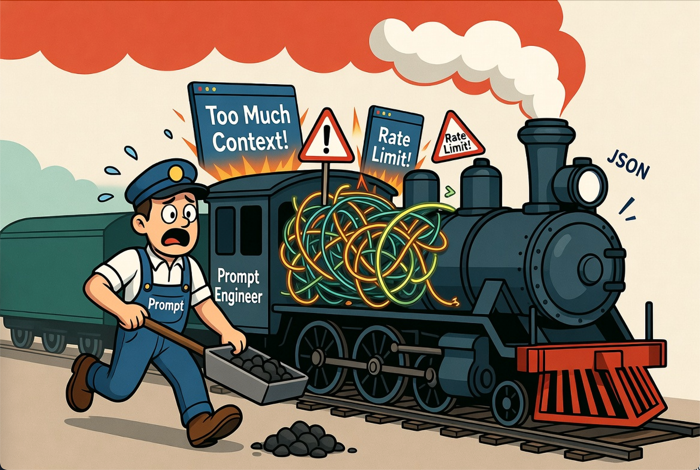
It is really about scoping context.
Prompt Engineering seemed to emerge quickly as a method for just writing fancy queries for AI. Kind of like how users who could do boolean well could get more out of early search engines. And it’s true eough that following any of the many strategies for better prompting can take you far. But this has evolved quickly.
The latest thinking is that prompt engineering still matters, but not in the old “learn these magic phrases and unlock the machine” sense. The more serious view now is that prompt engineering is useful as a practical steering layer. It helps in clearly defining the task, supplying the right context, setting constraints, specifying output format, and helping the model focus on the right slice of the problem. OpenAI still treats prompt engineering as an important way to get more consistent outputs, while also emphasizing evals and iteration rather than one-shot cleverness. Anthropic has gone a step further and explicitly framed the evolution as “context engineering,” meaning the real leverage often comes from what information, tools, memory, and instructions you place in the model’s working environment, not just from clever wording. Google’s guidance is similar place. Prompts help, but they work best as structured instructions plus relevant context and examples. (OpenAI Developers – Prompt engineering)
So prompt engineering is not dead, but it has been demoted from mysticism to craft. For product managers, that is actually good news. It means the job is less about becoming a “prompt wizard” and more about disciplined scoping: what does the model need to know, what should it ignore, what tools may it use, what output shape is acceptable, and how will you test whether the result is actually useful? In practice, prompt engineering is increasingly about building a bounded working context for the model, and much less about clever phrasing tricks. (Effective context engineering for AI agents)
GPTs… Imagery to Full Site
Understand the costs. Plan your prompts. It’s not always true that the more you put in the better, but a lot of times, having one clear longer prompt is better than multiple turns. One funny aspect of all this is the layers of specificity that may – or may not – be required. These things are supposed to understand us, but how well do we even understand each other? Traditional rules of communication apply: Sender > Channel > Receiver, with perceptual filters and context at both ends. The language may also be unfamiliar, which is why traditional experts will still do better here for awhile. Natural Language is sometimes anything but. You’ve probably heard someone speaking in some industrial jargon you’ve not understood and you’ve probably done it yourself. Is there a difference between, “move that blue thing a little to the left” vs. “Move the dark blue polygon near center of screen to the left from the viewer’s perspective, approximate 10% of it’s own current width.” Or “…to the left such that it’s equidistant from both objects on either side of it and below the circular object above it by a distance equal to the radius of that object.” Whatever. The point is, the clearer the instructions, whatever they may be, the less prompting is likely needed and therefore the less cost. It’s little different than when we hire general contractors. Or Product Managers. When people ask about what Product Managers do, there’s the usual thousand different perspectives. But among the tasks is “interpreter.” Of course, we all do this every day in every way as we function as communicators. But for PMs it’s fundamentally part of the job. Theoretically, we should be be the best at working with these things. Not because we can be more specific than a designer or a programmer with more detailed task syntax. But because we’re supposed to be the balance point of needs with most customer sensitivity. No?
Evals and Rubrics
If you are building with AI tools and not thinking seriously about evals and rubrics, you are mostly just vibing your way through quality control. That may be fine for casual experimentation. It is not fine for product work, especially anything mission or safety critical. Evals are how you test performance. Rubrics are how you define what “good” even means. Without them, teams tend to confuse “looked pretty good in a demo” with “ready for repeated real-world use.”
I wrote more on this earlier in Intro to AI Rubrics for Product Managers. The short version is that product managers do not need to become evaluation scientists, but they do need to make sure their teams define criteria, run repeatable checks, and not pretend that anecdotal success is the same thing as reliability.
Stop the Humanoid, Stop the Intruder!
Governance, Permissions, and Humans in the Loop
Got Kill Switches?
Kill switches are not just about shutting a thing down after it misbehaves. They’re about deciding in advance what the thing is allowed to touch in the first place.
If your bot can send email, write to databases, publish content, call external tools, trigger workflows, spend money, or move crypto, then permissions should not be an afterthought. Give it the minimum access needed. Separate read from write. Separate low-risk actions from hard-to-reverse ones. Put approvals in front of anything that can create legal, financial, operational, or reputational damage.
This is also where human-in-the-loop belongs. Not every task needs a human hovering over it, but some absolutely do. High-risk actions, unusual edge cases, first-run outputs, customer-facing changes, and anything involving money or regulated data are good candidates for a review gate. The goal is not to make the whole system manual again. It is to be deliberate about where autonomy stops and accountability resumes.
And someone has to own the keys. Who can change prompts or skill files? Who can grant tool access? Who can approve live deployment? Who can hit the stop button? If the answer is “sort of everybody,” then the answer is nobody.
Let’s Talk Money
AI cost is not just a token problem. It is a workflow design problem.
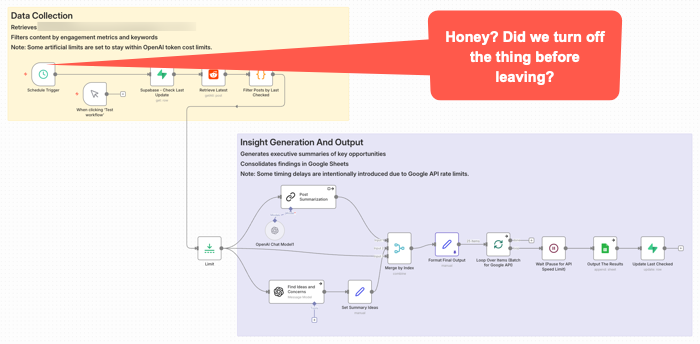
This workflow got triggered late Sunday night. It was left on for a couple of months after no longer needed. It quietly went about it’s weekend, burning some tokens along the way for no good reason.
That is one reason teams get surprised. They price out prompts and tokens, maybe even a few tests, and think the economics look fine. Then the real thing shows up: retries, loops, oversized context, verbose outputs, multiple tool calls, background checks, agent wandering, and a tendency to use the expensive model for work that does not deserve it. OpenAI’s guidance now explicitly pushes developers to reduce both tokens and requests, not just stare at one price per million tokens number. (OpenAI Developers – Batch API)
Prompt caching is one of the more practical levers. Not every tool exposes it cleanly. At least not yet. I’d assume more or all of them will add it as it’s a competitive checkbox thing. They may all have it within a week after I write this given how fast releases are coming in this area. The point is, if you are reusing the same big instruction block, system prompt, tool definitions, or repeated context in a workflow, caching can materially cut input cost and latency. OpenAI says prompt caching can reduce input token cost by up to 90 percent and latency by up to 80 percent on repeated prefixes. Anthropic similarly prices cache reads at a small fraction of normal input cost and notes that caching repeated content can also help effective throughput against rate limits. (OpenAI Developers – Prompt Caching 201 – Seriously, click this link and at least take a quick look at the charts.)
Other ways to save are less exciting, but could matter more.
Use the smallest model that can do the work. Do not send every classification, cleanup step, extraction task, or formatting pass to the premium brain. Google explicitly positions Flash-Lite as the budget option in the Gemini family, while more capable models cost more and should be used where they are actually needed. Again, nothing I write here will likely survive being accurate for more than a few hours. Okay, maybe weeks or months. But you will want to schedule a model review with some frequency for both quality and costs. (Google AI for Developers)
Keep context tighter. Some teams might treat the context window like an attic and just keep throwing boxes into it. That is sloppy technically and financially. If the model only needs three chunks, do not give it thirty. Anthropic’s caching and pricing docs make clear that long repeated context is a major target for optimization, and that pricing modifiers stack in ways people often overlook. (Claude’s Prompt caching API Docs) Remember, getting the context somewhat reasonably correct will be a quality issue. It’s probably impossible to tune this perfect. (That’s maybe just my personal opinion for now anyway. I’m just saying think about it and be explicit about choices.)
Use retrieval instead of brute-force stuffing. Pull in what is needed for the task instead of replaying whole documents, giant chat histories, or every rule you have ever written. This saves money, improves latency, and often improves output because the model has less junk to sort through. OpenAI’s cost guidance treats reducing input size as a core optimization lever.
Batch work when it does not need to happen live. This is one of the easiest practical savings opportunities. OpenAI’s Batch API offers a 50 percent discount compared with synchronous APIs, which makes it a pretty obvious choice for offline scoring, enrichment, summarization, or bulk transformations that do not need an immediate response. Anthropic also notes that prompt caching savings can stack with batch discounts. (OpenAI Developers) (I have not personally used this. It seems to make sense though, if a project is amenable to the treatment.)
Also watch the hidden multipliers. The real budget killers are often not the first call, but the dumb repetition around it: retry storms, long agent chains, double-check passes on low-value tasks, debugging with full production prompts, and overbuilt orchestration for work that should have stayed simple. A workflow does not have to be broken to be a bad product decision. Sometimes it works fine and still costs too much. (OpenAI Developers – Batch API) This is really similar to what you might do if looking at a cloud architecture data flow. Take AWS for example. You might put data in different storage containers depending on your reasons for needing it. There’s a lot of cost savings in putting data in long term storage. So the buckets may be different for AI workflows, but the idea is the same. We’re still cost constrained.
And that’s the practical PM point. Cost control is not one trick. It is discipline: model routing, smaller context, caching, selective retrieval, batching, and resisting the urge to let an impressive workflow become an economically stupid one. Not every PM has direct P&L responsibility. Many don’t. But even if you’re a junior feature owner or individual contributor, understanding these cost drivers helps you make better trade-off decisions and communicate effectively with stakeholders who do own the budget. If you do have P&L or budget accountability, this discipline needs to sit high on your priority list.
Perhaps the Worst Thing About These Tools
You know what I think maybe the worst thing is about most of these tools once you get some of the gunk blown out of the pipes and they’re kind of going?
Give up? OK, I’ll tell you.
I think one of the worst and most dangerous aspects of these things is that once they’re kind of working, they’re mostly pretty good most of the time.
Huh? How could that possibly be bad or dangereous?
Complacency. We are maybe creating things that lull us into a sense of security before we really should. You maybe get used to vibing/prompting along some changes. So you’re not backing up work or designs or files or databases or whatever. You’re moving. Wind in your hair. You’re like a whirling productive Tasmanian Devil. Then you, or it, screws up. Kaboom. No breakpoint. No restore point. No going back. You’ve maybe lost a whole lot of work. And worse, maybe all that’s left is what you kind of barely remember was on the screen because you were only kind of barely even involved in the process. Yes, you were there. Typing. Prompting. Vibing. You were maybe “in flow” during your build, but at the same time, not wholly situationally aware. S$^%.
More tools will be adding restore points. Or execution logs, depending on the tool. Still, you may want to look at various types of backups. Losing things here is not like losing a few edits in a document. It could represent a whole stream of thought process. So it’s not just about time to rebuild.
You need to keep up with best practices in terms of backups or find your own means for doing so even if not built in to your tools of choice.
This has become fairly well known at this point, but some of the worst things you can hear from your AI co-pilot buddies are things like this: “Now I can see the full picture, you have a node that does XYZ. Here’s your bulletproof solution.” Maybe it is. Or maybe you should just generate an nice big image that says “Welcome to the Rabbit Hole. Enjoy Your Stay. You’ll be here awhile.”
When not to use AI
One more thing. Not every problem needs AI.
Some workflows are stable, rules-based, low-ambiguity, and already well served by traditional software. Some need determinism more than flexibility. Some are too sensitive, too regulated, too expensive, or too easy to screw up for an LLM-shaped layer to make sense. And sometimes the right answer is not an agent. It is a script, a form, a queue, a dashboard, or a human with a checklist. One issue right now is some may feel if they’re not doing AI, then they themselves are just using medieval tools.
This may not be as exciting as everyone seems to want right now. Too bad. Product work should not be about sprinkling AI on everything that moves. It is about choosing the right tool for the job, with eyes open to risk, cost, and operational reality. Sometimes the smartest product decision is not where to something, but where to leave it out.
AI Deeper Value Content
A lot of “about AI” writing is still pretty surface level. Mine included. There is nothing wrong with summaries and practical explainers, but some of the better understanding still comes from reading the people actually building and studying these systems. You do not need to master all the math to get value from that material. You just need enough curiosity to go a layer deeper than the usual feed chatter.
If you want better signal, Anthropic has been publishing strong practical work on how agents actually fail and how to make them more reliable. Their pieces on Building Effective AI Agents, Effective context engineering for AI agents, and Writing effective tools for AI agents are especially useful because they focus less on mystique and more on concrete workflow design, tool choice, and context control. Also, Building effective agents.
Google has also been putting out material worth reading, especially where workflows and agents are concerned. A good recent example is Towards a science of scaling agent systems, which is useful partly because it treats agent systems as multi-step workflows where small errors can cascade, not as isolated one-shot prompts. For more practical builder guidance, Google’s docs on Using Tools with the Gemini API and prompt design strategies are also worth keeping around. (Google Research)
Some of the deeper material here is challenging. I don’t pretend to understand al of it. Still, if you only absorb part of it, you will usually come away with a better mental model than you get from another round of “LIKE and COMMENT SuperPrompt for my list of average prompts” content.

Practical YouTubers
If you want more practical things, here’s a few YouTubers I suggest checking out.
Nate B Jones is good for strategy-meets-execution content. (YouTube)
Nate Herk is a good one if you want hands-on AI automation, especially around workflow building and business use cases. He is very much in the “build the thing and show the steps” camp. He’s also very much into n8n.io which is my personal go to workflow automation tool, though he’s been very big on Claude Code recently as well. (YouTube)
Matt Wolfe is more mainstream and tool-focused, good for keeping up with what’s shipping and what people are actually trying in the market. (LinkedIn)
My general rule is ignore most of the polished “look what I built in 11 minutes” stuff. Favor the people who show workflows, failure points, tradeoffs, and actual implementation friction. That is usually where the value is.
See Also:
- MLOps
- What is MLOps? (Databricks)
- What is MLOps?(AWS)
- LLM Observability for AI Agents and Applications
- Mastering AI agent observability: From black-box to production-ready
- The Role of OpenTelemetry (OTEL) in LLM ObservabilityObservability for AI & LLMs
- What Is AI Observability: Best Practices, Challenges, Tips, and More
- AI Observability: How to Keep LLMs, RAG, and Agents Reliable in Production